Main Content

lasFileReader

Read point cloud data from LAS or LAZ file

Description

You can use a lasFileReader object to read point cloud data from a lidar aerial survey (LAS) or a LASzip (LAZ) file.

Creation

Description

lasReader = lasFileReader(fileName) creates a LAS file reader with properties set by the header information in the specified LAS or LAZ file fileName. The reader supports up to the LAS 1.4 specification.

example

Input Arguments

expand all

Name of the LAS or LAZ file, specified as a character vector or string scalar. You must specify the full file path of the file if it is not on your MATLAB® path.

This argument sets the FileName property as a character vector.

Note

Point cloud functions expect data in Cartesian coordinates. If a LAS or LAZ file contains data in geographic coordinates, you must convert the data to Cartesian coordinates. For more information on how to check and convert point cloud data from geographic to Cartesian coordinates, see the Working with Geographic CRS section of the Visualize Point Clouds on Maps Using Coordinate Reference System from LAS/LAZ Files example.

Data Types: char | string

Output Arguments

expand all

LAS or LAZ file reader, returned as a lasFileReader object. The object provides access to the point cloud data and metadata stored in the specified LAS or LAZ file. You can use the object functions such as readPointCloud, readCRS, and readVLR to read point cloud data, coordinate reference system information, and variable length records, respectively.

Properties

expand all

File Header Information

This property is read-only.

This property is read-only after object creation. To set this property, use the fileName argument when calling the lasFileReader function.

Name of the LAS or LAZ file, represented as a character vector.

This property is read-only.

LAS or LAZ file version, represented as a character vector.

This property is read-only.

Date of file creation, represented as a datetime object.

This property is read-only.

LAS file source identifier, represented as a nonnegative integer. Values are in the range [0 to 65535]. When this value is set to 0, no ID has been assigned. Use the ProjectID and FileSourceID properties to uniquely identify each point in a LAS file.

This property is read-only.

Project ID, represented as a string scalar. This value is a globally unique identifier (GUID). Use the ProjectID and FileSourceID properties to uniquely identify each point in a LAS file.

This property is read-only.

Name of the system used to generate the LAS file, represented as a string scalar.

This property is read-only.

Name of the generating software, represented as a string scalar. The name refers to the generating software used to create the LAS file.

This property is read-only.

Variable length record (VLR) or extended VLR information, represented as a table. Each row of the table contains this information describing a record:

  • Record ID — Record identification number, represented as a positive integer.

  • User ID — User identification associated with record ID, represented as a string scalar.

  • Description — Description of record, represented as a string scalar.

Point Data Summary

This property is read-only.

Number of points in the file, represented as a positive integer.

This property is read-only.

Maximum of all point laser returns, represented as a positive integer.

This property is read-only.

Maximum of all point classification values, represented as a positive integer.

Note

The lasFileReader function does not populate this property as object creation. To populate this property for the lasFileReader object lasReader, enter lasReader.NumClasses in the Command Window. This command also populates the GPSTimeLimits and ClassificationInfo properties of the object.

This property is read-only.

Point data record format ID, represented as a nonnegative integer in the range [0, 10]. Point data record format values between 0 and 5 contain optional information about GPS, color channels, or wave packets. Values between 6 and 10 contain optional information about color channels, near IR, or wave packets.

For more information on point data record formats, see the LAS format standard on the ASPRS LAS Working Group page.

Spatial Information

This property is read-only.

Range of coordinates along x-axis, stored as a two-element vector.

This property is read-only.

Range of coordinates along y-axis, stored as a two-element vector

This property is read-only.

Range of coordinates along z-axis, stored as a two-element vector.

Since R2025a

This property is read-only.

Scale of the xyz-coordinates, represented as a three-element real-valued row vector of the form [Xscale Yscale Zscale]. The values of Xscale, Yscale, and Zscale represent the scale along the x-, y-, and z-axes, respectively.

Since R2025a

This property is read-only.

Offset of the xyz coordinates, represented as a three-element real-valued row vector of the form [Xoffset Yoffset Zoffset]. The values of Xoffset, Yoffset, and Zoffset represent the offset along the x-, y-, and z-axes, respectively.

Temporal Information

This property is read-only.

Range of the GPS timestamp readings, represented as a two-element duration vector.

Note

The lasFileReader function does not populate this property as object creation. To populate this property for the lasFileReader object lasReader, enter lasReader.GPSTimeLimits in the Command Window. This command also populates the NumClasses and ClassificationInfo properties of the object.

Attribute Information

Since R2025a

This property is read-only.

List of the available attributes, represented as a string array. Use this property to identify all the attributes present in the file. You can also read all available attributes by using the readPointCloud object function.

This property is read-only.

Classification information, represented as a table. Each row of the table contains this information describing a point class:

  • Classification Value — Unique classification ID number for the class, represented as a positive integer.

  • Class Name — Label associated with the class, represented as a string scalar.

  • Number of Points by Class — Number of points in the class, represented as a positive integer.

Note

The lasFileReader function does not populate this property as object creation. To populate this property for the lasFileReader object lasReader, enter lasReader.ClassificationInfo in the Command Window. This command also populates the GPSTimeLimits and NumClasses properties of the object.

This property is read-only.

Laser return information, represented as a table. Each row of the table contains this information describing a laser return:

  • Laser Return Number — Laser return number, represented as a positive integer.

  • Number of Points by Return — Number of points per laser return, represented as a positive integer.

Object Functions

readPointCloudRead point cloud data from LAS or LAZ file
readCRSRead coordinate reference system data from LAS or LAZ file
readVLRRead variable length record from LAS or LAZ file

Examples

collapse all

Create a lasFileReader object to use to read point cloud data and header information from a LAZ file.

filepath = fullfile(toolboxdir("lidar"),"lidardata", ...
    "las","aerialLidarData.laz");
lasReader = lasFileReader(filepath);

Read point cloud data from the LAZ file using the readPointCloud function.

ptCloud = readPointCloud(lasReader);

Visualize the point cloud.

figure
pcshow(ptCloud.Location)

Figure contains an axes object. The axes object contains an object of type scatter.

Create a lasFileReader object to use to read point cloud data and header information from a LAZ file.

path = fullfile(toolboxdir("lidar"),"lidardata", ...
    "las","aerialLidarData.laz");
lasReader = lasFileReader(path);

Read point cloud data and classification attributes from the LAZ file using the readPointCloud function.

[ptCloud,pointAttributes] = readPointCloud(lasReader,Attributes="Classification");

Convert classification labels to RGB colors, and reshape them to match the point cloud structure.

labels = label2rgb(pointAttributes.Classification);
colorData = reshape(labels,[],3);

Visualize the point cloud using the color information.

figure
pcshow(ptCloud.Location,colorData)
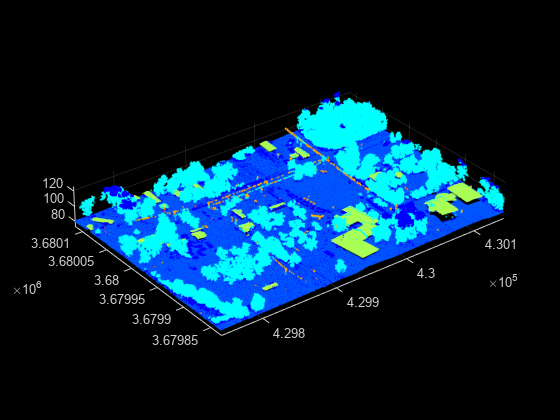
Figure contains an axes object. The axes object contains an object of type scatter.

Version History

Introduced in R2020b

expand all