Configure Driver in Oscilloscope Explorer App
R2026bBefore you can communicate between MATLAB® and an oscilloscope, you must configure a driver for the hardware. You can do so interactively in the Oscilloscope Explorer app.
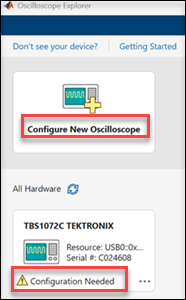
In the app, choose whether you are adding new hardware or configuring an oscilloscope that the app has detected.
Configure existing hardware — If the app detects your oscilloscope, its card appears under All Hardware. The device card might indicate Configuration Needed. The Resource, Model, and Vendor parameters are pre-populated. To continue configuration, see Verify Driver.
Configure new oscilloscope — If your oscilloscope is not automatically detected, click Configure New Oscilloscope to manually specify the connection. Then, to continue configuration, see Specify Connection Resource.
Specify Connection Resource
To manually configure a connection to an oscilloscope that was not automatically detected, specify the communication interface and resource string.
Select the communication Interface:
TCP/IP VXI-11,TCP/IP HiSLIP, orTCP/IP Socket.Enter the Resource string for your oscilloscope (for example,
TCPIP::192.168.1.1::INSTR). Alternatively, click Generate Resource to construct the resource name.To use a custom identification command, edit the Identification Command parameter. The default is
*IDN?.To test the connection, click Verify Resource. If the connection is successful, the app populates the Model and Vendor parameters, and the Connection Status displays
Successful.

Verify Driver
To check whether the correct driver is installed, click Verify Driver . If installation was successful, the app populates the Driver parameter with the matching driver name.
If the Driver parameter remains empty after you click Verify Driver, the driver is not installed or is not recognized. Manually install the driver.
Install Driver from IVI Foundation
If no driver is installed for your oscilloscope model, download and install driver from the IVI Foundation.
Click Install Driver to open the IVI Foundation Driver Registry website.
On the IVI Foundation website, select the Instrument Class as
IviScope.Select a Driver Type of
IVI-CandIVI-COM/IVI-C.In the Keywords text box, type the model number that was specified in the Model parameter in the Oscilloscope Explorer, and search.
In the list of Supported Models, click your oscilloscope model, and follow the on-screen instructions for installation.
If your oscilloscope model is not in the list of supported models, search the web to find and install the correct driver.
Confirm Driver Configuration
After verifying the resource connection and driver installation, connect with the oscilloscope by clicking Confirm Parameters. The app validates the resource and driver settings and connects to the device.
If the connection is successful, the app displays the Explorer tab that provides controls for the oscilloscope settings, operations, functions, and results.
If the connection is not successful, the app generates an error. Verify that the correct driver is installed and that the resource string is valid.
Click Cancel at any time to return to the app home page.

