makehdl
Generate HDL RTL code from model, subsystem, or model reference
Description
makehdl( generates HDL code from the
specified DUT model, subsystem, or model reference.dut)
Note
Running this command can activate the Open at simulation start setting for blocks such as the Scope block and therefore invoke the block.
makehdl(
generates HDL code from the specified DUT model, subsystem, or model reference with
options specified by one or more name-value pair arguments.dut,Name,Value)
Examples
This example shows how to generate VHDL for the symmetric FIR model.
Open the sfir_fixed model.
open_system("sfir_fixed");
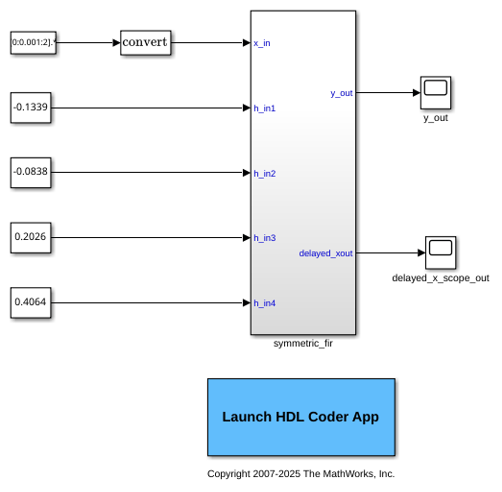
Generate HDL code for the current model with default code generation options. HDL Coder™ generates VHDL code by default.
makehdl("sfir_fixed/symmetric_fir");
### Working on the model <a href="matlab:open_system('sfir_fixed')">sfir_fixed</a>
### Generating HDL for <a href="matlab:open_system('sfir_fixed/symmetric_fir')">sfir_fixed/symmetric_fir</a>
### Using the config set for model <a href="matlab:configset.showParameterGroup('sfir_fixed', { 'HDL Code Generation' } )">sfir_fixed</a> for HDL code generation parameters.
### Running HDL checks on the model 'sfir_fixed'.
### Begin compilation of the model 'sfir_fixed'...
### Working on the model 'sfir_fixed'...
### Working on... <a href="matlab:configset.internal.open('sfir_fixed', 'GenerateModel')">GenerateModel</a>
### Begin model generation 'gm_sfir_fixed'...
### Copying DUT to the generated model....
### Model generation complete.
### Generated model saved at <a href="matlab:open_system('hdlsrc/sfir_fixed/gm_sfir_fixed.slx')">hdlsrc/sfir_fixed/gm_sfir_fixed.slx</a>
### Begin VHDL Code Generation for 'sfir_fixed'.
### Working on sfir_fixed/symmetric_fir as hdlsrc/sfir_fixed/symmetric_fir.vhd.
### Code Generation for 'sfir_fixed' completed.
### Generating HTML files for code generation report at <a href="matlab:hdlcoder.report.openReportV2Dialog('/tmp/Bdoc26a_3146167_3710757/tp4873507c/hdlcoder-ex90622764/hdlsrc/sfir_fixed', '/tmp/Bdoc26a_3146167_3710757/tp4873507c/hdlcoder-ex90622764/hdlsrc/sfir_fixed/html/index.html')">index.html</a>
### Creating HDL Code Generation Check Report file:///tmp/Bdoc26a_3146167_3710757/tp4873507c/hdlcoder-ex90622764/hdlsrc/sfir_fixed/symmetric_fir_report.html
### HDL check for 'sfir_fixed' complete with 0 errors, 0 warnings, and 0 messages.
### HDL code generation complete.
HDL Coder™ saves the generated VHDL code in the hdlsrc folder.
Generate Verilog® for the subsystem symmetric_fir within the model sfir_fixed.
Open the sfir_fixed model.
open_system("sfir_fixed");
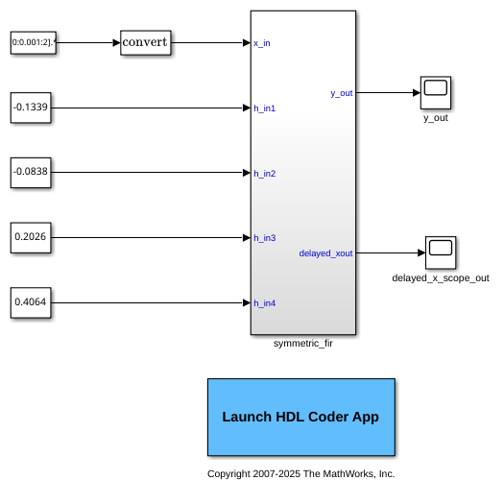
Generate Verilog for the symmetric_fir subsystem.
makehdl("sfir_fixed/symmetric_fir","TargetLanguage","Verilog")
### Working on the model <a href="matlab:open_system('sfir_fixed')">sfir_fixed</a>
### Generating HDL for <a href="matlab:open_system('sfir_fixed/symmetric_fir')">sfir_fixed/symmetric_fir</a>
### Using the config set for model <a href="matlab:configset.showParameterGroup('sfir_fixed', { 'HDL Code Generation' } )">sfir_fixed</a> for HDL code generation parameters.
### Running HDL checks on the model 'sfir_fixed'.
### Begin compilation of the model 'sfir_fixed'...
### Working on the model 'sfir_fixed'...
### Working on... <a href="matlab:configset.internal.open('sfir_fixed', 'GenerateModel')">GenerateModel</a>
### Begin model generation 'gm_sfir_fixed'...
### Copying DUT to the generated model....
### Model generation complete.
### Generated model saved at <a href="matlab:open_system('hdlsrc/sfir_fixed/gm_sfir_fixed.slx')">hdlsrc/sfir_fixed/gm_sfir_fixed.slx</a>
### Begin Verilog Code Generation for 'sfir_fixed'.
### Working on sfir_fixed/symmetric_fir as hdlsrc/sfir_fixed/symmetric_fir.v.
### Code Generation for 'sfir_fixed' completed.
### Generating HTML files for code generation report at <a href="matlab:hdlcoder.report.openReportV2Dialog('/tmp/Bdoc26a_3146167_3710757/tp4873507c/hdlcoder-ex03211129/hdlsrc/sfir_fixed', '/tmp/Bdoc26a_3146167_3710757/tp4873507c/hdlcoder-ex03211129/hdlsrc/sfir_fixed/html/index.html')">index.html</a>
### Creating HDL Code Generation Check Report file:///tmp/Bdoc26a_3146167_3710757/tp4873507c/hdlcoder-ex03211129/hdlsrc/sfir_fixed/symmetric_fir_report.html
### HDL check for 'sfir_fixed' complete with 0 errors, 0 warnings, and 1 messages.
### HDL code generation complete.
HDL Coder™ saves the generated Verilog code for the symmetric_fir subsystem in the hdlsrc\sfir_fixed\symmetric_fir.v folder.
Close the model.
bdclose("sfir_fixed");
Generate SystemVerilog code for the subsystem symmetric_fir within the model sfir_fixed.
Open the sfir_fixed model.
open_system("sfir_fixed");
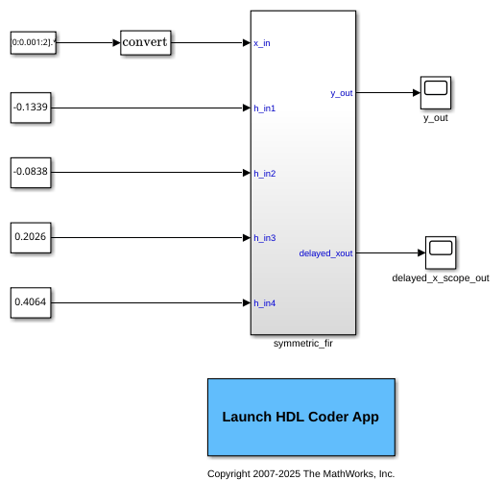
Generate SystemVerilog code for the symmetric_fir subsystem.
makehdl("sfir_fixed/symmetric_fir","TargetLanguage","SystemVerilog")
### Working on the model <a href="matlab:open_system('sfir_fixed')">sfir_fixed</a>
### Generating HDL for <a href="matlab:open_system('sfir_fixed/symmetric_fir')">sfir_fixed/symmetric_fir</a>
### Using the config set for model <a href="matlab:configset.showParameterGroup('sfir_fixed', { 'HDL Code Generation' } )">sfir_fixed</a> for HDL code generation parameters.
### Running HDL checks on the model 'sfir_fixed'.
### Begin compilation of the model 'sfir_fixed'...
### Working on the model 'sfir_fixed'...
### Working on... <a href="matlab:configset.internal.open('sfir_fixed', 'GenerateModel')">GenerateModel</a>
### Begin model generation 'gm_sfir_fixed'...
### Copying DUT to the generated model....
### Model generation complete.
### Generated model saved at <a href="matlab:open_system('hdlsrc/sfir_fixed/gm_sfir_fixed.slx')">hdlsrc/sfir_fixed/gm_sfir_fixed.slx</a>
### Begin SystemVerilog Code Generation for 'sfir_fixed'.
### Working on sfir_fixed/symmetric_fir as hdlsrc/sfir_fixed/symmetric_fir.sv.
### Code Generation for 'sfir_fixed' completed.
### Generating HTML files for code generation report at <a href="matlab:hdlcoder.report.openReportV2Dialog('/tmp/Bdoc26a_3146167_3710757/tp4873507c/hdlcoder-ex36659318/hdlsrc/sfir_fixed', '/tmp/Bdoc26a_3146167_3710757/tp4873507c/hdlcoder-ex36659318/hdlsrc/sfir_fixed/html/index.html')">index.html</a>
### Creating HDL Code Generation Check Report file:///tmp/Bdoc26a_3146167_3710757/tp4873507c/hdlcoder-ex36659318/hdlsrc/sfir_fixed/symmetric_fir_report.html
### HDL check for 'sfir_fixed' complete with 0 errors, 0 warnings, and 0 messages.
### HDL code generation complete.
HDL Coder™ saves the generated SystemVerilog code for the symmetric_fir subsystem in the hdlsrc\sfir_fixed\symmetric_fir.sv folder.
Close the model.
bdclose("sfir_fixed");
Check that the subsystem symmetric_fir is compatible with HDL code generation, then generate HDL.
Open the sfir_fixed model.
open_system("sfir_fixed");
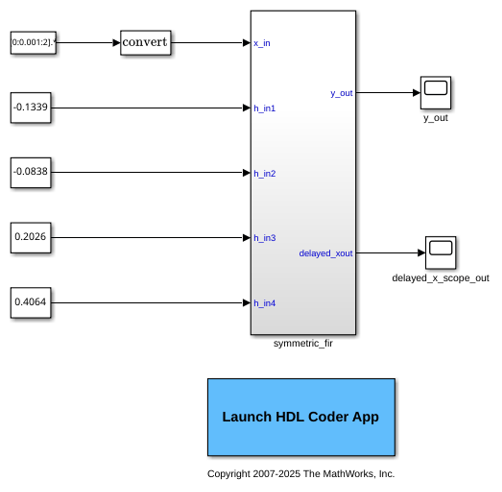
The model opens in a new Simulink® window.
Use the checkhdl function to check whether the symmetric_fir subsystem is compatible with HDL code generation.
checkhdl("sfir_fixed/symmetric_fir");
### Running HDL checks on the model 'sfir_fixed'. ### Begin compilation of the model 'sfir_fixed'... ### Creating HDL Code Generation Check Report file:///tmp/Bdoc26a_3146167_3692017/tp2693ca09/hdlcoder-ex38375738/hdlsrc/sfir_fixed/symmetric_fir_report.html ### HDL check for 'sfir_fixed' complete with 0 errors, 0 warnings, and 0 messages.
checkhdl completed successfully, which means that the model is compatible for HDL code generation. To generate code, use makehdl
makehdl("sfir_fixed/symmetric_fir");
### Working on the model <a href="matlab:open_system('sfir_fixed')">sfir_fixed</a>
### Generating HDL for <a href="matlab:open_system('sfir_fixed/symmetric_fir')">sfir_fixed/symmetric_fir</a>
### Using the config set for model <a href="matlab:configset.showParameterGroup('sfir_fixed', { 'HDL Code Generation' } )">sfir_fixed</a> for HDL code generation parameters.
### Running HDL checks on the model 'sfir_fixed'.
### Begin compilation of the model 'sfir_fixed'...
### Working on the model 'sfir_fixed'...
### Working on... <a href="matlab:configset.internal.open('sfir_fixed', 'GenerateModel')">GenerateModel</a>
### Begin model generation 'gm_sfir_fixed'...
### Copying DUT to the generated model....
### Model generation complete.
### Generated model saved at <a href="matlab:open_system('hdlsrc/sfir_fixed/gm_sfir_fixed.slx')">hdlsrc/sfir_fixed/gm_sfir_fixed.slx</a>
### Begin VHDL Code Generation for 'sfir_fixed'.
### Working on sfir_fixed/symmetric_fir as hdlsrc/sfir_fixed/symmetric_fir.vhd.
### Code Generation for 'sfir_fixed' completed.
### Generating HTML files for code generation report at <a href="matlab:hdlcoder.report.openReportV2Dialog('/tmp/Bdoc26a_3146167_3692017/tp2693ca09/hdlcoder-ex38375738/hdlsrc/sfir_fixed', '/tmp/Bdoc26a_3146167_3692017/tp2693ca09/hdlcoder-ex38375738/hdlsrc/sfir_fixed/html/index.html')">index.html</a>
### Creating HDL Code Generation Check Report file:///tmp/Bdoc26a_3146167_3692017/tp2693ca09/hdlcoder-ex38375738/hdlsrc/sfir_fixed/symmetric_fir_report.html
### HDL check for 'sfir_fixed' complete with 0 errors, 0 warnings, and 0 messages.
### HDL code generation complete.
HDL Coder™ saves the generated VHDL® code for the symmetric_fir subsystem in the hdlsrc\sfir_fixed\symmetric_fir.vhd folder.
Close the model.
bdclose("sfir_fixed");
Input Arguments
Specified as subsystem name, top-level model name, or model reference name with full hierarchical path.
Example: "top_level_name"
Example: "top_level_name/subsysA/subsysB/codegen_subsys_name"
Name-Value Arguments
Specify optional pairs of arguments as
Name1=Value1,...,NameN=ValueN, where Name is
the argument name and Value is the corresponding value.
Name-value arguments must appear after other arguments, but the order of the
pairs does not matter.
Example: "TargetLanguage","Verilog"
HDL Code Generation
Specify the subsystem in your model to generate HDL code for. For more information, see Generate HDL for.
Specify whether to generate VHDL or Verilog code. For more information, see Language.
Specify a path to write the generated files and HDL code into. For more information, see Code Generation Folder.
Target
Specify the synthesis tool for targeting the generated HDL code as a character vector. For more information, see Synthesis Tool.
Specify the synthesis tool chip family for the target device as a character vector. For more information, see Family.
Specify the synthesis tool device name for the target device as a character vector. For more information, see Device.
Specify the synthesis tool package name for the target device as a character vector. For more information, see Package.
Specify the synthesis tool speed value for the target device as a character vector. For more information, see Speed.
Specify the target frequency in MHz as a character vector. For more information, see Target Frequency.
Optimizations - General
Specify whether to enable delay balancing on the model. For more information, see Balance delays.
Specify whether to map pipeline registers in the generated HDL code to block RAMs on the FPGA. For more information, see Map pipeline delays to RAM.
Specify the minimum RAM size required for mapping to RAMs instead of registers. You can specify either:
A single integer to define the mapping threshold that maps any delay or persistent array greater than that threshold bit size to RAM.
A string that define two thresholds, one for delay length or array size and one for word length.
For more information, see RAM mapping threshold.
Specify whether to transform Delay blocks that have nonzero initial value to Delay blocks that have a zero initial value. For more information, see Transform non zero initial value delay.
For more information, see Remove Unused Ports.
Generate an enable-based multicycle path constraints file. For more information, see Enable-based constraints.
Optimizations - Pipelining
Option to allow design delay distribution during distributed
pipelining and delay absorption, specified as "off"
or "on". For more information, see Allow design delay distribution.
Whether to prioritize numerical integrity or
performance for distributed pipelining
and delay absorption, specified as "Numerical
Integrity" or "Performance". For more
information, see Pipeline distribution priority.
Insert pipeline registers at the clock rate instead of the data rate for multi-cycle paths. For more information, see Clock-rate pipelining.
Enable clock-rate pipelining for DUT ports. For more information, see Allow clock-rate pipelining of DUT output ports.
Synchronize the DUT outputs while satisfying the highest-latency requirements of the outputs. For more information, see Balance clock-rate pipelined DUT output ports.
Enable pipeline register distribution, which is a speed optimization that increases the clock speed by moving design delays or pipeline delays in a design to reduce the critical path For more information, see Distributed pipelining.
Use synthesis timing estimates for distributed pipelining to more accurately reflect how components function on hardware to better distribute pipelines and increase clock speed for your target device. For more information, see Use synthesis estimates for distributed pipelining.
Insert adaptive pipeline registers in your design. For more information, see Adaptive pipelining.
Map lookup tables in your design to block RAM and reduce area usage on the target FPGA device. For more information, see Map lookup tables to RAM.
Optimizations - Resource Sharing
Use resource sharing optimization to share adders in your design. For more information, see Share Adders.
Minimum bitwidth of a shared adder for the resource sharing optimization, specified as a positive integer. For more information, see Adder sharing minimum bitwidth.
Use resource sharing optimization to share multipliers in your design. For more information, see Share Multipliers.
Minimum bitwidth of a shared multiplier for the resource sharing optimization, specified as a positive integer. For more information, see Multiplier sharing minimum bitwidth.
Minimum wordlength by which the code generator promotes a multiplier for sharing with other multipliers. For more information, see Multiplier promotion threshold.
Partition multipliers in the design based on a threshold value. The
threshold must be a positive integer value, N. For
more information, see Multiplier partitioning threshold.
Use resource sharing optimization to share Multiply-Add blocks in your design. For more information, see Multiply-Add blocks.
Minimum bitwidth of a shared Multiply-Add block for the resource sharing optimization, specified as a positive integer. For more information, see Multiply-Add block sharing minimum bitwidth.
Use resource sharing optimization to share Atomic Subsystem blocks in your design. For more information, see Atomic subsystems.
Use resource sharing optimization to share MATLAB Function blocks in your design. For more information, see MATLAB Function blocks.
Use resource sharing optimization to share floating-point IPs in your design. For more information, see Floating-Point IPs.
Optimizations - Frame to Sample Conversion
Use frame-to-sample conversion optimization to reduce I/O by streaming matrix inputs as smaller samples for HDL code generation. For more information, see Enable frame to sample conversion.
Set the number of samples per cycle after frame-to-sample conversion. The streamed input signal is either a scalar (one sample per cycle) or 1-D vectors with N elements (N samples per cycle). For more information, see Samples per cycle.
Set the register size of input FIFOs for streaming matrix inputs after frame-to-sample conversion. For more information, see Input FIFO size.
Set the register size of output FIFOs for streaming matrix outputs after frame-to-sample conversion. For more information, see Output FIFO size.
Select row-major or column-major ordering for streaming frame inputs after frame-to-sample conversion. For more information, see Input processing order.
Set a threshold in kilobytes for offloading large integer delays to external memory instead of using FPGA resources. For more information, see Delay size threshold for external memory (kilobytes).
Floating Point
Use the native floating-point library in your design. For more information, see Use Floating Point.
For more information, see Vendor Specific Floating Point Library.
Global Settings
Specify whether to use synchronous or asynchronous reset in the generated HDL code. For more information, see Reset type.
Specify whether to use an active-high or active-low asserted level for the reset input signal. For more information, see Reset asserted level.
Specify the clock input port name as a character vector. For more information, see Clock input port.
Specify the clock enable input port name as a character vector. For more information, see Clock enable input port.
Reset input port name, specified as a character vector.
For more information, see Reset input port.
Specify whether to generate single or multiple clock inputs in the HDL code. For more information, see Clock inputs.
Use this parameter to let HDL Coder™ automatically set an oversampling value based on your
Simulink® model rates and the TargetFrequency
parameter value during HDL code generation. For more information, see
Treat Simulink rates as actual hardware rates.
Specify the active clock edge for the generated HDL code. For more information, see Clock edge
Frequency of global oversampling clock, specified as an integer multiple of the model’s base rate. For more information, see Treat Simulink rates as actual hardware rates and Oversampling factor.
Global Settings - General
Specify the file name extension for generated Verilog files. For more information, see Verilog file extension.
Specify the file name extension for generated VHDL files. For more information, see VHDL file extension.
Specify the file name extension for generated SystemVerilog files. For more information, see SystemVerilog file extension.
Specify the postfix for the package file name as a character vector. For more information, see Package postfix.
Specify the postfix as a character vector that resolves duplicate entity or module names. For more information, see Entity conflict postfix.
For more information, see Split entity file postfix.
For more information, see Reserved word postfix.
For more information, see Split arch file postfix.
Specify the postfix for clocked process names as a character vector. For more information, see Clocked process postfix.
For more information, see Split entity and architecture.
For more information, see Complex real part postfix.
For more information, see VHDL architecture name.
For more information, see Complex imaginary part postfix.
Specify a prefix for every module or entity name in the generated HDL code. HDL Coder also applies this prefix to generated script file names
For more information, see Module name prefix.
Prefix for internal clock enable and control flow enable signals, specified as a character vector. For more information, see Clock enable input port and Enable prefix.
For more information, see Timing controller postfix.
For more information, see Pipeline postfix.
For more information, see VHDL library name.
For more information, see Generate VHDL or SystemVerilog code for model references into a single library.
For more information, see Block generate label.
For more information, see Output generate label.
For more information, see Instance generate label.
For more information, see Vector prefix.
For more information, see Instance prefix.
For more information, see Instance postfix.
For more information, see Map file postfix.
Global Settings - Ports
VHDL inputs can have "std_logic_vector" or
"signed/unsigned" data type. Verilog inputs must be "wire".
For more information, see Input data type.
VHDL output can be "Same as input data
type", "std_logic_vector" or
"signed/unsigned". Verilog output must be "wire".
For more information, see Output data type.
Clock enable output port name, specified as a character vector.
For more information, see Clock enable output port.
For more information, see Minimize clock enables.
For more information, see Minimize global resets.
For more information, see Use trigger signal as clock.
For more information, see Enable HDL DUT input port generation for tunable parameters.
Enable this setting to insert matching delays on generated DUT inport port paths. For more information, see Balance delays for generated DUT input ports.
For more information, see Enable HDL DUT output port generation for test points.
Enable this setting to insert matching delays on generated DUT output port paths. For more information, see Balance delays for generated DUT output ports.
For more information, see Scalarize ports.
Specify the maximum number of I/O pins for your target FPGA. For more information, see Max number of I/O pins for FPGA deployment.
Specify the type of message generated when the DUT pin count in the
generated code exceeds the maximum number of I/O pins set by the
IOThreshold parameter. For more information, see
Check for DUT pin count exceeding I/O
Threshold.
Global Settings - Coding style
For more information, see Represent constant values by aggregates.
For more information, see Inline MATLAB Function block code.
For more information, see Initialize all RAM blocks.
For more information, see RAM Architecture.
For more information, see No-reset registers initialization.
For more information, see Minimize intermediate signals.
For more information, see Unroll For-Generate Loops.
For more information, see Generate parameterized HDL code from masked subsystem.
For more information, see Enumerated Type Encoding Scheme.
For more information, see Use “rising_edge/falling_edge” style for registers.
Specify whether to generate a single reusable file to represent the subsystem logic for your model subsystem. For more information, see Code reuse.
For more information, see Inline VHDL configuration.
For more information, see Concatenate type safe zeros.
Specify whether you want to obfuscate the generated HDL code. For more information, see Generate obfuscated HDL code.
Specify whether you want to generate code with VHDL construct record types for bus signals at design under test (DUT) interface and different subsystem-level interfaces. For more information, see Preserve Bus structure in the generated HDL code.
For more information, see Indexing for scalarized port naming.
For more information, see Optimize timing controller.
For more information, see Timing controller architecture.
For more information, see Use Verilog or SystemVerilog `timescale directives.
For more information, see Verilog or SystemVerilog timescale specification.
Global Settings - Coding standards
Specify whether the generated HDL code must conform to the Industry coding standard guidelines. For more information, see HDL coding standard.
Coding standards customization object to use with the Industry coding standard when generating HDL code. For more information, see Show passing rules in coding standard report.
Global Settings - Comments
Enable or disable comments in the generated HDL code. For more information, see Enable Comments.
Specify comment lines in header of generated HDL and test bench files. For more information, see Comment in header.
For more information, see Emit time/date stamp in header.
For more information, see Include requirements in block comments.
For more information, see Custom File Header Comment.
For more information, see Custom File Footer Comment.
Global Settings - Model Generation
For more information, see Generated model.
For more information, see Validation model.
For more information, see Suffix for validation model name.
For more information, see Prefix for generated model name.
For more information, see Layout style.
For more information, see Auto signal routing.
For more information, see Inter-block horizontal scaling.
For more information, see Inter-block vertical scaling.
Global Settings - Advanced
For more information, see Check for name conflicts in black box interfaces.
For more information, see Check for presence of reals in generated HDL code.
Generate HDL code for the model. For more information, see Generate HDL code.
Specify whether you want to generate HDL code, or only display the generated model, or generate HDL code and display the generated model. For more information, see Generate HDL code.
Specify whether to highlight feedback loops in your design.
Specify whether to highlight barriers for clock-rate pipelining optimization.
Specify whether to highlight blocks that inhibit distributed pipelining.
Report
Generate a traceability report that has hyperlinks for navigating from code-to-model and from model-to-code. For more information, see Generate traceability report.
Generate a traceability report that has hyperlinks from each line or to a comment indicating block of code for navigating from code-to-model and from model-to-code. For more information, see Traceability style.
Generate a web view of the model in the Code Generation report to easily navigate between the code and model. For more information, see Generate model Web view.
Generate a resource utilization report that displays the number of hardware resources that the generated HDL code uses. For more information, see Generate resource utilization report.
Generate an optimization report that displays the effect of optimizations such as streaming, sharing, and distributed pipelining. For more information, see Generate optimization report.
Specify whether to generate a highlighting script that shows the estimated critical path. For more information, see Generate high-level timing critical path report.
Specify the path to load your custom timing .mat
files. For more information, see Custom Timing Database Directory.
EDA Tool Scripts
For more information, see Generate EDA scripts.
Include code coverage switches in the generated compilation script. These switches turn on code coverage for the generated compilation script.
For more information, see HDL code coverage.
For more information, see Compile file postfix.
For more information, see Compile initialization.
VHDL compilation command, specified as a character vector.
The SimulatorFlags name-value pair specifies the
first argument, and the entity name specifies the second argument.
For more information, see Compile command for VHDL.
Verilog compilation command, specified as a character vector.
The SimulatorFlags name-value pair specifies the
first argument, and the module name specifies the second argument.
For more information, see Compile command for Verilog or SystemVerilog.
For more information, see Compile termination.
Specify a postfix to append to the DUT or test bench name to form the simulation script file name. For more information, see Simulation file postfix.
Format name passed to fprintf to write the
initialization section of the simulation script. For more information,
see Simulation
initialization.
Format name passed to fprintf to write the
simulation command. For more information, see Simulation
command.
Specify the waveform viewing command written to simulation script. For more information, see Simulation waveform viewing command.
Format name passed to fprintf to write the
termination portion of the simulation script. For more information, see
Simulation
termination.
Specify simulator flags to apply to generated compilation scripts. For more information, see Simulator flags.
For more information, see Choose synthesis tool.
HDL synthesis script file name postfix, specified as a character
vector. The default is derived from the HDLSynthTool
name-value pair.
For more information, see Synthesis file postfix.
Initialization for the HDL synthesis script, specified as a character
vector. The default is derived from the HDLSynthTool
name-value pair.
For more information, see Synthesis initialization.
HDL synthesis command, specified as a character vector. The default is
derived from the HDLSynthTool name-value pair.
For more information, see Synthesis command.
Termination name for the HDL synthesis script. The default is derived
from the HDLSynthTool name-value pair.
For more information, see Synthesis termination.
Include additional HDL or constraint files in synthesis project. For more information, see Additional files to add to synthesis project.
For more information, see Choose HDL lint tool.
HDL lint initialization name, specified as a character vector. The
default is derived from the HDLLintTool name-value
pair.
For more information, see Lint initialization.
HDL lint command, specified as a character vector. The default is
derived from the HDLLintTool name-value pair.
For more information, see Lint command.
HDL lint termination, specified as a character vector. The default is
derived from the HDLLintTool name-value pair.
For more information, see Lint termination.
Version History
Introduced in R2006b
MATLAB Command
You clicked a link that corresponds to this MATLAB command:
Run the command by entering it in the MATLAB Command Window. Web browsers do not support MATLAB commands.
Select a Web Site
Choose a web site to get translated content where available and see local events and offers. Based on your location, we recommend that you select: .
You can also select a web site from the following list
How to Get Best Site Performance
Select the China site (in Chinese or English) for best site performance. Other MathWorks country sites are not optimized for visits from your location.
Americas
- América Latina (Español)
- Canada (English)
- United States (English)
Europe
- Belgium (English)
- Denmark (English)
- Deutschland (Deutsch)
- España (Español)
- Finland (English)
- France (Français)
- Ireland (English)
- Italia (Italiano)
- Luxembourg (English)
- Netherlands (English)
- Norway (English)
- Österreich (Deutsch)
- Portugal (English)
- Sweden (English)
- Switzerland
- United Kingdom (English)