Driving Log Analyzer
R2026bImport, visualize, and synchronize real-world driving sensor data
Since R2025b
Description
Add-On Required: This feature requires the Scenario Builder for Automated Driving Toolbox add-on.
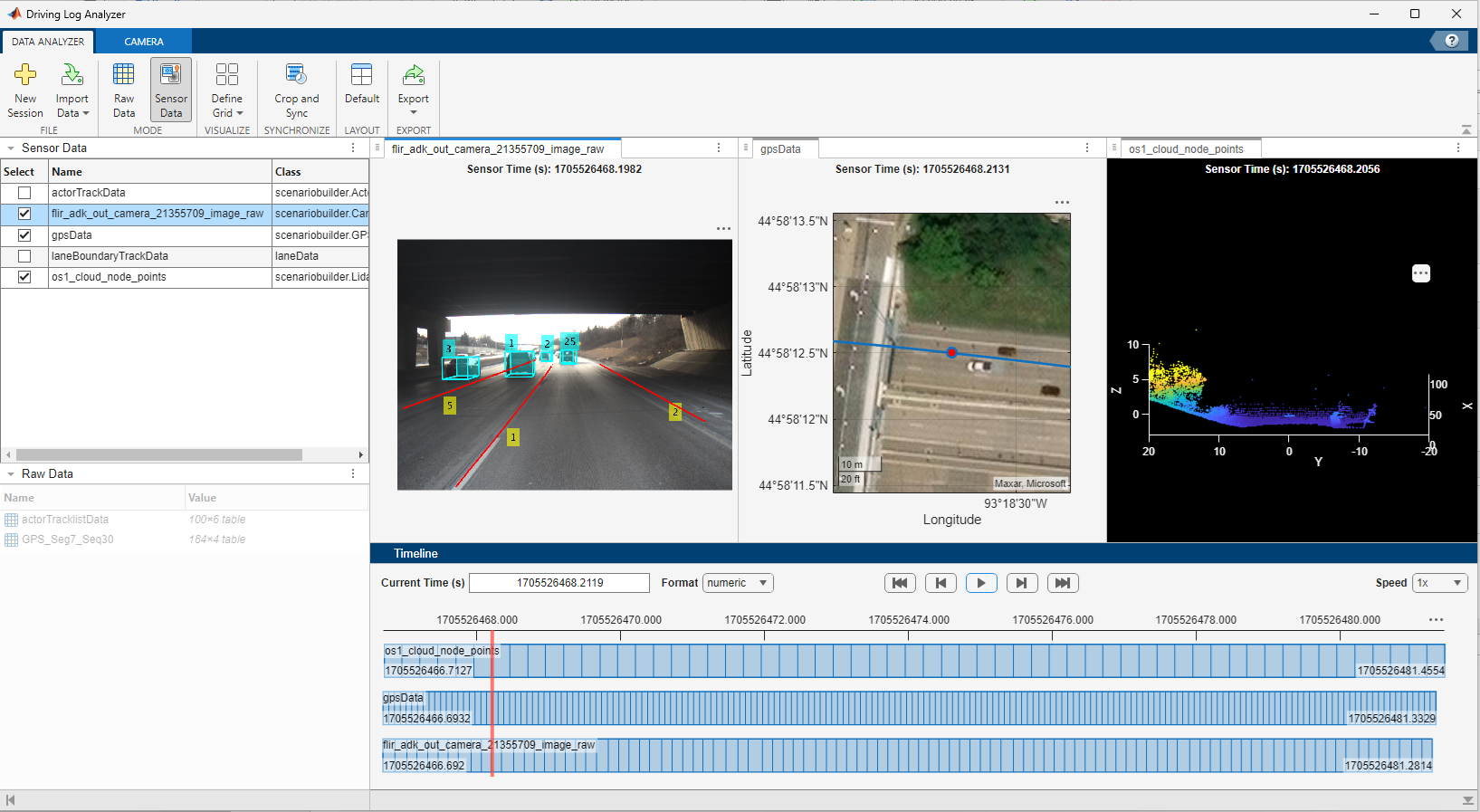
The Driving Log Analyzer app enables you to import raw sensor data,
such as camera, lidar, GPS, trajectory, actor tracks, and lane boundary tracks, as well as
sensor data objects, such as GPSData, Trajectory,
CameraData,
LidarData, and
ActorTrackData.
You can map the imported raw data to sensor data objects and visualize them in one or more
panes. The graphical interface enables you to preprocess sensor data objects by correcting
offset, cropping, synchronizing, and normalizing timestamps. Additionally, you can export the
sensor data objects and generate a script automatically for the operations you performed in a
session of the app.
Open the Driving Log Analyzer App
MATLAB® Toolstrip: On the Apps tab, under Automotive, click the Driving Log Analyzer app icon.
MATLAB command prompt: Enter
drivingLogAnalyzer.
Examples
Version History
Introduced in R2025b

