Main Content

frequencySweep

R2026b

Create frequency sweep object

Since R2025a

    Description

    Create a frequency sweep object to setup the interpolation parameters for frequency sweep with a full-wave solver.

    Creation

    Description

    h = frequencySweep creates a default interpolating sweep object.

    You can set the properties of this object only after its creation. Properties that you do not specify, retain their default values.

    For example, h = frequencySweep; h.NumFreqs = 150; creates a default frequency sweep object and sets the number of frequency points to 150.

    example

    Properties

    expand all

    Type of interpolating frequency sweep, specified as:

    • "interp" uses interpolation with the minimum possible set of points within the specified frequency range.

    • "interpWithGrad" uses a gradient-based interpolation technique to predict the next point within the specified frequency range.

    Example: "interpWithGrad"

    Data Types: string

    Maximum error tolerance in subsequent fitting iterations, specified as a negative scalar. The default error tolerance is -80 dB.

    Example: -90

    Data Types: double

    Number of points to discretize frequency range, specified as a positive integer. The value of NumFreqs relative to the number of frequencies you pass to the analysis function determines which frequencies are actually analyzed and returned:

    • When you provide only two frequencies [fmin fmax], the sweep analyzes NumFreqs points spanning that band.

    • When NumFreqs is greater than or equal to the number of input frequencies, the sweep analyzes all of your frequencies and adds points until the total reaches NumFreqs. Your specified frequencies are included in the result.

    • When NumFreqs is less than the number of input frequencies, the sweep ignores your specific frequencies and instead analyzes NumFreqs points spaced uniformly between the smallest and largest input frequencies. Only the band limits are preserved.

    To ensure that every frequency you specify appears in the result, set NumFreqs greater than or equal to number of frequencies in the analysis function.

    Example: 150

    Data Types: double

    Maximum number of iterations for fitting, specified as a positive integer.

    Example: 50

    Data Types: double

    Object Functions

    getRationalModelRead rational fitting parameters

    Examples

    collapse all

    Create a frequency sweep object for using a gradient-based interpolating sweep.

    h = frequencySweep;
    h.SweepType = "interpWithGrad";
    h.NumFreqs = 200;

    Create a dipole antenna. Calculate its S-parameter in the range 60 MHz to 80 MHz using frequency sweep interpolation.

    d = dipole; 
    [s,sweeptype] = sparameters(d,[60e6,80e6],SweepOption=h)
    s = 
      sparameters with properties:
    
          Impedance: 50
           NumPorts: 1
         Parameters: [1×1×200 double]
        Frequencies: [200×1 double]
    
    
    sweeptype = 
      frequencySweep with properties:
    
        SweepType: "interpWithGrad"
           ErrTol: -80
         NumFreqs: 200
         NumIters: 25


    View rational fit parameters of the interpolated sweep.

    g = getRationalModel(sweeptype)
    g = 
      rational with properties:
    
          NumPorts: 1
          NumPoles: 5
             Poles: [5×1 double]
          Residues: [1×1×5 double]
        DirectTerm: 0.0947
             ErrDB: -154.4964


    Plot the S-parameter.

    figure
    rfplot(s)
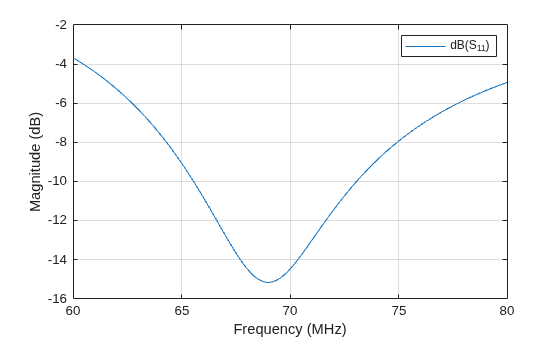
    Figure contains an axes object. The axes object with xlabel Frequency (MHz), ylabel Magnitude (dB) contains an object of type line. This object represents dB(S_{11}).

    References

    [1] Yuan, Hao-Bo, Wen-Tao Bao, Chung Hyun Lee, Brian F. Zinser, Salvatore Campione, and Jin-Fa Lee. “A Method of Moments Wide Band Adaptive Rational Interpolation Method for High-Quality Factor Resonant Cavities.” IEEE Transactions on Antennas and Propagation 70, no. 5 (2022): 3595–604. https://doi.org/10.1109/TAP.2022.3142281.

    Version History

    Introduced in R2025a

    See Also

    Objects

    Functions