Build Light in Unreal Editor
R2026bFollow these steps to build light in the Unreal® Editor. You can also use the AutoVrtlEnv project lighting
in a custom scene.
In the editor, under Build, select Lighting Quality > Production to rebuild production quality maps. Rebuilding complex maps can be time-intensive.

Select Build Lighting Only or Build All Levels to build the game. Production-quality lighting takes the a long time to build.
Use AutoVrtlEnv Project Lighting in Custom Scene
To use the lighting that comes installed with the
AutoVrtlEnv project in Aerospace Blockset™ Interface for Unreal Engine® Projects, follow these steps.
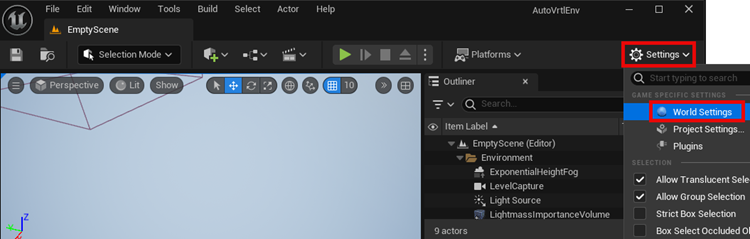
On the World Settings tab, clear Force no precomputed lighting.

Tip
To display the World Settings tab, click Settings and select World Settings.
Under Build, select Lighting Quality > Production to rebuild the maps with production quality. Rebuilding complex maps can be time-intensive.
See Also
Simulation 3D Scene Configuration
Topics
- Create Empty Project in Unreal Engine
- Unreal Engine Simulation Environment Requirements and Limitations

