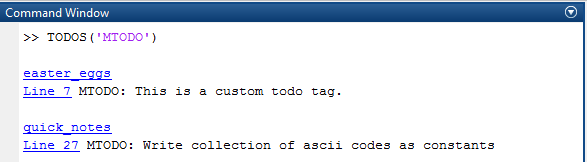
Use tags in code comments to create notes/todos and display links to them in the command window.

You are now following this Submission
- You will see updates in your followed content feed
- You may receive emails, depending on your communication preferences
Use tags in code comments to create notes/todos and display links to them in the command window.
TODOS: Similar to Matlab's TODO/FIXME report generator. Audits a file, folder, folder + subdirectories or the Matlab search path for tags created in code by commenting and displays them (as links to the matlab files) in the command window. Syntax: TODOS; searches the current directory and its subdirectories for TODO tags.
TODOS(TAG) searches the current directory and its subdirectories for tags specified by TAG. TAG can be a string or a cell array of strings.
TODOS(TAG, DIRNAME) scans the specified folder and its subdirectories.
TODOS(TAG, FILENAME, 'file') scans the matlab file FILENAME.
TODOS(TAG, DIRNAME, OPTION) specifies where to scan: OPTION == 'file' -> treats DIRNAME as a FILENAME OPTION == 'dir' -> scans the folder without subdirectories OPTION == 'all' -> scans the entire Matlab search path OPTION == 'subdirs' -> scans DIRNAME and its subdirectories
Cite As
Marc Jakobi (2026). TODOS (https://github.com/mrcjkb/TODOS), GitHub. Retrieved .
General Information
- Version 1.2.0.0 (3.84 KB)
-
View License on GitHub
MATLAB Release Compatibility
- Compatible with any release
Platform Compatibility
- Windows
- macOS
- Linux
Versions that use the GitHub default branch cannot be downloaded
| Version | Published | Release Notes | Action |
|---|---|---|---|
| 1.2.0.0 | Re-added description |
||
| 1.1.0.0 | added thumbnail, moved to GitHub |
||
| 1.0.0.0 |