New m-file (dynamical/document​ed header)

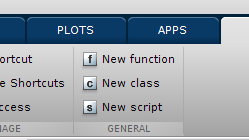
new m-file with dynamical/documented header acting as the usual "new file" matlab desktop shortcut

You are now following this Submission

This function creates a new class/function/script following the same behaviour as the "new file" desktop short-cut, except that headers are dynamically implemented, customizable and adapted for further code documentation.
The function comes with 3 default headers corresponding to 'class', 'function' and 'script' files. Feel free to adapt these header files to your own needs. They have been implemented based on the template headers proposed by Denis Gilbert, in order to facilitate the further code documentation (using mtoc++/doxygen for example).
Even if the templates are customizable, some part are implemented dynamically during the opening of the new class/function/script, such as date of creation, file name, copyright year, etc.
Basically, I have made a compilation of different tools available on the File exchange. But I wanted a tool both simple and powerful, and, most of all, able to efficiently replace the "new file" Matlab desktop short-cut, in such a way that it remains invisible to the user. To do this, you just have to add a short-cut to your short-cut toolbar using the Shortcut Editor, with callback : "new('f')" (function), "new('s')" (script) or "new('c')" (class).
Add command to Shortcut panel :
- On the Home tab, click New, and then select Command Shortcut. Or click on the "New Shortcut" in the quick access toolbar.
- In the Shortcut Editor, choose a "Label" (such as "new function"), an Icon (such as "f") and fill the "Callback" edit text panel with the corresponding command (such as "new('f')").
- Click "Save".
That's all. Whenever you want to change the headers' format, edit the corresponding file('default_function', 'default_class' or 'default_script') and save changes.

Cite As

Benjamin Pillot (2026). New m-file (dynamical/documented header) (https://se.mathworks.com/matlabcentral/fileexchange/57079-new-m-file-dynamical-documented-header), MATLAB Central File Exchange. Retrieved .

Acknowledgements

Inspired by: M-file Header Template, TEDIT, mdrohmann/mtocpp, NewFile

Categories

Find more on Environment and Settings in Help Center and MATLAB Answers

General Information

MATLAB Release Compatibility

  • Compatible with any release

Platform Compatibility

  • Windows
  • macOS
  • Linux
Version Published Release Notes Action
1.0.0.0

Picture update

Description update