mplot: Multiple plots in a single figure with list box selection

Adds multiple plot instructions to a figure and the user chooses which one to use from a list box.

You are now following this Submission

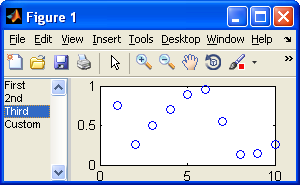
mplot creates a figure with a list box and axes. The list box contains references to plot instructions to sketch data on the axes. Plot instructions are added to the list box with successive calls to the function mplot.

A plot instruction is either a function handle that takes at least a single argument, which is an axes handle; or a series of additional arguments passed to mplot, which are delegated unchanged to the built-in plot function.

When an item is selected in the list box, the corresponding instructions are used to plot data on the right-hand side axes. This means either calling the user-defined function with the axes handle as the first parameter, or the built-in plot function with all the additional arguments. When an item is double-clicked, a new figure window opens and data are plotted on a new pair of axes. This is useful when the axes are to be saved or exported.

EXAMPLES

mplot;
% creates an empty mplot figure if current figure is not already one

fig = mplot;
% returns the current figure handle in fig if it is an mplot figure, creating a new figure if needed

fig = mplot('new')
% unconditionally creates an empty mplot figure and returns its handle in fig

x = 1:100; y = rand(1,100); mplot(x, y, 'kx');
% adds a new plot to the currently active mplot figure; whenever the corresponding list item is clicked, plot(x,y,'kx') is executed

x = 1:100; y = rand(1,100); mplot(fig, x, y, 'kx');
% uses the specified mplot figure instead of the currently active one

x = 1:100; y = rand(1,100); mplot('my caption', x, y, 'kx');
% assigns the given caption to the newly added plot

fun = @(ax) plot(ax, x, y, 'k.'); mplot(fun);
% adds a new plot instruction given by a user function

Cite As

Levente Hunyadi (2026). mplot: Multiple plots in a single figure with list box selection (https://se.mathworks.com/matlabcentral/fileexchange/27111-mplot-multiple-plots-in-a-single-figure-with-list-box-selection), MATLAB Central File Exchange. Retrieved .

Acknowledgements

Inspired by: uisplitter

Categories

Find more on Interactive Control and Callbacks in Help Center and MATLAB Answers

General Information

MATLAB Release Compatibility

  • Compatible with any release

Platform Compatibility

  • Windows
  • macOS
  • Linux
Version Published Release Notes Action
1.1.0.0

Added reference to uisplitter.

1.0.0.0