Decode J1939 Data from BLF Files
R2026bThis example shows you how to import and decode J1939 data from BLF files in MATLAB® for analysis.
The BLF file used in this example was generated from Vector CANoe using the "System Configuration (J1939)" sample. This example also uses the CAN database file, Powertrain_J1939_BLF.dbc, provided with the Vector sample configuration.
Investigate the BLF File
Retrieve and view information about the BLF file. The blfinfo function parses general information about the format and contents of the Vector Binary Logging Format BLF file and returns the information as a structure.
binf = blfinfo("LoggingBLF_J1939.blf")binf = struct with fields:
Name: "LoggingBLF_J1939.blf"
Path: "C:\Users\user\OneDrive - MathWorks\Documents\MATLAB\Examples\vnt-ex52809946\LoggingBLF_J1939.blf"
Application: "CANoe"
ApplicationVersion: "12.0.167"
Objects: 131119
StartTime: 21-Apr-2021 10:05:13.232
EndTime: 21-Apr-2021 10:09:14.344
ChannelList: [2×3 table]
Notice the ChannelList property indicates there are 2 channels referenced in the BLF file with ChannelID values of 1 and 2. The J1939 powertrain data of interest was logged from the CAN2 network, so this example focuses on ChannelID 2.
binf.ChannelList
ans = 2×3 table
    1    "CAN"    92720
    2    "CAN"    26054
J1939 is a protocol built on top of the CAN protocol. A parameter group (PG) is a set of parameters belonging to the same topic and sharing the same transmission rate e.g. EngCoolantTemp, EngFuelTemp, EngTurboOilTemp, etc. of the ET1_EMS PG (see the ET1_EMS PG in signalTimetables below). Each parameter group is addressed via a unique number called the parameter group number (PGN). J1939 PGs are transmitted as CAN frames.
Read J1939 CAN Data Frames from the BLF File
Read all data from channel 2 into a timetable using the blfread function. Each row of the timetable represents one raw CAN frame from the bus.
canData = blfread("LoggingBLF_J1939.blf", 2)canData = 26054×8 timetable
0.000568 sec 418316262 1 '' [105,52,169,232,0,131,0,16] 8 0×0 struct 0 0
0.27057 sec 418383078 1 '' [255,255,255,208,7,255,255,255] 8 0×0 struct 0 0
0.29057 sec 418383078 1 '' [255,255,255,208,7,255,255,255] 8 0×0 struct 0 0
0.30058 sec 418382822 1 '' [255,0,255,255,255,255,255,255] 8 0×0 struct 0 0
0.30116 sec 419327206 1 '' [255,255,255,255,255,255,255,255] 8 0×0 struct 0 0
0.31057 sec 418383078 1 '' [255,255,255,208,7,255,255,255] 8 0×0 struct 0 0
0.33057 sec 418383078 1 '' [255,255,255,208,7,255,255,255] 8 0×0 struct 0 0
0.35058 sec 418382822 1 '' [255,0,255,255,255,255,255,255] 8 0×0 struct 0 0
0.35115 sec 418383078 1 '' [255,255,255,208,7,255,255,255] 8 0×0 struct 0 0
0.35173 sec 419327206 1 '' [255,255,255,255,255,255,255,255] 8 0×0 struct 0 0
0.3523 sec 419361254 1 '' [255,0,0,12,255,255,224,255] 8 0×0 struct 0 0
0.37057 sec 418383078 1 '' [255,255,255,208,7,255,255,255] 8 0×0 struct 0 0
0.39057 sec 418383078 1 '' [255,255,255,208,7,255,255,255] 8 0×0 struct 0 0
0.40058 sec 418382822 1 '' [255,0,255,255,255,255,255,255] 8 0×0 struct 0 0
⋮
Decode J1939 Parameter Groups Using the DBC File
Open the database file using the canDatabase function.
canDB = canDatabase("Powertrain_J1939_BLF.dbc")canDB =
Database with properties:
Name: 'Powertrain_J1939_BLF'
Path: 'C:\Users\user\OneDrive - MathWorks\Documents\MATLAB\Examples\vnt-ex52809946\Powertrain_J1939_BLF.dbc'
Nodes: {12×1 cell}
NodeInfo: [12×1 struct]
Messages: {93×1 cell}
MessageInfo: [93×1 struct]
Attributes: {3×1 cell}
AttributeInfo: [3×1 struct]
UserData: []
The j1939ParameterGroupTimetable function uses the database to decode the raw CAN Data into PGs, PGNs and signals. The timetable of binary logging format data is converted into a Vehicle Network Toolbox™ J1939 parameter group timetable.
j1939PGTimetable = j1939ParameterGroupTimetable(canData, canDB)
j1939PGTimetable = 26030×8 timetable
    0.000568 sec    ACL    60928    6    Peer-to-Peer (Type 1)    230    255    [105,52,169,232,0,131,0,16]    1×1 struct
    0.27057 sec    EEC1_EMS    61444    6    Broadcast (Type 2)    230    255    [255,255,255,208,7,255,255,255]    1×1 struct
    0.29057 sec    EEC1_EMS    61444    6    Broadcast (Type 2)    230    255    [255,255,255,208,7,255,255,255]    1×1 struct
    0.30058 sec    EEC2_EMS    61443    6    Broadcast (Type 2)    230    255    [255,0,255,255,255,255,255,255]    1×1 struct
    0.30116 sec    TCO1_TCO    65132    6    Broadcast (Type 2)    230    255    [255,255,255,255,255,255,255,255]    1×1 struct
    0.31057 sec    EEC1_EMS    61444    6    Broadcast (Type 2)    230    255    [255,255,255,208,7,255,255,255]    1×1 struct
    0.33057 sec    EEC1_EMS    61444    6    Broadcast (Type 2)    230    255    [255,255,255,208,7,255,255,255]    1×1 struct
    0.35058 sec    EEC2_EMS    61443    6    Broadcast (Type 2)    230    255    [255,0,255,255,255,255,255,255]    1×1 struct
    0.35115 sec    EEC1_EMS    61444    6    Broadcast (Type 2)    230    255    [255,255,255,208,7,255,255,255]    1×1 struct
    0.35173 sec    TCO1_TCO    65132    6    Broadcast (Type 2)    230    255    [255,255,255,255,255,255,255,255]    1×1 struct
    0.3523 sec    CCVS_EMS    65265    6    Broadcast (Type 2)    230    255    [255,0,0,12,255,255,224,255]    1×1 struct
    0.37057 sec    EEC1_EMS    61444    6    Broadcast (Type 2)    230    255    [255,255,255,208,7,255,255,255]    1×1 struct
    0.39057 sec    EEC1_EMS    61444    6    Broadcast (Type 2)    230    255    [255,255,255,208,7,255,255,255]    1×1 struct
    0.40058 sec    EEC2_EMS    61443    6    Broadcast (Type 2)    230    255    [255,0,255,255,255,255,255,255]    1×1 struct
      ⋮
View the signal data stored in the third PG of the timetable, which is one instance of the "EEC1_EMS" PG.
signalData = j1939PGTimetable.Signals{3}signalData = struct with fields:
EngDemandPercentTorque: 130
EngStarterMode: 15
SrcAddrssOfCtrllngDvcForEngCtrl: 255
EngSpeed: 250
ActualEngPercentTorque: 130
DriversDemandEngPercentTorque: 130
EngTorqueMode: 15
Repackage and Visualize Signal Values of Interest
Use the j1939SignalTimetable function to repackage signal data from each unique PGN on the bus into a signal timetable. This example creates two individual signal timetables for the two PGs of interest, "EEC1_EMS" and "TCO1_TCO", from the J1939 PG timetable.
signalTimetable1 = j1939SignalTimetable(j1939PGTimetable, "ParameterGroups", "EEC1_EMS")
signalTimetable1 = 12043×7 timetable
    0.27057 sec    130    15    255    250    130    130    15
    0.29057 sec    130    15    255    250    130    130    15
    0.31057 sec    130    15    255    250    130    130    15
    0.33057 sec    130    15    255    250    130    130    15
    0.35115 sec    130    15    255    250    130    130    15
    0.37057 sec    130    15    255    250    130    130    15
    0.39057 sec    130    15    255    250    130    130    15
    0.41057 sec    130    15    255    250    130    130    15
    0.43057 sec    130    15    255    250    130    130    15
    0.45115 sec    130    15    255    250    130    130    15
    0.47057 sec    130    15    255    250    130    130    15
    0.49057 sec    130    15    255    250    130    130    15
    0.51057 sec    130    15    255    250    130    130    15
    0.53057 sec    130    15    255    250    130    130    15
      ⋮
signalTimetable2 = j1939SignalTimetable(j1939PGTimetable, "ParameterGroups", "TCO1_TCO")
signalTimetable2 = 4817×14 timetable
    0.30116 sec    255.9961    8.1919e+03    3    3    3    3    3    15    3    3    15    3    7    7
    0.35173 sec    255.9961    8.1919e+03    3    3    3    3    3    15    3    3    15    3    7    7
    0.40116 sec    255.9961    8.1919e+03    3    3    3    3    3    15    3    3    15    3    7    7
    0.45173 sec    255.9961    8.1919e+03    3    3    3    3    3    15    3    3    15    3    7    7
    0.50116 sec    255.9961    8.1919e+03    3    3    3    3    3    15    3    3    15    3    7    7
    0.55173 sec    255.9961    8.1919e+03    3    3    3    3    3    15    3    3    15    3    7    7
    0.60116 sec    255.9961    8.1919e+03    3    3    3    3    3    15    3    3    15    3    7    7
    0.65173 sec    255.9961    8.1919e+03    3    3    3    3    3    15    3    3    15    3    7    7
    0.70116 sec    255.9961    8.1919e+03    3    3    3    3    3    15    3    3    15    3    7    7
    0.75173 sec    255.9961    8.1919e+03    3    3    3    3    3    15    3    3    15    3    7    7
    0.80116 sec    255.9961    8.1919e+03    3    3    3    3    3    15    3    3    15    3    7    7
    0.85173 sec    255.9961    8.1919e+03    3    3    3    3    3    15    3    3    15    3    7    7
    0.90116 sec    255.9961    8.1919e+03    3    3    3    3    3    15    3    3    15    3    7    7
    0.95173 sec    255.9961    8.1919e+03    3    3    3    3    3    15    3    3    15    3    7    7
      ⋮
You can alternatively choose to convert the whole J1939 PG timetable into a struct containing multiple J1939 signal timetables for each individual PG, and index into it to get data for a particular PG.
signalTimetables = j1939SignalTimetable(j1939PGTimetable)
signalTimetables = struct with fields:
          ACL: [1×14 timetable]
     CCVS_EMS: [2408×19 timetable]
           DD: [240×5 timetable]
     EEC1_EMS: [12043×7 timetable]
     EEC2_EMS: [4817×10 timetable]
      ET1_EMS: [240×6 timetable]
    HOURS_EMS: [240×2 timetable]
      LFC_EMS: [480×2 timetable]
         SERV: [240×6 timetable]
     TCO1_TCO: [4817×14 timetable]
     VDHR_EMS: [240×2 timetable]
       VI_EMS: [24×1 timetable]
       VW_SSC: [240×4 timetable]
signalTimetables.EEC1_EMS
ans = 12043×7 timetable
    0.27057 sec    130    15    255    250    130    130    15
    0.29057 sec    130    15    255    250    130    130    15
    0.31057 sec    130    15    255    250    130    130    15
    0.33057 sec    130    15    255    250    130    130    15
    0.35115 sec    130    15    255    250    130    130    15
    0.37057 sec    130    15    255    250    130    130    15
    0.39057 sec    130    15    255    250    130    130    15
    0.41057 sec    130    15    255    250    130    130    15
    0.43057 sec    130    15    255    250    130    130    15
    0.45115 sec    130    15    255    250    130    130    15
    0.47057 sec    130    15    255    250    130    130    15
    0.49057 sec    130    15    255    250    130    130    15
    0.51057 sec    130    15    255    250    130    130    15
    0.53057 sec    130    15    255    250    130    130    15
      ⋮
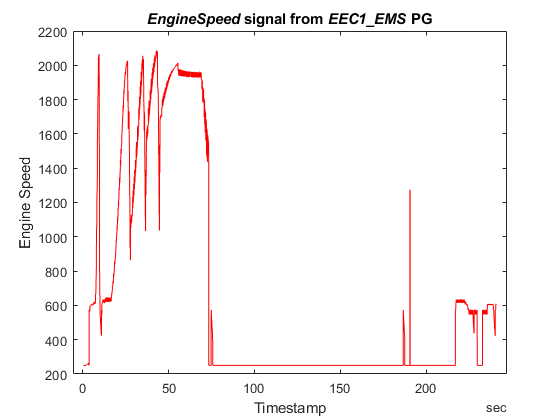
To visualize a signal of interest, variables from the signal timetables can be plotted over time for further analysis. For this example, look at the "EngineSpeed" signal from the "EEC1_EMS" PG.
plot(signalTimetable1.Time, signalTimetable1.EngSpeed, "r")
title("{\itEngineSpeed} signal from {\itEEC1\_EMS} PG", "FontWeight", "bold")
xlabel("Timestamp")
ylabel("Engine Speed")
Close the File
Close access to the DBC file by clearing its variable from the workspace.
clear canDB
