Main Content

CompactClassificationEnsemble

R2026b

Compact classification ensemble

Description

CompactClassificationEnsemble is a compact version of a classification ensemble. The compact version does not include the data used to train the classification ensemble. Therefore, you cannot perform some tasks, such as cross-validation, using the compact classification ensemble. Use a compact classification ensemble to make predictions (classifications) for new data.

Creation

Create a CompactClassificationEnsemble object from a full ClassificationEnsemble or ClassificationBaggedEnsemble model object by using the compact object function.

Properties

expand all

Ensemble Properties

This property is read-only.

Method used to combine weak learner weights, returned as 'WeightedAverage' or 'WeightedSum'.

Data Types: char

This property is read-only.

Number of trained weak learners in the ensemble, returned as a positive integer.

Data Types: double

This property is read-only.

Trained weak learners, returned as a cell vector. The entries of the cell vector contain the corresponding compact classification models.

Data Types: cell

This property is read-only.

Trained weak learner weights, returned as a numeric vector. TrainedWeights has NumTrained elements, where NumTrained is the number of weak learners in the ensemble. The ensemble computes the predicted response by aggregating weighted predictions from its learners.

Data Types: double

Indicator that learner j uses predictor i, returned as a logical matrix of size P-by-NumTrained, where P is the number of predictors (columns) in the training data. UsePredForLearner(i,j) is true when learner j uses predictor i, and is false otherwise. For each learner, the predictors have the same order as the columns in the training data.

If the ensemble is not of type Subspace, all entries in UsePredForLearner are true.

Data Types: logical

Data Properties

This property is read-only.

Predictor names, returned as a cell array of character vectors. The order of the entries in PredictorNames is the same as in the training data.

Data Types: cell

This property is read-only.

Categorical predictor indices, returned as a vector of positive integers. CategoricalPredictors contains index values indicating that the corresponding predictors are categorical. The index values are between 1 and p, where p is the number of predictors used to train the model. If none of the predictors are categorical, then this property is empty ([]).

Data Types: single | double

This property is read-only.

Expanded predictor names, returned as a cell array of character vectors.

If the model uses encoding for categorical variables, then ExpandedPredictorNames includes the names that describe the expanded variables. Otherwise, ExpandedPredictorNames is the same as PredictorNames.

Data Types: cell

This property is read-only.

List of the elements in Y with duplicates removed, returned as a categorical array, cell array of character vectors, character array, logical vector, or numeric vector. ClassNames has the same data type as the data in the argument Y. (The software treats string arrays as cell arrays of character vectors.)

Data Types: double | logical | char | cell | categorical

This property is read-only.

Name of the response variable, returned as a character vector.

Data Types: char

Other Classification Properties

This property is read-only.

Misclassification costs, returned as a square numeric matrix. Cost has K rows and columns, where K is the number of classes.

Cost(i,j) is the cost of classifying a point into class j if its true class is i. The order of the rows and columns of Cost corresponds to the order of the classes in ClassNames.

Data Types: double

This property is read-only.

Prior probabilities for each class, returned as a K-element numeric vector, where K is the number of unique classes in the response. The order of the elements of Prior corresponds to the order of the classes in ClassNames.

Data Types: double

Function for transforming scores, specified as a function handle or the name of a built-in transformation function. "none" means no transformation; equivalently, "none" means @(x)x. For a list of built-in transformation functions and the syntax of custom transformation functions, see ScoreTransform (for trees) or ScoreTransform (for ensembles).

Add or change a ScoreTransform function using dot notation:

Mdl.ScoreTransform = "function"
% or
Mdl.ScoreTransform = @function

Data Types: char | string | function_handle

Object Functions

compareHoldoutCompare accuracies of two classification models using new data
edgeClassification edge for classification ensemble model
gatherGather properties of Statistics and Machine Learning Toolbox object from GPU
limeLocal interpretable model-agnostic explanations (LIME)
lossClassification loss for classification ensemble model
marginClassification margins for classification ensemble model
partialDependenceCompute partial dependence
plotPartialDependenceCreate partial dependence plot (PDP) and individual conditional expectation (ICE) plots
predictPredict labels using classification ensemble model
predictorImportanceEstimates of predictor importance for classification ensemble of decision trees
removeLearnersRemove members of compact classification ensemble
shapleyShapley values

Examples

collapse all

Create a compact classification ensemble for efficiently making predictions on new data.

Load the ionosphere data set.

load ionosphere

Train a boosted ensemble of 100 classification trees using all measurements and the AdaBoostM1 method.

Mdl = fitcensemble(X,Y,Method="AdaBoostM1")
Mdl = 
  ClassificationEnsemble
             ResponseName: 'Y'
    CategoricalPredictors: []
               ClassNames: {'b'  'g'}
           ScoreTransform: 'none'
          NumObservations: 351
               NumTrained: 100
                   Method: 'AdaBoostM1'
             LearnerNames: {'Tree'}
     ReasonForTermination: 'Terminated normally after completing the requested number of training cycles.'
                  FitInfo: [100×1 double]
       FitInfoDescription: {2×1 cell}


  Properties, Methods

Mdl is a ClassificationEnsemble model object that includes the training data.

Create a compact version of Mdl.

CMdl = compact(Mdl)
CMdl = 
  CompactClassificationEnsemble
             ResponseName: 'Y'
    CategoricalPredictors: []
               ClassNames: {'b'  'g'}
           ScoreTransform: 'none'
               NumTrained: 100


  Properties, Methods

CMdl is a CompactClassificationEnsemble model object. CMdl is similar to Mdl, but does not store the training data.

Compare the amount of memory used by Mdl and CMdl.

mdlInfo = whos("Mdl");
cMdlInfo = whos("CMdl");
[mdlInfo.bytes cMdlInfo.bytes]
ans = 1×2

      864863      617126

Mdl uses more memory than CMdl.

CMdl.Trained stores the trained classification trees (CompactClassificationTree model objects) that compose Mdl.

Display a graph of the first tree in the compact ensemble.

view(CMdl.Trained{1},Mode="graph");
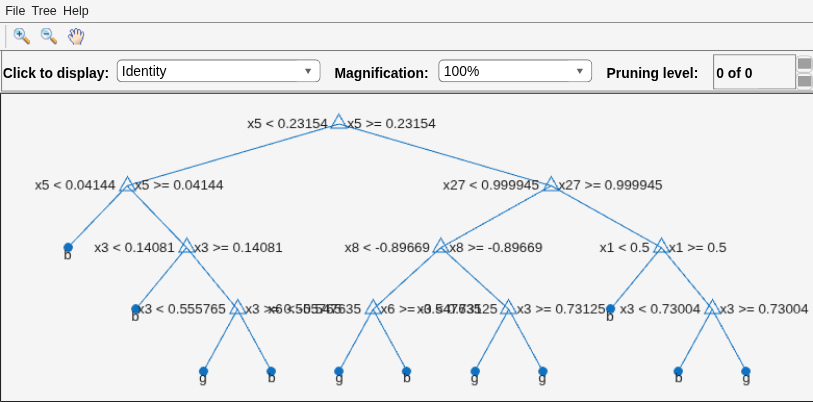
Figure Classification tree viewer contains an axes object and other objects of type uimenu, uicontrol. The axes object contains 36 objects of type line, text. One or more of the lines displays its values using only markers

By default, fitcensemble grows shallow trees for boosted ensembles of trees.

Predict the label of the mean of X using the compact ensemble.

predMeanX = predict(CMdl,mean(X))
predMeanX = 1×1 cell array
    {'g'}

Tips

  • For an ensemble of classification trees Mdl, the Trained property stores an Mdl.NumTrained-by-1 cell vector of compact classification models. For a textual or graphical display of tree t in the cell vector, enter:

    • view(Mdl.Trained{t}.CompactRegressionLearner) for ensembles aggregated using LogitBoost or GentleBoost

    • view(Mdl.Trained{t}) for all other aggregation methods

Extended Capabilities

expand all

Version History

Introduced in R2011a

expand all