metric.config.Configuration
R2026bDescription
A metric.config.Configuration object represents a custom
threshold configuration that contains threshold sets, threshold rules, and classifications. To
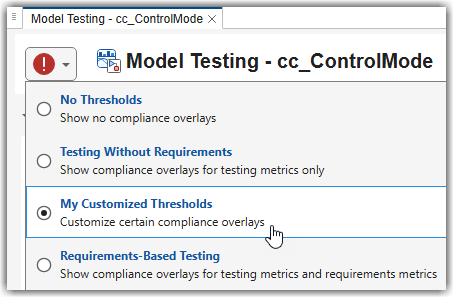
make custom thresholds appear in the Model Testing, SIL Code Testing, and PIL Code Testing
dashboards, use this object to copy and modify a shipping threshold set. Then, save and
register the configuration. For more information, see Adjust Dashboard Thresholds to Match Your Testing Criteria.
Creation
To create a metric.config.Configuration object, either:
Copy an existing shipping threshold set using the
copyThresholdSetfunction.Load an existing configuration from a JSON file using the
metric.config.Configuration.open
Threshold customization uses a hierarchy of objects:
A configuration (
metric.config.Configuration) contains one or more threshold sets.A threshold set (
metric.threshold.ThresholdSetA threshold rule (
metric.threshold.ThresholdRuleA classification (
metric.threshold.Classification
Properties
Object Functions
Examples
Create a new configuration by copying a shipping threshold set. Modify a threshold rule, then save and register the configuration for use in the testing dashboards.
The shipping threshold sets include threshold sets for "Testing"
and "ReqBasedTesting". Copy one of these shipping threshold
sets.
config = metric.config.Configuration.copyThresholdSet( ...
    SourceThresholdSetId="ReqBasedTesting", ...
    TargetThresholdSetId="MyTestingThresholds")
config =

  Configuration with properties:

                         FileName: []
                             Name: ''
                    ThresholdSets: [1x1 metric.threshold.ThresholdSet]
                          Metrics: [0x0 metric.config.MetricDefinition]
                     TableMetrics: [0x0 metric.config.TableMetricDefinition]
    MetricDefinitionSchemaVersion: "0.3.0"
                   ThresholdRules: [1x32 metric.threshold.ThresholdRule]
           ThresholdSchemaVersion: "0.2.0"
Set a display name for the custom threshold set and get a threshold rule to modify.
config.ThresholdSets.Name = "My Customized Thresholds";

rule = getThresholdRule(config, ...
    ThresholdSetId="MyTestingThresholds", ...
    MetricId="modeltesting.TestResultAnalysis[slcomp.TestStatusDistribution]", ...
    ThresholdRuleId="NotRun");
rule.Classifications(2).Category = "Warning";
To make the custom threshold set appear in the dashboard, save and register the configuration.
proj = currentProject;
p = proj.RootFolder;
config.FileName = fullfile(p,"MyConfig.json");
saveAndRegister(config,ResourcesLocation=p)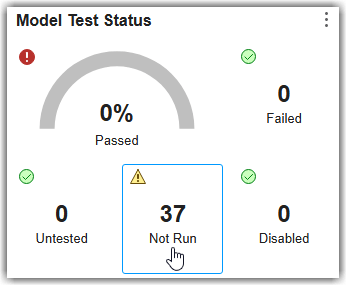
Version History
Introduced in R2026b

