Simulink.ConfigSet
R2026bModel configuration set
Description
Use the Simulink.ConfigSet object to access a model
configuration set. Get information about your configuration set and manage configuration
parameters.
The Simulink.ConfigSet object is a handle object.
Creation
Use the getActiveConfigSet function to get
the active configuration set for a model. Use the getConfigSet function to get a model
configuration set by name.
Properties
Object Functions
Examples
Open the model vdp and get the active configuration
set.
openExample('simulink_general/VanDerPolOscillatorExample');
configSetObj = getActiveConfigSet('vdp');
Specify the configuration set to use for a simulation using a
Simulink.ConfigSet object. The sim
function applies the configuration set for the simulation without dirtying the
model. Changes to the model revert when the simulation completes.
A configuration set specifies only model configuration parameter values. To
specify additional values, such as variable and block parameter values, use a
Simulink.SimulationInput object instead.
Suppose you want to simulate the model IntegrateSine,
described in Run Simulations Using Current Parameter Values, for
20 seconds using the solver ode45.
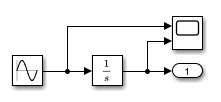
To specify the parameter values to use in the simulation, create and
configure a Simulink.ConfigSet object.
Open the model.
Get the configuration set for the model.
Create a copy of the model configuration set.
Specify the stop time and solver on the copy of the model configuration set.
mdl = "IntegrateSine";
open_system(mdl)
mdlconfig = getActiveConfigSet(mdl);
simconfig = copy(mdlconfig);
Simulate the model using the configuration set
simconfig.
out = sim(mdl,simconfig);
To see the parameter values used in the simulation, check the simulation metadata returned with the simulation results.
slvr = out.SimulationMetadata.ModelInfo.SolverInfo.Solver
slvr =

    'ode45'
tstop = out.SimulationMetadata.ModelInfo.StopTime
tstop =

    20
Version History
Introduced in R2006a

