Schedule Time Hits and Function-Call Events During Simulation
R2026bThis example shows how to use the Hit Scheduler block to schedule time hits and function-call events based on the runtime behavior of a system. The model in this example represents a traffic camera system that captures images of speeding vehicles. The Hit Scheduler block schedules time hits for the simulation based on runtime computations that determine when the camera should capture an image.
Open and Explore Model
Open the model TrafficCam. The model implements the scheduling for a traffic camera on a two-lane road with a speed limit of 65 miles per hour.
mdl = "TrafficCam";
open_system(mdl)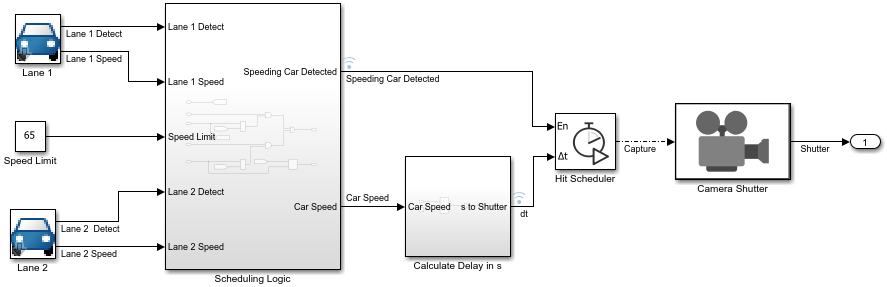
Two masked subsystems represent the vehicles that travel in each lane. Each subsystem contains logic that detects a vehicle and the vehicle speed. The vehicle detection signals are random, and the vehicle speeds vary randomly around a nominal value of 64 miles per hour. The subsystem named Scheduling Logic uses the outputs from these masked subsystems to determine whether the camera should capture an image of an approaching vehicle.
The Hit Scheduler block schedules time hits relative to the current simulation time. To schedule a time hit, you calculate the delay from the current simulation time to the scheduled time hit based on the runtime system behavior. The subsystem named Calculate Delay in s calculates the delay input for each scheduled time hit based on the speed of the detected vehicle.
The Hit Scheduler block:
Schedules a time hit for each image capture based on the calculated delay
Produces a function-call event in each scheduled time step to activate the triggered subsystem that represents the camera shutter
Simulate Model and Analyze Results
Simulate the model. Then, open the Simulation Data Inspector and use the Simulink.sdi.loadView function to load the view file TrafficCamView.mldatx.
out = sim(mdl);
Simulink.sdi.view
Simulink.sdi.loadView("TrafficCamView.mldatx");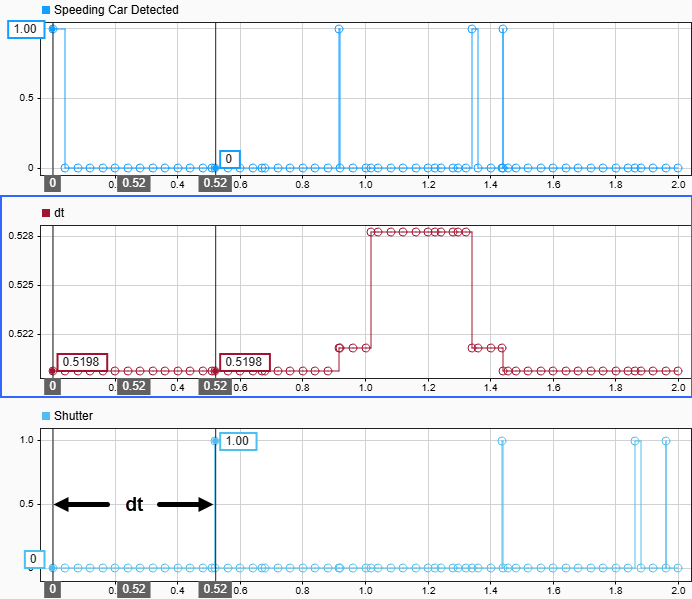
In the first time step, the system detects a speeding vehicle. The calculated delay to the time for the camera to capture an image is 0.5198 seconds.
logsout = out.logsout;
dt = getElement(logsout,"dt");
dt0 = dt.Values.Data(1)
dt0 = 0.5198
The Hit Scheduler block schedules a time step to occur at 0.5198 seconds. In the scheduled time step, the Hit Scheduler block produces a function-call event that triggers the Camera Shutter subsystem.
The shutter activates for the first time in the time step that corresponds to the first scheduled hit time. Get the Shutter signal from the logged data and check the time of the first nonzero value.
yout = out.yout;
shutter = getElement(yout,"Shutter");
n = find(shutter.Values.Data,1);
timage = shutter.Values.Time(n)
timage = 0.5198
Use the cursors in the Simulation Data Inspector to continue analyzing the Speeding Car Detected, dt, and Shutter signals and understand how the Hit Scheduler block controls the action of the camera.
See Also
Hit Scheduler | Function-Call Subsystem

