Generate C++ Code That Analyzes Vibration Signals from Rotating Machinery
R2026bThis example shows how to generate C++ code that analyzes the vibration signal from an accelerometer attached to a gearbox and identifies the local faults on the gear or pinion teeth. To learn more about the algorithm this example uses, see Vibration Analysis of Rotating Machinery.
Examine Gearbox Schematic and MATLAB Code That Identifies Local Fault
In this example, you use the function detectGearboxToothLocalFault, which takes a signal from a gearbox accelerometer and outputs whether it detects faults on the gear or pinion teeth. For this example, assume that you have data from an idealized gearbox. This image shows the gearbox schematics:
The gearbox has a 13-tooth pinion meshing ( = 13) with a 35-tooth gear ( = 35). The pinion is coupled to an input shaft that connects to a prime mover. The gear connects to an output shaft. The roller bearings on the gearbox housing support the shafts. There are two accelerometers, and , on the bearing and gearbox housings, respectively. The accelerometers operate at a sample rate of = 20 kHz. The pinion rotates at a rate of = 22.5 Hz, or 1350 RPM.
The detectGearboxToothLocalFault function analyzes the signal obtained from the accelerometer . The first input argument is the accelerometer signal, and the second is a time vector.
type detectGearboxToothLocalFault.mfunction faultLocation = detectGearboxToothLocalFault(accSignal,tvec,fs,Np,Ng,fPin) %#codegen
arguments (Input)
accSignal (1,:) double
tvec (1,:) double
fs (1,1) double {mustBePositive(fs)}
Np (1,1) double {mustBePositive(Np),mustBeInteger(Np)}
Ng (1,1) double {mustBePositive(Ng),mustBeInteger(Ng)}
fPin (1,1) double {mustBePositive(fPin)}
end
arguments (Output)
faultLocation {mustBeMember(faultLocation,{'pinion','gear','pinionAndGear','none'})}
end
fGear = fPin*Np/Ng; % Gear-shaft frequency (Hz)
fMesh = fPin*Np; % Gear-mesh frequency (Hz)
% Locations of first 5 gear and pinion sidebands on either side of fMesh
harmonics = -5:5;
SBandsGear = (fMesh+fGear.*harmonics);
SBandsPin = (fMesh+fPin.*harmonics);
% Set frequency limits for power spectrum calculation to include all gear
% and pinion sidebands.
frequencyLimits = [min([SBandsGear,SBandsPin])-10, ...
max([SBandsGear,SBandsPin])+10];
% Calculate time synchronous average and power spectrum for the gear signal.
% Check if the power spectrum peaks match with the sidebands.
tPulseOut = 0:1/fGear:max(tvec);
taGear = tsa(accSignal,fs,tPulseOut,NumRotations=10);
fResGear = pspectrumFResCalculator(taGear,fs);
[pGear,fGear] = pspectrum(taGear,fs,FrequencyResolution=fResGear, ...
FrequencyLimits=frequencyLimits);
[~,locsPGear] = findpeaks(pGear);
isGearFaulty = isSubsetTol(SBandsGear,fGear(locsPGear));
% Calculate time synchronous average and power spectrum for the pinion signal.
% Check if the power spectrum peaks match with the sidebands.
tPulseIn = 0:1/fPin:max(tvec);
taPin = tsa(accSignal,fs,tPulseIn,NumRotations=10);
fResPin = pspectrumFResCalculator(taPin,fs);
[pPin,fPin] = pspectrum(taPin,fs,FrequencyResolution=fResPin, ...
FrequencyLimits=frequencyLimits);
[~,locsPPin] = findpeaks(pPin);
isPinFaulty = isSubsetTol(SBandsPin,fPin(locsPPin));
% Output the location of the fault based on the peak-matching exercises.
if isGearFaulty
if isPinFaulty
faultLocation = 'pinionAndGear';
else
faultLocation = 'gear';
end
else
if isPinFaulty
faultLocation = 'pinion';
else
faultLocation = 'none';
end
end
end
The detectGearboxToothLocalFault function:
Performs time-synchronous averaging on the input signal by using the
tsafunctionCalculates the power spectrum of the averaged signal by using the
pspectrumfunctionLocates the peaks of the power spectrum by using the
findpeaksfunctionChecks whether the power spectrum peaks appear at the expected sideband harmonics which are specified by the
SBandsGearorSBandsPinvariablesOutputs the location of the fault as one of the character vectors:
'pinion','gear','pinionAndGear', or'none'
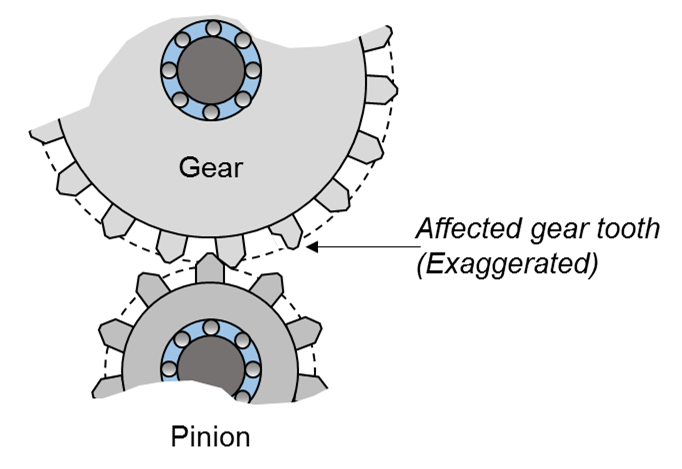
If the function detects a local fault on a gear, pinion tooth, or both, it outputs 'gear', 'pinion', or 'gearandpinion', respectively. If it detects no faults, it outputs 'none'. For example, this image shows a local fault on one of the gear teeth.
To perform these calculations, the detectGearboxToothLocalFault function also calls the helper functions pspectrumFResCalculator and isSubsetTol. These helper functions are attached with this example.
Test MATLAB Function Using Example Signals
Examine the test script testDetectGearboxToothLocalFault.m, which generates 20 seconds of vibration data:
The signal
aHealthyNoisyis a noisy signal for a gearbox with no local fault.The signal
aFaultyNoisyis a noisy signal for a gearbox that has a local fault on a single gear tooth.
The script then calls the detectGearboxToothLocalFault function, which detects the location of the fault for both signals.
type testDetectGearboxToothLocalFault.m%% Specify the Gearbox Parameters and Duration of Vibration Data
fs = 20e3; % Sample Rate (Hz)
Np = 13; % Number of teeth on pinion
Ng = 35; % Number of teeth on gear
fPin = 22.5; % Pinion (Input) shaft frequency (Hz)
fGear = fPin*Np/Ng; % Gear (Output) shaft frequency (Hz)
fMesh = fPin*Np; % Gear-mesh frequency (Hz)
dur = 20; % Generate 20 seconds of vibration data
t = 0:1/fs:dur-1/fs; % Time vector for the generated signals
%% Generate a Healthy Noisy Signal
% Generate vibration waveforms for the pinion and the gear. Model the
% vibrations as sinusoids occurring at primary shaft gear mesh frequencies.
% The gear-mesh waveform is responsible for transmitting load and thus
% possesses the highest vibration amplitude.
afIn = 0.4*sin(2*pi*fPin*t); % Pinion waveform
afOut = 0.2*sin(2*pi*fGear*t); % Gear waveform
aMesh = sin(2*pi*fMesh*t); % Gear-mesh waveform
aHealthy = afIn + afOut + aMesh; % Healthy signal
%% Add a Fault Signal to the Healthy Noisy Signal
% Generate a high-frequency impact signal caused by a local fault on a
% single gear tooth. Make the impact periodic by modeling it as a periodic
% train of pulses. Add the fault signal xImpactPer to the healthy signal to
% generate a faulty signal.
ipf = fGear;
fImpact = 2000;
tImpact = 0:1/fs:2.5e-4-1/fs;
xImpact = sin(2*pi*fImpact*tImpact)/3;
xImpactPer = 2*pulstran(t,0:1/ipf:t(end),xImpact,fs);
aFaulty = aHealthy + xImpactPer; % Faulty signal
%% Add White Gaussion Noise to Both Signals
rng default
aHealthyNoisy = aHealthy + randn(size(t))/5; % Healthy noisy signal
aFaultyNoisy = aFaulty + randn(size(t))/5; % Faulty noisy signal
%% Detect Location of Fault for Both Noisy Signals
locHealthyNoisy = detectGearboxToothLocalFault(aHealthyNoisy,t,fs,Np,Ng,fPin);
locFaultyNoisy = detectGearboxToothLocalFault(aFaultyNoisy,t,fs,Np,Ng,fPin);
disp("Fault location for healthy signal: " + locHealthyNoisy)
disp("Fault location for faulty signal: " + locFaultyNoisy)
Call this script to test the algorithm.
testDetectGearboxToothLocalFault
Fault location for healthy signal: none
Fault location for faulty signal: gear
Generate and Run C++ MEX Function
Before generating standalone code, it is a best practice to generate and run a MEX function for the MATLAB® entry-point function. This step enables you to detect code generation errors and run-time errors early in the development process.
Generate a C++ MEX function for the detectGearboxToothLocalFault function by using the codegen (MATLAB Coder) command. Because the detectGearboxToothLocalFault entry-point function contains an arguments block that specifies the type and size of the input arguments, you do not need to use the -args option. Specify the name of the code generation folder as detectGearboxToothLocalFault_mex.
codegen -lang:c++ detectGearboxToothLocalFault -d detectGearboxToothLocalFault_mex -report
Code generation successful: View report
Next, test the functionality of the MEX function by running the original test script, testDetectGearboxToothLocalFault, and replacing the calls to the MATLAB function with calls to the MEX function. To replace the calls, use the coder.runTest (MATLAB Coder) function.
coder.runTest("testDetectGearboxToothLocalFault","detectGearboxToothLocalFault")
Fault location for healthy signal: none
Fault location for faulty signal: gear
The output of the generated MEX function matches the execution of the original MATLAB function.
Generate C++ Static Library and Verify Execution Using SIL Interface
To generate a C++ static library and an associated software-in-the-loop (SIL) interface, create a coder.EmbeddedCodeConfig (MATLAB Coder) object. Specify the target language as C++ and the verification mode as SIL.
cfg = coder.config("lib");
cfg.VerificationMode = "SIL";
cfg.TargetLang = "C++";
Generate a C++ static library and a SIL interface for the detectGearboxToothLocalFault entry-point function by using the codegen command. Specify the name of the code generation folder as detectGearboxToothLocalFault_sil.
codegen -config cfg detectGearboxToothLocalFault -d detectGearboxToothLocalFault_sil -report
Code generation successful: View report
If you use the Microsoft® Visual C++ compiler to compile the generated source code, you might get the compiler warning C4701 that says the local variable y in the generated file median.cpp is potentially uninitialized. For this example, this is a false positive issue that occurs because the compiler's static analysis is unable to prove that the local variable y is always initialized before it is used.
Verify that the SIL MEX function is functionally equivalent to the original MATLAB function by running the test script, testDetectGearboxToothLocalFault, and replacing the calls to the MATLAB function with calls to the SIL MEX function. To replace the calls, use the coder.runTest function.
coder.runTest("testDetectGearboxToothLocalFault","detectGearboxToothLocalFault","detectGearboxToothLocalFault_sil")
### Starting SIL execution for 'detectGearboxToothLocalFault'
    To terminate execution: clear detectGearboxToothLocalFault_sil
Fault location for healthy signal: none
Fault location for faulty signal: gear
The output of the generated SIL MEX function matches the execution of the original MATLAB function.
Finally, clear the loaded SIL MEX function from memory.
clear detectGearboxToothLocalFault_sil### Application stopped ### Stopping SIL execution for 'detectGearboxToothLocalFault'
Helper Functions
The pspectrumFResCalculator function calculates the minimum frequency resolution that is achievable for the default pspectrum algorithm for the signal x at the sample rate fs. This function rounds up the minimum resolution value to the decimal place specified by roundTo, which has a default value of 1.
type pspectrumFResCalculator.mfunction fres = pspectrumFResCalculator(x,fs,roundTo)
arguments (Input)
x (1,:) double
fs (1,1) double {mustBePositive(fs)}
roundTo (1,1) double {mustBeInteger} = 1;
end
arguments (Output)
fres (1,1) double {mustBePositive(fres)}
end
ENBW = 2.5667; % Default ENBW for pspectrum algorithm
fresMin = ENBW*fs/numel(x);
roundingConst = 10*roundTo;
fres = ceil(fresMin*roundingConst)/roundingConst;
end
The isSubsetTol function checks if all elements of the array A are also elements of the array B within the tolerance tol. The default value of the tol is 1.
type isSubsetTol.mfunction tf = isSubsetTol(A,B,tol)
arguments (Input)
A (1,:) double
B (1,:) double
tol (1,1) double {mustBePositive(tol)} = 1
end
arguments (Output)
tf (1,1) logical
end
% For each A-element, calculate the distance to the closest B-element
f = @(a) min(abs(B-a));
distances = arrayfun(f,A);
% Check if the maximum of these distances is within tolerance
dH = max(distances);
tf = dH <= tol;
end
See Also
tsa | pspectrum | findpeaks | codegen (MATLAB Coder) | coder.runTest (MATLAB Coder) | coder.EmbeddedCodeConfig (MATLAB Coder)

