Tire (Friction Parameterized)
R2026bTire with friction parameterized in terms of static and kinetic coefficients
Tire (Friction Parameterized) block

To add a block to a model, double-click the canvas and start typing the block name. Then, select the block from the list.
Libraries:
Simscape /
Driveline /
Tires & Vehicles
Description
The Tire (Friction Parameterized) block represents a tire with friction parameterized in terms of static and kinetic coefficients. The static friction coefficient, μs, determines the applied torque at which the tire loses traction and begins to slip. The kinetic friction coefficient, μk, determines the amount of torque that the tire transmits to the pavement once it begins to slip. The tire regains traction when its relative velocity over the pavement falls below the specified traction velocity tolerance.
To increase the fidelity of the tire model, specify properties such as tire compliance, inertia, and rolling resistance. Note that these properties increase the complexity of the tire model and can slow down simulation. Consider ignoring tire compliance and inertia if simulating the model in real time or when preparing the model for hardware-in-the-loop (HIL) simulation.
Wheel Slip
When you set Slip output type to Relative,
the block outputs the relative slip velocity as a unitless physical signal at port
S, such that
where:
Vx is the wheel hub longitudinal velocity at port H.
rw is the rolling radius.
Ω is the wheel axle angular velocity at port A.
When you set Slip output type to
Absolute, port S outputs the
absolute contact point slip velocity in a rotational form such that
where u is the time-rate of change in longitudinal deformation and u/rw is equivalent to the rotational velocity of the spring and damper in the logged simulation results.
When you set Slip output type to Absolute,
the block uses the friction model of the Fundamental Friction Clutch block. The figure demonstrates how the
block implements slip:

When you set Compliance to No
compliance - Suitable for HIL simulation, the block sets .
Examples
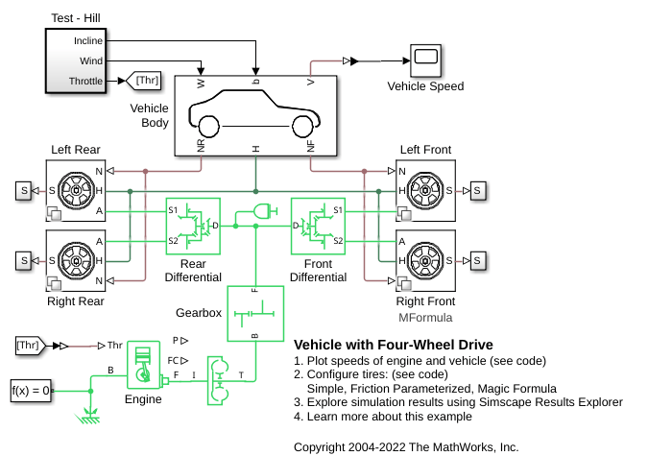
Vehicle with Four-Wheel Drive
A four-wheel drive vehicle starting from rest and ascending a 15 degree incline. Initially the vehicle rolls backward until the engine develops sufficient torque to counter the slope. The tire compliance dynamics can be seen as the vehicle starts to accelerate. The model variant chosen for all of the tires can be set to the Simple, Friction Parameterized, or Magic Formula tire model using the hyperlinks in the model.
Ports
Input
Physical signal input port associated with the normal force acting on the tire, in N. The normal force is positive if it acts downward on the tire, pressing it against the pavement.
Programmatic Use
Port:
N
Physical signal input port associated with the unitless static and kinetic friction coefficients, μs and μk, respectively. Provide the friction coefficients as a two-element vector, specified in the order [μs, μk].
Dependencies
To enable this port, set Friction model to
Physical signal friction
coefficients.
Programmatic Use
Port:
M
Output
Physical signal output port associated with the slip between the tire and road, unitless or in rad/s. When you set Output type to:
Relative, the port outputs unitless, relative slip.Absolute, the port outputs absolute slip in rad/s.
Programmatic Use
Port:
Srel
Conserving
Mechanical rotational conserving port associated with the axle.
Programmatic Use
Port:
A
Mechanical rotational port associated with the wheel hub.
Programmatic Use
Port:
H
Parameters
Main
Distance between the pavement and the center of the tire.
Programmatic Use
Parameter:
r_tire
Whether the block uses a relative or absolute slip friction parameterization.
Programmatic Use
| Parameter: | slip_output |
| Values: | "sdl.enum.SlipOutput.Relative" | "sdl.enum.SlipOutput.Absolute" |
Friction model the block uses during the simulation. When you select:
Fixed kinetic friction coefficient, the block uses the constant static and kinetic friction coefficients that you specify.Table lookup kinetic friction coefficient, you can specify friction using a table lookup. The block treats the static coefficient as a constant and treats the kinetic coefficient as a constant or function of tire slip. Use this setting to simulate tire dynamics under constant pavement conditions.Physical signal friction coefficients, the block enables port M for you to provide [μs, μk]. Use this setting to simulate tire dynamics under variable pavement conditions.
Programmatic Use
| Parameter: | friction_model |
| Values: | "sdl.enum.friction_model_var.fixed" | "sdl.enum.friction_model_var.TLU" | "sdl.enum.friction_model_var.PS" |
Ratio of the allowable longitudinal force to the normal force allowed before the tire begins to slip, μs. The value of this parameter must be greater than either the Kinetic friction coefficient parameter or the largest value in the Kinetic friction coefficient vector parameter.
Dependencies
To enable this parameter, set Friction model to Fixed
kinetic friction coefficient or Table
lookup kinetic friction coefficient.
Programmatic Use
Parameter:
mu_static
Ratio of the longitudinal force transferred to the road to the normal force allowed during tire slip, μk. The ratio must be greater than zero.
Dependencies
To enable this parameter, set Friction model
to Fixed kinetic friction
coefficient.
Programmatic Use
Parameter:
mu_kinetic
Reference tire slip. The elements in this vector correspond one-to-one with the Kinetic friction coefficient vector parameter. If the Tire slip vector parameter contains only nonnegative values, the block assumes the slip-versus-friction function to be symmetric about the slip axis.
Dependencies
To enable this parameter, set Friction model
to Table lookup kinetic friction
coefficient.
Programmatic Use
Parameter:
slip_vector
Kinetic friction coefficient for a given tire slip. The elements in this vector correspond one-to-one with the Tire slip vector parameter. The vectors must be the same size.
Dependencies
To enable this parameter, set Friction model
to Table lookup kinetic friction
coefficient.
Programmatic Use
Parameter:
mu_kinetic_vector
Interpolation method for the lookup table to process the tire slip-kinetic friction
coefficient characteristic. To prioritize performance, select
Linear. To produce a continuous curve
with continuous first-order derivatives, select
Smooth.
For more information on interpolation algorithms, see the PS Lookup Table (1D) block reference page.
Dependencies
To enable this parameter, set Friction model to Table
lookup kinetic friction coefficient.
Programmatic Use
| Parameter: | interp_method |
| Values: | "simscape.enum.interpolation.linear" | "simscape.enum.interpolation.smooth" |
Extrapolation method for the lookup table to process the tire slip-kinetic friction coefficient characteristic. To produce:
Linear— Select this option to produce a curve with continuous first-order derivatives in the extrapolation region and at the boundary with the interpolation region.Nearest— Select this option to produce an extrapolation that does not go above the highest point in the data or below the lowest point in the data.Error— Select this option to avoid going into the extrapolation mode when you want your data to be within the table range. If the input signal is outside the range of the table, the simulation stops and generates an error.
For more information on extrapolation algorithms, see the PS Lookup Table (1D) block reference page.
Dependencies
To enable this parameter, set Friction model to Table
lookup kinetic friction coefficient.
Programmatic Use
| Parameter: | extrap_method |
| Values: | "simscape.enum.extrapolation.linear" | "simscape.enum.extrapolation.nearest" | "simscape.enum.extrapolation.error" |
Dynamics
Model for the dynamical compliance of the tire.
No compliance - Suitable for HIL simulation— The block ignores dynamical compliance.Specify stiffness and damping— The block treats the tire as a stiff, dampened spring that deforms under load.
Programmatic Use
| Parameter: | model_compliance |
| Values: | "sdl.enum.compliance.off" | "sdl.enum.compliance.on" |
Tire longitudinal stiffness, CFx.
Dependencies
To enable this parameter, set Compliance to
Specify stiffness and damping.
Programmatic Use
Parameter:
stiffness
Tire longitudinal damping, bFx.
Dependencies
To enable this parameter, set Compliance to
Specify stiffness and damping.
Programmatic Use
Parameter:
damping
Whether to simulate tire rotational inertia. When you select
No inertia— The block ignores inertia.Specify inertia and initial velocity— The block treats the tire as a stiff, dampened spring that deforms under load.
Dependencies
To enable this parameter, set Inertia to
Specify inertia and initial
velocity.
Programmatic Use
| Parameter: | model_inertia |
| Values: | "true" | "false" |
Rotational inertia, Iw, of the wheel-tire assembly.
Dependencies
To enable this parameter, set Inertia to
Specify inertia and initial
velocity.
Initial angular velocity, Ω(0), of the tire.
Dependencies
To enable this parameter, set Inertia to Specify
inertia and initial velocity.
Programmatic Use
Parameter:
initial_velocity
Rolling Resistance
Whether to simulate rolling resistance.
Programmatic Use
| Parameter: | model_resistance |
| Values: | "true" | "false" |
Whether to simulate the rolling resistance of the tire. When you select
Constant coefficient— The block ignores rolling resistance.Pressure and velocity dependent— Include rolling resistance.
Programmatic Use
| Parameter: | resistance_model |
| Values: | "sdl.enum.RollingResistance.Constant" | "sdl.enum.RollingResistance.Velocity" |
Coefficient that sets the proportionality between the normal force and the rolling resistance force. The parameter must be greater than zero.
Dependencies
To enable this parameter, select Rolling resistance and set
Resistance model to Constant
coefficient.
Programmatic Use
Parameter:
coeff
Inflation pressure of the tire. The parameter must be greater than zero.
Dependencies
To enable this parameter, select Rolling resistance and set
Resistance model to Pressure
and velocity dependent.
Programmatic Use
Parameter:
p_tire
Exponent of the tire pressure in the model equation.
Dependencies
To enable this parameter, select Rolling
resistance and set Resistance
model to Pressure and velocity
dependent.
Programmatic Use
Parameter:
alpha
Exponent of the normal force model equation.
Dependencies
To enable this parameter, select Rolling
resistance and set Resistance
model to Pressure and velocity
dependent.
Programmatic Use
Parameter:
beta
Velocity-independent force component in the model equation. The parameter must be greater than zero.
Dependencies
To enable this parameter, select Rolling
resistance and set Resistance
model to Pressure and velocity
dependent.
Programmatic Use
Parameter:
coeff_a
Velocity-dependent force component in the model equation. The parameter must be greater than zero.
Dependencies
To enable this parameter, select Rolling
resistance and set Resistance
model to Pressure and velocity
dependent.
Programmatic Use
Parameter:
coeff_b
Force component that depends on the square of the velocity term in the model equation. The parameter must be greater than zero.
Dependencies
To enable this parameter, select Rolling
resistance and set Resistance
model to Pressure and velocity
dependent.
Programmatic Use
Parameter:
coeff_c
Velocity at which the block applies the full rolling resistance. This parameter ensures that the force remains continuous during velocity direction changes, which increases the numerical stability of the simulation. The parameter must be greater than zero.
Dependencies
To enable this parameter, select Rolling resistance.
Programmatic Use
Parameter:
v_thr
Advanced
Magnitude of the relative velocity between the tire and ground at which the tire regains traction. If this value is too low, the tire does not gain traction. If this value is too high, the tire velocity changes suddenly when the tire gains traction, which can result in an unstable simulation. The parameter must be greater than zero.
Programmatic Use
Parameter:
v_tol
Threshold force at which block applies the normal force to the tire. If this value is too low, the tire gains and loses traction rapidly. If this value is too high, the block produces unrealistically low static and dynamic friction forces. The parameter must be greater than zero.
Programmatic Use
Parameter:
F_min
Option to have the tire in traction or slipping at the start of simulation.
Programmatic Use
| Parameter: | initial_traction_state |
| Values: | "sdl.enum.tireIC.slipping" | "sdl.enum.tireIC.traction" |
More About
For optimal simulation performance, set the Dynamics > Compliance parameter to No compliance - Suitable for HIL
simulation.
Extended Capabilities
C/C++ Code Generation
Generate C and C++ code using Simulink® Coder™.
Version History
Introduced in R2012aThe Rolling resistance parameter now uses a check box. This parameter used a drop down in previous releases.
The block locations of the inertias and compliance to be more accurate during acceleration. The block uses new definitions of absolute and relative slip to more closely reflect the Tire (Magic Formula) block. Models that contain the Tire (Friction Parameterized) block generate different outputs in R2024b than in previous releases.
You can now model relative tire slip, which is consistent with the Tire
(Magic Formula) block. To select between relative and absolute
slip, set Output type to Relative or
Absolute. The output at port S is now
multiplied by -1 compared to versions prior to R2024b.
MATLAB Command
You clicked a link that corresponds to this MATLAB command:
Run the command by entering it in the MATLAB Command Window. Web browsers do not support MATLAB commands.
Select a Web Site
Choose a web site to get translated content where available and see local events and offers. Based on your location, we recommend that you select: .
You can also select a web site from the following list
How to Get Best Site Performance
Select the China site (in Chinese or English) for best site performance. Other MathWorks country sites are not optimized for visits from your location.
Americas
- América Latina (Español)
- Canada (English)
- United States (English)
Europe
- Belgium (English)
- Denmark (English)
- Deutschland (Deutsch)
- España (Español)
- Finland (English)
- France (Français)
- Ireland (English)
- Italia (Italiano)
- Luxembourg (English)
- Netherlands (English)
- Norway (English)
- Österreich (Deutsch)
- Portugal (English)
- Sweden (English)
- Switzerland
- United Kingdom (English)
