Antenna Size Analysis Using ITU-R P.618 Propagation Model
R2026bThis example shows how to select the diameter of a parabolic antenna for a particular ground location using the ITU P.618 [1] propagation model function in the Satellite Communications Toolbox. The optimal antenna size can be highly sensitive to local climate conditions, such that locations with rainy climates require larger antennas than those with dry climates. The ITU-R P.618 recommendation provides a comprehensive model for attenuation, noise temperature, and depolarization of radio signals through the atmosphere for space-to-ground links in every area of the earth.
The example particularly applies to low earth orbit (LEO) satellites as they traverse a range of elevation angles on each pass.
Obtain Map Data Required by P.618
Download and unpack ITU data maps if the zipped map file is not already present on the MATLAB® path. If the zipped map file already exists on the MATLAB path, just unpack it.
matFile = exist('iturp618v14Maps.mat','file');
if ~matFile
    if ~exist('ITURP618v14DigitalMaps.tar.gz','file')
        url = 'https://www.mathworks.com/supportfiles/spc/P618/ITURP618v14DigitalMaps.tar.gz';
        websave('ITURP618v14DigitalMaps.tar.gz',url)
        untar('ITURP618v14DigitalMaps.tar.gz')
    else
        untar('ITURP618v14DigitalMaps.tar.gz')
    end
    addpath(cd)
end
Specify System Parameters
Specify the range of ground antenna diameters and elevation angles to be analyzed. An outage percentage of 1% is chosen, which corresponds to an availability of 99%.
Singapore serves as the ground station site because it experiences a higher rain rate than most other locations worldwide.
Also specify other parameters such as satellite equivalent isotropic radiated power (EIRP), altitude, transmit frequency, ground station antenna efficiency, ground station radome loss, pointing loss, receiver temperature, implementation loss, required Es/No, and either single or dual polarization.
mgnParams.pctOutage = 1; % Outage percentage; % Availability = (100 - p) percent mgnParams.gndAntLat = 1.29; % North latitude, deg mgnParams.gndAntLon = 103.5; % East longitude, deg mgnParams.satEIRP = 27.0; % Satellite EIRP, dBW mgnParams.satAlt = 500; % Satellite altitude, km mgnParams.satTransmitFreq = 8.2; % Satellite transmit frequency, GHz mgnParams.antEff = 0.631; % Ground station antenna efficiency mgnParams.radomeLoss = 0.74; % Radome loss, dB mgnParams.ptgLoss = 0.2; % Pointing loss, dB mgnParams.rcvrTemp = 100; % Receiver noise temperature, K mgnParams.symRate = 100e6; % Symbol rate, sym/sec mgnParams.implLoss = 2.5; % Implementation loss, dB mgnParams.EsNoRqd = 17.8; % Required Es/No for BER=1e-5 in % AWGN-only channel, dB % 12.6 for OQPSK, 20.6 for D8PSK, % 17.8 dB for 8PSK gndAntDiam = [3 5 7 9]; % Ground antenna diameters, m gndAntEl = [5 10 15 20]; % Elevation angles, deg satAntPol ="Dual"; % Antenna polarization % Initialize outputs [marginSinglePol,marginDualPol] = deal(zeros(size(gndAntDiam))); linkMarginVsElAng = zeros(length(gndAntDiam),length(gndAntEl)); lgndEntries = repmat("",numel(gndAntEl)*2,1); % *2 for clear sky and rain
Run Analysis
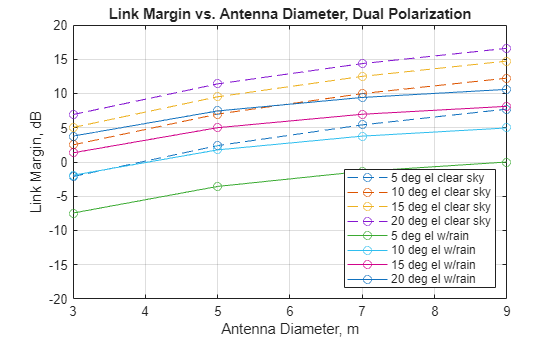
This code section calls HelperLinkMarginVsEl, which in turn calls the MATLAB function p618PropagationLosses for each set of elevation angles and antenna diameters. Plot the results to clearly illustrate the link margins available for various configurations and geometries.
The next plot presents results for both clear sky and rain. The plot clearly distinguishes the performance under the best and worst rain conditions for the given location and availability percentage. To analyze the effect of reflector-related parameters and various exciter antenna geometries, you can enable the reflectorCalculator input from the Antenna Toolbox. Set the corresponding flag in the HelperLinkMarginVsEl helper function to configure this feature. In this example, the flag is set to false by default.
% Use the flag to enable reflectorCalculator feature refFlag =false; if refFlag % For refFlag set to true, create a reflector object. r = reflectorCalculator(RadiatingElement='horn',ClearanceHeight=0,RadiatorAperture=0.07); clrSky = ["y","n","y","n"]; % Use the id's to separate the code used for reflectorCalculator when flag is true refIdx = [0 0 1 1]; f2 = figure; ax2 = axes(f2); else clrSky = ["y","n"]; refIdx = [0 0]; end f1 = figure; ax1 = axes(f1); for n=1:numel(clrSky) if clrSky(n) == "y" clrSkyMkr = "--o"; if ~refIdx(n) lgndSkyStr = "clear sky"; else lgndSkyStr = "clear sky reflector antenna"; end lgndIdx = 0; else % "n" clrSkyMkr = "-o"; if ~refIdx(n) lgndSkyStr = "w/rain"; else lgndSkyStr = "w/rain reflector antenna"; end lgndIdx = 1; end numAntEl = length(gndAntEl); for idxEl = 1:numAntEl for idxDiam = 1:length(gndAntDiam) if refFlag&&refIdx(n) % f/D ratio f_by_D = 0.5; % Assign diameter r.Diameter = gndAntDiam(idxDiam); % Calculate focal length from f/D ratio r.FocalLength = f_by_D *r.Diameter; [marginSinglePol(idxDiam),marginDualPol(idxDiam)] = ... HelperLinkMarginVsEl(mgnParams,gndAntDiam(idxDiam), ... gndAntEl(idxEl),clrSky(n),refFlag&&refIdx(n),r); else [marginSinglePol(idxDiam),marginDualPol(idxDiam)] = ... HelperLinkMarginVsEl(mgnParams,gndAntDiam(idxDiam), ... gndAntEl(idxEl),clrSky(n)); end end if satAntPol == "Dual" margin = marginDualPol; elseif satAntPol == "Single" margin = marginSinglePol; end if n<=2 plot(ax1,gndAntDiam,margin,clrSkyMkr); hold(ax1,'on'); lgndEntries1(numAntEl*lgndIdx+idxEl) = ... string(gndAntEl(idxEl)) + " deg el " + lgndSkyStr; linkMarginVsElAng(:,idxEl) = margin; if n==2 newlinkMarginVsElAng = linkMarginVsElAng; end else % Calculate link margin when reflectorCalculator flag is true plot(ax2,gndAntDiam,margin,clrSkyMkr); hold(ax2,'on'); lgndEntries2(numAntEl*lgndIdx+idxEl) = ... string(gndAntEl(idxEl)) + " deg el " + lgndSkyStr; linkMarginVsElAng(:,idxEl) = margin; end end end xlabel(ax1,"Antenna Diameter, m"); ylabel(ax1,"Link Margin, dB"); title(ax1,"Link Margin vs. Antenna Diameter, " + satAntPol + ... " Polarization"); legend(ax1,lgndEntries1(1:end), ... "Location","Southeast"); grid(ax1,"on"); ylim(ax1,[-20 20]);
if refFlag
    % Plot link margin comparison with rain when refFlag is true
    linkMarginVsElAng = newlinkMarginVsElAng;
    xlabel(ax2,"Antenna Diameter (m)"); ylabel(ax2,"Link Margin (dB)");
    title(ax2,"Link Margin vs. Antenna Diameter, " + satAntPol + ...
        " Polarization");
    legend(ax2,lgndEntries2(1:end), ...
        Location="Southeast");
    grid(ax2,"on");
    ylim(ax2,[-20 20]);
end
At low elevation angles (5 and 10 degrees), antennas smaller than 6 meters cannot close the link during rainfall conditions with a 1% annual exceedance rate. In clear sky, a 6-meter antenna has almost zero margin at 5 degrees. To gain extra margin, use an antenna larger than 6 meters.
For the given reflector antenna set up, plot the variation in directivity relative to antenna diameter using a horn element. You can also choose other types of horn antenna elements by enabling the reflectorCalculator feature.
if refFlag
    for nn=1:numel(gndAntDiam)
        r.Diameter = gndAntDiam(nn);
        peakDir(nn) = peakDirectivity(r,mgnParams.satTransmitFreq*1e9);
    end
    figure;
    plot(gndAntDiam,peakDir,'-o');
    xlabel("Antenna Diameter (m)"); ylabel("Peak Directivity (dB)");
    title("Diameter vs Directivity");
end
Generate Tabular Output
The table shows link margins with rain for each antenna diameter (rows) and elevation angle (columns).
You can apply such a table to find a polynomial fit for the margins at each elevation angle, which the columns in the table indicate. Then you can find the antenna diameter at each elevation angle for a particular margin (for example, 3 dB). This approach assists you in choosing a minimum elevation angle for a particular choice of antenna diameter.
AntennaDiameter = gndAntDiam';
Margin5Deg = linkMarginVsElAng(:,1);
Margin10Deg = linkMarginVsElAng(:,2);
Margin15Deg = linkMarginVsElAng(:,3);
Margin20Deg = linkMarginVsElAng(:,4);
T = table(AntennaDiameter,Margin5Deg,Margin10Deg,Margin15Deg,Margin20Deg)
T = 4×5 table
    3    -7.4539    -1.9329    1.3426     3.7813
    5    -3.5645     1.7710    5.0057     7.4529
    7    -1.3668     3.7758    6.9709     9.4275
    9    -0.0036     4.9704    8.1329    10.5982
Further Exploration
This example analyzes the location of Singapore and a satellite in a 500 km altitude circular orbit. Adjust the parameters in the function call to the helper function HelperLinkMarginVsEl and explore different ground station locations with different environmental parameters. The MATLAB p618PropagationLosses function automatically computes these parameters, or adjust any of the P.618 parameters manually. Adjust the altitude of the satellite, the carrier frequency, satellite EIRP, antenna diameters, system losses, receiver temperature, and required Es/No as desired.
The example showcases the dual polarization case. You can change the satAntPol variable to single, rerun the analysis, and compare the results to the dual polarized case.
Another important parameter is the annual exceedance percentage (p), which is the probability that a particular rain rate and atmospheric noise temperature will be exceeded. Annual exceedance percentage relates to availability (a) as
a = (100 - p) %.
For LEO systems, the availability value has a less concrete meaning than for the geostationary orbit (GSO) case, where the geometry between the ground station and satellite is fixed. But as a qualitative measure, setting the availability to 99% is a typical value to use when assessing ground sites with moderate rain rates.
The example could be modified to address the GSO case by using the Satellite Communications Toolbox function aer in conjunction with a satellite scenario to compute the slant range between a ground station and a GSO satellite at a particular longitude. In this case the HelperLinkMarginVsEl function would have to be modified accordingly.
Supporting Files
This example uses this supporting file:
HelperLinkMarginVsEl: Compute link margin over a range of elevation values
References
[1] International Telecommunication Union, ITU-R Recommendation P.618 (08/2023).

