Loop unrolling threshold
R2026b Specify minimum array size width for generating for
loops
Model Configuration Pane: Code Generation / Optimization
Description
The Loop unrolling threshold specifies the minimum array size
width for which a for loop is generated. For array sizes below this
width, the code generator unrolls the for loop when possible.
Dependencies
If you want to use this parameter for specifying the minimum array size width for
parallel for-loops, Embedded Coder® is required.
Settings
5 (default)Specify the array size at which the code generator begins to use a
for loop instead of separate assignment statements to assign
values. For array sizes below this width, the code generator unrolls the
for loop when possible.
When there are perfectly nested loops, the code generator uses a for loop if the product of the loop counts for loops in the perfect loop nest is greater than or equal to the threshold.
Examples
This example shows how to generate optimized code by unrolling parallel for-loops (parfor-loops). For a small number of loop iterations that perform some simple calculation, parallelization is inefficient as it introduces overhead, which includes time taken for thread creation, data synchronization between threads, and thread deletion. By unrolling small parallel for-loops, you can achieve improved execution speed. Unrolling loops that have a large number of iterations can significantly increase code generation time and generate inefficient code.
Example Model
Open the example model rtwdemo_unroll_parfor. The model is configured to generate multithreaded code by selecting the Generate parallel for loops parameter.
model = 'rtwdemo_unroll_parfor';
open_system(model)
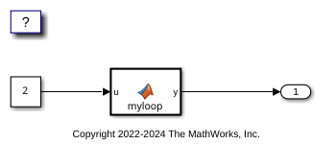
The MATLAB Function block contains this code:
type('myloop.m')
function y = myloop(u)
  y = ones(1,100);
  parfor (i = 1:5)
    y(i) = i+u;
  end
end
The code contains a parfor-loop that has five iterations.
Generate Code by Using the Default Threshold Value
1. Build the model.
slbuild(model);
### Searching for referenced models in model 'rtwdemo_unroll_parfor'.
### Total of 1 models to build.
### Starting top model code generation target build for: rtwdemo_unroll_parfor
### Successful completion of build procedure for: rtwdemo_unroll_parfor

Build Summary

Top model targets:

Model                  Build Reason                                     Status                        Build Duration
====================================================================================================================
rtwdemo_unroll_parfor  Target (rtwdemo_unroll_parfor.c) did not exist.  Code generated and compiled.  0h 0m 20.081s

1 of 1 models built (0 models already up to date)
Build duration: 0h 0m 22.542s
Inspect the generated rtwdemo_unroll_parfor_step step function in the rtwdemo_unroll_parfor.c.
file = fullfile('rtwdemo_unroll_parfor_ert_rtw','rtwdemo_unroll_parfor.c');
coder.example.extractLines(file,'/* Model step function */','/* Model initialize function',1,1);
/* Model step function */
void rtwdemo_unroll_parfor_step(void)
{
  int32_T i;
  int32_T i_0;

  /* MATLAB Function: '<Root>/MATLAB Function' */
  for (i_0 = 0; i_0 < 100; i_0++) {
    rtwdemo_unroll_parfor_Y.Outport[i_0] = 1.0;
  }

#pragma omp parallel for num_threads(omp_get_max_threads())

  for (i = 0; i < 5; i++) {
    rtwdemo_unroll_parfor_Y.Outport[i] = ((real_T)i + 1.0) + 2.0;
  }

  /* End of MATLAB Function: '<Root>/MATLAB Function' */
}

/* Model initialize function */
The code generator generates a parallel for-loop for the MATLAB Function block because it has 5 iterations which is equal to the default threshold value.
Generate Code by Raising the Threshold Value
1. Open the Configuration Parameters dialog box. On the Optimization pane, set the Loop unrolling threshold to 6. Alternatively, use the command-line API:
set_param(model, 'RollThreshold','6')
Build the model. Inspect the generated rtwdemo_unroll_parfor_step step function in the rtwdemo_unroll_parfor.c.
slbuild(model);
file = fullfile('rtwdemo_unroll_parfor_ert_rtw','rtwdemo_unroll_parfor.c');
coder.example.extractLines(file,'/* Model step function */','/* Model initialize function',1,1);
### Searching for referenced models in model 'rtwdemo_unroll_parfor'.
### Total of 1 models to build.
### Starting top model code generation target build for: rtwdemo_unroll_parfor
### Successful completion of build procedure for: rtwdemo_unroll_parfor

Build Summary

Top model targets:

Model                  Build Reason                                                 Status                        Build Duration
================================================================================================================================
rtwdemo_unroll_parfor  Model or library rtwdemo_unroll_parfor has unsaved changes.  Code generated and compiled.  0h 0m 6.388s

1 of 1 models built (0 models already up to date)
Build duration: 0h 0m 7.1463s

/* Model step function */
void rtwdemo_unroll_parfor_step(void)
{
  int32_T i;
  int32_T i_0;

  /* MATLAB Function: '<Root>/MATLAB Function' */
  for (i_0 = 0; i_0 < 100; i_0++) {
    rtwdemo_unroll_parfor_Y.Outport[i_0] = 1.0;
  }

#pragma omp parallel for num_threads(omp_get_max_threads())

  for (i = 0; i < 5; i++) {
    rtwdemo_unroll_parfor_Y.Outport[i] = ((real_T)i + 1.0) + 2.0;
  }

  /* End of MATLAB Function: '<Root>/MATLAB Function' */
}

/* Model initialize function */
The code generator unrolls the parallel for-loop and produces a copy of the loop body for each iteration because it has fewer iterations compared to the threshold value.
Clean Up Example Folders and Files
Close the model and remove temporary folders and files.
bdclose(model);
Recommended Settings
| Application | Setting |
|---|---|
| Debugging | No impact |
| Traceability | No impact |
| Efficiency | >0 |
| Safety precaution | No impact |
Programmatic Use
Parameter:
RollThreshold |
| Type: character vector |
| Value: valid value |
Default:
'5' |
Limitations
Loop unrolling optimization is not supported in Simulink models that contain both For Each Subsystem blocks and Model References, regardless of their configuration or hierarchy.
Version History
Introduced before R2006a

