Main Content

Coordinate Transformation Conversion

Convert to a specified coordinate transformation representation

  • Coordinate Transformation Conversion block

Libraries:
Robotics System Toolbox / Utilities
Navigation Toolbox / Utilities
ROS Toolbox / Utilities
UAV Toolbox / Utilities

Description

The Coordinate Transformation Conversion block converts a coordinate transformation from one representation to another. The Coordinate Transformation Conversion block can convert a single or multiple transformations. For a single transformation, the input and output transformations use these representations.

Vector representations:

  • Axis-Angle (AxAng) — [x;y;z;theta]

  • Euler Angles (Eul) — Three-element vector [z;y;x]

  • Quaternion (Quat) — [w;x;y;z]

  • Translation Vector (TrVec) — [x;y;z]

Matrix representations:

  • Homogeneous Transformation (TForm) — 4-by-4 matrix

  • Rotation Matrix (RotM) — 3-by-3 matrix

For multiple transformations, the input and output transformations use these representations.

  • d-by-N matrix, where each column vector is a single transformation of length d. N is the number of transformations.

  • M-by-M-by-N array, where each M-by-M page of the array is a single transformation.

To accommodate representations that only contain position or orientation information (TrVec or Eul, for example), you can specify two inputs or outputs to handle all transformation information. When you select the Homogeneous Transformation as an input or output, the optional Show TrVec input port or Show TrVec output port parameters can be selected on the block mask to toggle the multiple ports.

Examples
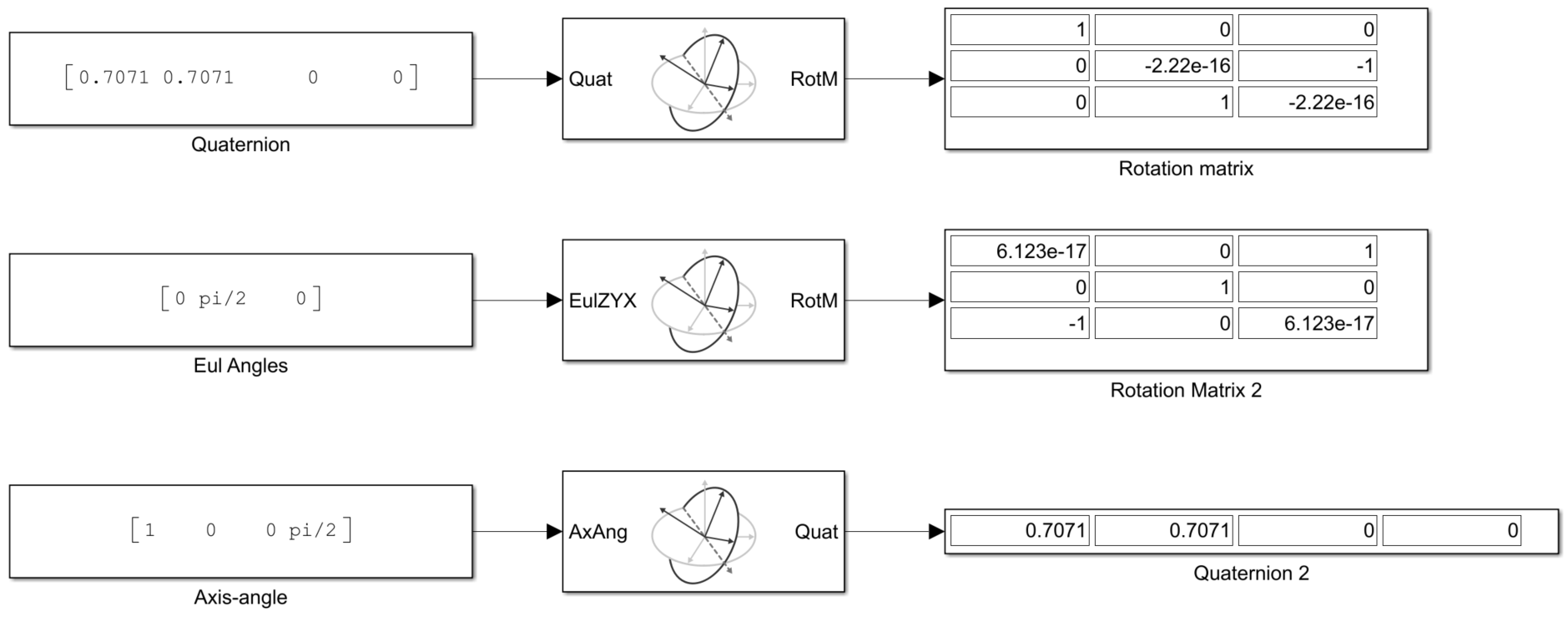
Ports

Input

expand all

Coordinate transformation, specified as a column vector, 3-by-3 matrix, 4-by-4 matrix, d-by-N matrix, or M-by-M-by-N array. You can specify single or multiple coordinate transformations. For a single coordinate transformation, the block supports these representations.

Vector representations:

  • Axis-Angle (AxAng) — [x;y;z;theta]

  • Euler Angles (Eul) — Three-element vector [z;y;x]

  • Quaternion (Quat) — [w;x;y;z]

  • Translation Vector (TrVec) — [x;y;z]

Matrix representations:

  • Homogeneous Transformation (TForm) — 4-by-4 matrix

  • Rotation Matrix (RotM) — 3-by-3 matrix

For multiple coordinate transformations, the block supports these representations:

  • d-by-N matrix, where each column vector is a single transformation of length d. N is the number of transformations.

  • M-by-M-by-N array, where each M-by-M page of the array is a single transformation.

To accommodate representations that only contain position or orientation information (TrVec or Eul, for example), you can specify two inputs or outputs to handle all transformation information. When you select the Homogeneous Transformation as an input or output, the optional Show TrVec input port or Show TrVec output port parameters can be selected on the block mask to toggle the multiple ports.

Translation vector, specified as a three element column vector or a 3-by-N matrix. N is the number of transformations specified to the Input transformation port. Each column is of the form [x;y;z] where x, y, and z specify a translation in the x-, y-, and z- axes respectively. You can use this port to input the translation information separately from the rotation vector.

When specifying multiple transformations to the Input transformation port, specifying the TrVec input port as a vector applies the translation vector to all input transformations. Otherwise, the number of translations must match the number of rotations specified to the Input transformation port. Otherwise, an error occurs during simulation.

Dependencies

To enable this port, you must set the output Representation parameter to Homogeneous Transformation, the input Representation parameter to any value other than Homogeneous Transformation or Translation Vector, and select Show TrVec input port.

Output Arguments

expand all

Output transformation, returned as a column vector, 3-by-3 matrix, 4-by-4 matrix, d-by-N matrix, or M-by-M-by-N array. For each transformation specified to Input transformation, this port returns a transform with the representation specified by the output Representation parameter. If you specify N coordinate transformations to Input transformation, this port returns N coordinate transformations. For a single coordinate transformation, the following representations are supported.

Vector representations:

  • Axis-Angle (AxAng) — [x;y;z;theta]

  • Euler Angles (Eul) — Three-element vector [z;y;x]

  • Quaternion (Quat) — [w;x;y;z]

  • Translation Vector (TrVec) — [x;y;z]

Matrix representations:

  • Homogeneous Transformation (TForm) — 4-by-4 matrix

  • Rotation Matrix (RotM) — 3-by-3 matrix

For multiple coordinate transformations, the block supports these representations:

  • d-by-N matrix, where each column vector is a single transformation of length d. N is the number of transformations.

  • M-by-M-by-N array, where each M-by-M page of the array is a single transformation.

To accommodate representations that only contain position or orientation information (TrVec or Eul, for example), you can specify two inputs or outputs to handle all transformation information. When you select Homogeneous Transformation as an input or output, the optional Show TrVec input port or Show TrVec output port parameters can be selected on the block mask to toggle the multiple ports.

Translation vector, returned as a three element column vector or a 3-by-N matrix. N is the number of transformations specified to the Input transformation port. Each column is of the form where x-, y-, and z- specify a translation in the x, y, and z axes respectively. You can use this port to output the translation information separately from the rotation vector.

Dependencies

To enable this port, you must set the input Representation parameter to Homogeneous Transformation, the output Representation parameter to any value other than Homogeneous Transformation or Translation Vector, and select Show TrVec output port.

Parameters

expand all

Input

Select the representation for the input port for the block. If you are using a transformation with only orientation information, you can also select the Show TrVec input port or Show TrVec output port when converting to or from a homogeneous transformation.

Order of the Euler angle axis rotations, specified as one of these string scalars:

  • ZYX (default)

  • ZYZ

  • ZXY

  • ZXZ

  • YXY

  • YZX

  • YXZ

  • YZY

  • XYX

  • XYZ

  • XZX

  • XZY

The order of the angles in the input port Eul must match this rotation sequence. Each character indicates the corresponding axis. For example, if the sequence is ZYX, then the three specified Euler angles are interpreted in order as a rotation around the z-axis, a rotation around the y-axis, and a rotation around the x-axis. When applying this rotation to a point, it will apply the axis rotations in the order x, then y, then z.

Dependencies

You must select Euler Angles for the input Representation parameter. The axis rotation sequence only applies to Euler angle rotations.

Toggle the TrVec input port when you want to specify a separate translation vector for position information along with an orientation representation.

Dependencies

You must select Homogeneous Transformation for the output Representation parameter to get the option to show the additional TrVec input port. Enable the port by clicking Show TrVec input port.

Output

Select the representation for the output port for the block. If you are using a transformation with only orientation information, you can also select the Show TrVec input port or Show TrVec output port when converting to or from a homogeneous transformation.

Order of the Euler angle axis rotations, specified as one of these string scalars:

  • ZYX (default)

  • ZYZ

  • ZXY

  • ZXZ

  • YXY

  • YZX

  • YXZ

  • YZY

  • XYX

  • XYZ

  • XZX

  • XZY

The order of the angles in the output port Eul must match this rotation sequence. Each character indicates the corresponding axis. For example, if the sequence is ZYX, then the three returned Euler angles are interpreted in order as a rotation around the z-axis, a rotation around the y-axis, and a rotation around the x-axis. When applying this rotation to a point, it will apply the axis rotations in the order x, then y, then z.

Dependencies

You must select Euler Angles for the output Representation parameter. The axis rotation sequence only applies to Euler angle rotations.

Toggle the TrVec output port when you want to receive a separate translation vector for position information along with an orientation representation.

Dependencies

You must select Homogeneous Transformation for the input Representation parameter to get the option to show the additional TrVec output port. Enable the port by clicking Show TrVec output port.

  • Interpreted execution — Simulate model using the MATLAB® interpreter. This option shortens startup time but has a slower simulation speed than Code generation. In this mode, you can debug the source code of the block.

  • Code generation — Simulate model using generated C code. The first time you run a simulation, Simulink® generates C code for the block. The C code is reused for subsequent simulations, as long as the model does not change. This option requires additional startup time, but the speed of the subsequent simulations is comparable to Interpreted execution.

Tunable: No

Extended Capabilities

expand all

C/C++ Code Generation
Generate C and C++ code using Simulink® Coder™.

Version History

Introduced in R2017b

expand all