Use Message Passing to Estimate Pi
R2026bThis example shows the basics of working with message passing in spmd statements, similar to collective operations in the Message Passing Interface (MPI) specification. In this example, you approximate the value of by distributing the computation of an integral across several workers then combine the results from workers to obtain the value of .
You can approximate by evaluating the following integral numerically:
You can evaluate this integral in parallel by dividing the interval [0,1] among multiple workers. Each worker computes the integral over its assigned subinterval. You then use message passing to combine the results.
Start a parallel pool of four workers using the local Processes profile.
p = parpool("Processes",4);Starting parallel pool (parpool) using the 'Processes' profile ... Connected to parallel pool with 4 workers.
Define Integral Function
You can approximate by the numerical integral of 4/(1 + x^2) from 0 to 1, which is the derivative of 4*atan(x). Define the function to integrate.
function y = quadpi(x)
y = 4./(1 + x.^2);
end
Distribute Interval to Workers
To divide the work between the workers, each worker calculates the integral of the function over a subinterval of [0,1] as shown in this figure.
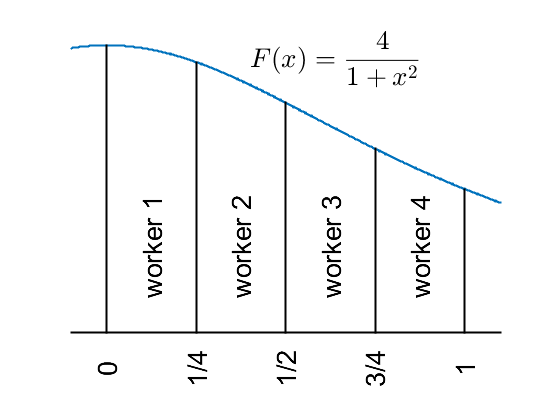
You can use the value of each worker's spmdIndex and the value of spmdSize to divide the interval [0,1] into contiguous, nonoverlapping subintervals, one for each worker. The spmdIndex is a unique integer between 1 and spmdSize, which is the number of workers running in the current spmd block. The spmdIndex value remains the same for each worker for the duration of a parallel pool.
On each worker, define the start of the subinterval a, and the end of the subinterval b, based on the worker's spmdIndex value. Display each subinterval. The code inside the spmd statement executes in parallel on all the workers in the parallel pool.
spmd
    a = (spmdIndex-1)/spmdSize;
    b = spmdIndex/spmdSize;
    fprintf('Subinterval: [%-4g,%-4g]\n',a,b);
end
Worker 1:
  Subinterval: [0   ,0.25]
Worker 2:
  Subinterval: [0.25,0.5 ]
Worker 3:
  Subinterval: [0.5 ,0.75]
Worker 4:
  Subinterval: [0.75,1   ]
Compute Integrals
Use the quadrature method defined in the supporting function quadpi to approximate the integral over the subinterval on the workers. The workers all run the same function, but on the different subintervals of [0,1] as shown in the figure above. Display the integrals for each worker.
spmd
    myIntegral = integral(@quadpi,a,b);
    fprintf('Subinterval: [%-4g, %-4g]   Integral: %4g\n', ...
        a,b,myIntegral);
end
Analyzing and transferring files to the workers ...done.
Worker 1:
  Subinterval: [0   , 0.25]   Integral: 0.979915
Worker 2:
  Subinterval: [0.25, 0.5 ]   Integral: 0.874676
Worker 3:
  Subinterval: [0.5 , 0.75]   Integral: 0.719414
Worker 4:
  Subinterval: [0.75, 1   ]   Integral: 0.567588
Gather Results
After the workers compute their local integrals, use the spmdPlus function to add the results across all workers and store a copy of the global sum on each worker. This operation mimics the reduction step in MPI, where each process contributes its local result to a global sum.
spmd
    piApprox = spmdPlus(myIntegral);
end
Inspect Results on Client
When you assign a variable inside an spmd statement, you can access the variable on the client as a Composite. Composite objects resemble cell arrays with one element for each worker. Indexing into a Composite brings back the corresponding value from the worker to the client.
The variable piApprox is a Composite object, with each worker holding a copy of the global sum. Retrieve the value from the first worker and compare it to the value of in MATLAB.
approx1 = piApprox{1};   % 1st element holds value on worker 1.
fprintf('pi           : %.18f\n',pi);
pi : 3.141592653589793116
fprintf('Approximation: %.18f\n',approx1);Approximation: 3.141592653589793560
fprintf('Error : %g\n',abs(pi - approx1))Error : 4.44089e-16
Use Results in Further Computations
Suppose you want each worker to compute the area of a circle with radius equal to its spmdIndex. All workers can now use the same value of piApprox available on each worker.
spmd
    radius = spmdIndex;
    area = piApprox*radius^2;

    fprintf("radius = %d, area = %.4f\n",radius,area);
end
Worker 1:
  radius = 1, area = 3.1416
Worker 2:
  radius = 2, area = 12.5664
Worker 3:
  radius = 3, area = 28.2743
Worker 4:
  radius = 4, area = 50.2655

