Object Lifecycle Management (Beta)
R2026bThe object lifecycle management system for MATLAB® is being updated to garbage collection. The garbage collection system enables performance improvements for applications that use MATLAB objects. In particular, creation and deletion of objects as well as property access is faster. The overall performance increase depends on the nature of your application, but applications that create and delete a large number of small objects will benefit the most. To try this new feature, start with this download on File Exchange.
Note
This new feature is in beta development and should not be used for production or development activities. Software development is ongoing, and specific features are subject to change.
Object Reference Counts
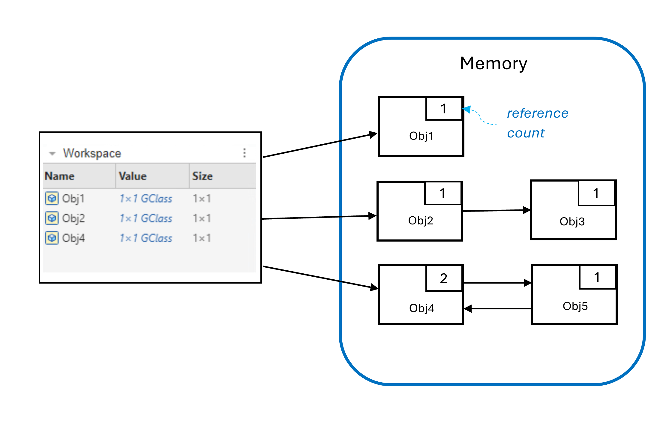
MATLAB reclaims memory from unreachable objects by monitoring the reference counts of objects in memory. The reference count is the total number of references to an object. When the reference count of an object reaches 0, the object is no longer accessible from the workspace, and MATLAB immediately destroys the object.
In this figure, three objects in memory—Obj1,
Obj2, and Obj4—are directly accessible
from the workspace and have a reference count of 1 or more.
Clearing the workspace variables for Obj1,
Obj2, and Obj4 reduces the object
reference counts by 1. Obj1 and Obj2 have
reference counts of 0, and they are immediately destroyed. When
Obj2 is destroyed, the reference count for
Obj3 will drop to 0, and it will also be destroyed.
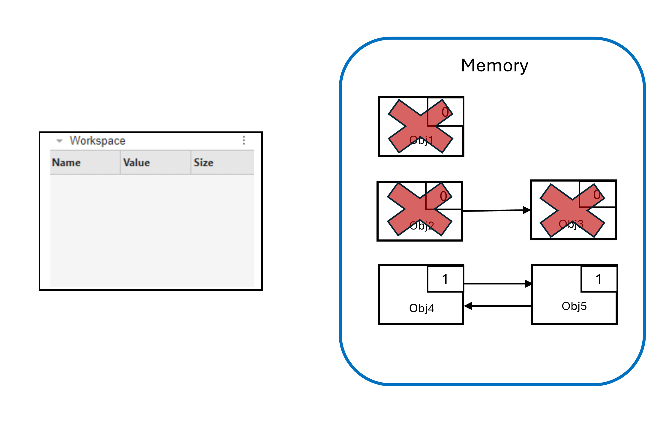
Obj4 and Obj5 are inaccessible from the
workspace but have nonzero reference counts, meaning that MATLAB cannot destroy them based on reference count alone. These two objects
have references to each other, creating an orphaned cycle.
Garbage Collection (Beta)
In the current lifecycle management system, MATLAB immediately deletes orphaned cycles but must perform expensive bookkeeping operations to confirm that the cycle can be safely destroyed. In this beta, MATLAB uses garbage collection to improve its lifecycle management. Objects with reference counts of 0 are still destroyed immediately, but objects in orphaned cycles are not handled immediately. The changes for orphaned cycles include:
Less frequent sweeps
Sweeps performed at more opportune times, for example, when MATLAB returns to the command prompt
Because of these changes, MATLAB destroys object cycles at different times and in a different order than in previous releases. Existing code might have incompatibilities with garbage collection because of these changes, but you can take actions to prepare your code.
Update Code for Compatibility with Garbage Collection
Because the new garbage collection system for MATLAB destroys objects in a different order and at different times than the previous lifecycle management system, you might have code incompatibilities when an object meets all three of these conditions:
The object defines a custom destructor.
The custom destructor relies on a particular order or timing for object destruction. For example, a custom destructor of an object is designed to destroy associated objects in a set order.
The object is referenced in a cycle.
Removing any one of these conditions is enough to avoid incompatibilities. For example, you can remove reference cycles to resolve incompatibilities.
Break Cycles Using Weak Reference Handles
MATLAB introduced weak reference handles in R2024b. Weak references do
not add to the reference count for an object and therefore do not have an impact
on the lifecycle of the object. Using the previous example, if
Obj5 has a weak reference to Obj4,
then removing the reference to Obj4 from the workspace lowers
its reference count to 0, and MATLAB can destroy Obj4 based on reference count
alone. The reference count for Obj5 will then drop to 0, and
it can also be destroyed based on reference count.
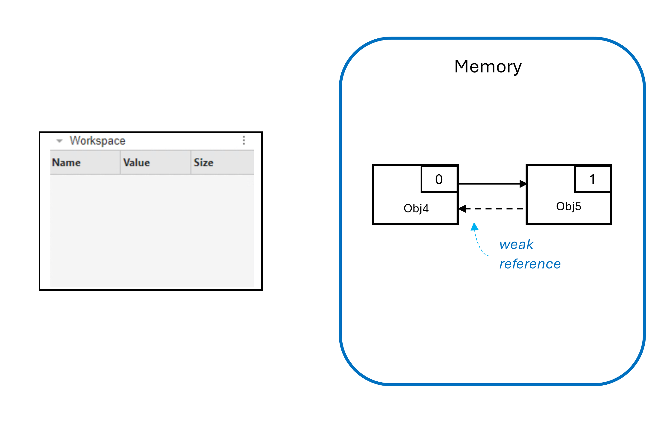
The use of the weak reference in this case has the added benefit of ensuring
that Obj4 is destroyed before Obj5. If
Obj5 has a child-parent relationship with
Obj4, the weak reference ensures that the child object
(Obj5) is not destroyed before the parent
(Obj4).
You can create weak references by changing how properties are defined. For
example, the Node class represents one node of a binary tree,
with properties that point to parent and child
nodes.
classdef Node < handle
    properties
        Parent = Node.empty
        Left = Node.empty
        Right = Node.empty
        Value {mustBeInteger}
    end
end
When used to create a binary tree, this class definition creates reference cycles between parent and child nodes.
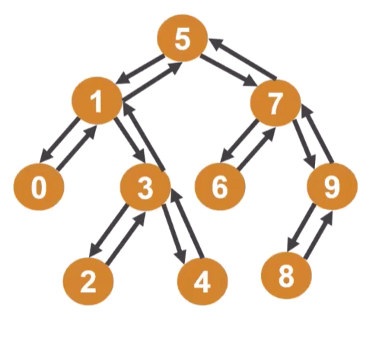
To avoid creating reference cycles, change the Parent
property to a weak reference using the WeakHandle attribute.
classdef Node < handle
    properties
        Left = Node.empty
        Right = Node.empty
        Value {mustBeInteger}
    end
    properties (WeakHandle)
        Parent Node = Node.empty
    end
end
Note
Properties defined with the WeakHandle attribute
must use class validation.
With this revised definition, the binary trees do not have reference cycles because the weak references from child nodes to parent nodes are not included in the reference count.
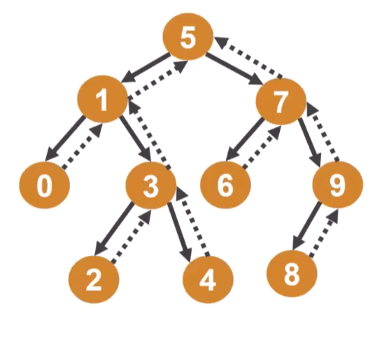
Besides making the code compatible with garbage collection, the revised class
definition also simplifies cleanup of data structures like binary trees. For
example, clearing node 5 under the old Node definition leaves the
rest of the tree intact because nodes 1 and 7 are strongly referenced by their
child nodes. The reference counts do not drop to 0, and the garbage collector
does not immediately delete them based on reference count. Under the revised
definition, clearing node 5 has a cascading effect through the tree, reducing
the reference count of nodes 1 and 7 to 0, and so on.
For more information on using weak references, see Weak References.
Additional Changes to MATLAB Behavior to Support Garbage Collection
To avoid creating strong reference cycles that would interfere with garbage collection, this beta contains two additional changes to MATLAB behavior.
Listener Cycles
In the previous versions of MATLAB, defining an event can create a strong reference cycle. For
example, this code creates a listener for MyEvent defined by the
class MySource.
source = MySource;
lis = source.addlistener('MyEvent',@myCallback);
The addlistener method returns an instance of
event.listener or event.proplistener. The
method also ties the lifetime of the listener object to the source object with a
strong reference. In this example, source has a strong
reference to lis, and lis has a strong
reference to source, which creates a strong reference cycle.
In this beta release, the reference from lis to
source is now a weak reference, breaking the cycle.
This change applies to all event listeners and is implemented through these changes:
The
Sourceproperty ofevent.listener(and its subclassevent.proplistener) is now a weak reference.The
Sourceproperty ofevent.EventDatais now a weak reference.
Scope of Nested Function Handles
In previous versions of MATLAB, when a parent function returns a handle to a nested function, the parent function variables are not immediately cleared. The variables in the parent function workspace are not cleared until the last nested function handle has been destroyed.
In this beta release, MATLAB clears the variables in the parent workspace immediately unless they are referenced explicitly by a nested function handle. This change in behavior prevents the creation of strong reference cycles and can cause incompatibilities in two cases:
A nested function references a variable implicitly, through
whos,eval, or similar functions.The parent function workspace contains an object whose destruction has visible side effects (for example, an
onCleanupobject), and the variable containing that object is not referenced by any nested functions.
Implicit Variable References. ParentFunc defines a nested function that only
references x implicitly in a call to
eval.
function out = ParentFunc
    x = 3;

    function NestedFunc
        eval("disp(x)")
    end

    out = @NestedFunc;
end
In previous versions of MATLAB, x is not cleared after the call to
ParentFunc, and calling the function handle
returned by ParentFunc shows x is
still set to
3.
out = ParentFunc;
out()
3
In this beta release, MATLAB clears x immediately because it is not
explicitly referenced in the nested function. Calling the function handle
returned by ParentFunc errors.
out = ParentFunc;
out()
Unrecognized function or variable 'x'.
Destructors. In this example, ParentFunc defines a nested function
and an onCleanup object that displays a message when
destroyed.
function out = ParentFunc
    cleanup = onCleanup(@()disp("onCleanup object cleared."));

    function NestedFunc
    end

    out = @NestedFunc;
end
In previous versions of MATLAB, the cleanup object is not destroyed until
the nested function handle returned by ParentFunc is
destroyed.
out = ParentFunc
out =

  function_handle with value:

    @ParentFunc/NestedFunc
clear outonCleanup object cleared.
In this beta release, MATLAB destroys cleanup as soon as it goes out of
scope. The handle to NestedFunc no longer keeps the
object active.
out = ParentFunc;
onCleanup object cleared.
Automatic Updates for Modified Classes
MATLAB allows only one definition for a class to be active at a time. When you edit a class definition or change the position of the class on the path, objects of that class that were created before the change might be unusable when you return to the command line. If an object becomes unusable, MATLAB errors if you try to interact with that object. You cannot access properties, invoke methods, or use an instance as an argument for another function or method. Whether an object of a modified class becomes unusable depends on the type of change you make to the class.
Changes to Class Definitions
Supported changes to a class definition do not make objects created under the old definition unusable. You can continue to interact with existing instances of the class under the new definition. Unsupported changes make objects created under the old definition unusable, and you can no longer interact with those objects.
Supported Changes. The following changes to a class definition do not make objects created under the old class definition unusable:
Adding, removing, or modifying class methods
Adding new enumeration members that do not conflict with existing members
Unsupported Changes. The following changes to a class definition make objects created under the old class definition unusable:
Changing the value of class attributes
Adding, removing, or reordering superclasses
Adding, removing, or modifying property definitions
Adding, removing, or modifying get or set methods of properties
Adding, removing, or modifying event definitions
Removing or renaming an enumeration member, or changing the underlying value of an enumeration member
The rules for how supported and unsupported changes affect instances of the class also apply to metaclass instances of the class.
Removing Classes from the Path
Removing a class definition from the path—by using rmpath
or changing the current directory with cd, for
example—makes the class inaccessible and objects of that class unusable. If you
try to interact with an instance of that class, MATLAB errors. However, the instances of a class removed from the path
can become usable again if you undo the path change.
However, instances of a class removed from the path become permanently unusable under any of these conditions:
You change the class definition in an unsupported way while the class is inaccessible and then undo the path change.
You replace the class with a new definition in a different folder.
Package Changes and Class Definitions
Uninstalling a package makes existing instances of classes defined in that package unusable. Otherwise, the guidelines for supported and unsupported changes to class definitions apply in the same way to classes defined inside packages.

