Set and View HDL Model and Block Parameters
R2026bYou can view and set properties related to HDL code generation, such as implementation parameters for individual blocks or the entire model.
Set HDL Block Properties
You can set HDL block properties by using the HDL Block Properties dialog box, the command line, or by using the HDL Property Inspector. When you change a property, the changes take effect immediately in the dialog box, command line, and HDL Property Inspector. You can also assign numeric values to HDL block properties using variables from the MATLAB® base workspace, mask workspace, or model workspace.
Using HDL Block Properties Dialog Box
To open the HDL Properties dialog box, do one of the following:
In the Apps tab, select HDL Coder. The HDL Code tab appears. Select the block for which you want to see the HDL parameters, then select HDL Property Inspector > HDL Block Properties.
Right-click the block. To add the HDL Coder app options to the context menu, point to Select Apps and click HDL Coder. Then, in the HDL Coder app section, select HDL Block Properties.
The HDL Block Properties dialog box opens and displays the HDL block properties of the selected block. You can modify the block properties as needed.
Using the Command-Line Interface
To set the HDL block properties from the MATLAB command line, use the hdlset_param function.
hdlset_param(
sets properties for the specified block or model referenced by
path,Name,Value)path. Use each name-value arguments to specify the parameters
and its value, respectively. You can specify several name and value arguments in any order
as Name1,Value1,…,NameN,ValueN arguments.
For example:
To set the
SharingFactorto2and theArchitectureproperty toTreefor the selected block, enter:hdlset_param (gcb,'SharingFactor',2,'Architecture','Tree')
To view the value of a specific HDL block property, use the
hdlget_paramfunction. For example, to view the valueArchitectureproperty, enter:hdlget_param(gcb,'Architecture')To retrieve all HDL block properties and their values as a cell array, enter:
p = hdlget_param(gcb,'all')The function returns a cell array,
pthat contains the HDL block properties and their values.p = 'Architecture' 'Linear' 'InputPipeline' [0] 'OutputPipeline' [0]
Set HDL Block Properties Using HDL Property Inspector
Since R2024b
To edit and view HDL block properties by using the HDL Property Inspector:
In the Apps tab, select HDL Coder.
In the HDL Code tab, click HDL Property Inspector > HDL Property Inspector.
The HDL Property Inspector pane open. When you select a block, the pane displays its HDL properties.
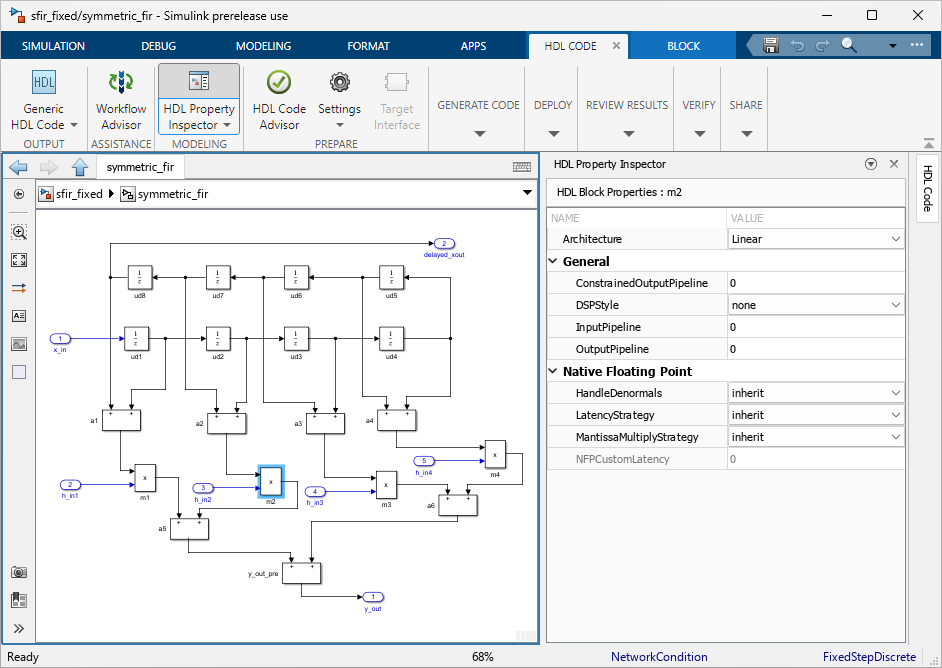
You can reposition or undock the HDL Property Inspector pane. Use the down arrow next to the pane title to undock, minimize, and open help for the pane.
Set HDL Block Parameters for Multiple Blocks Programmatically
You can set the HDL block properties for multiple blocks by using MATLAB commands.
Use the find_system function to identify the blocks
of interest and then use a loop to call hdlset_param and set the
desired parameters for each block.
For example, to find all Product blocks in the
sfir_fixed model and set the OutputPipeline
parameter to 2 for each block, enter:
open_system('sfir_fixed')

% Find all Product blocks in the model
prodblocks = find_system('sfir_fixed/symmetric_fir','BlockType','Product')

% Set the output pipeline to 2 for the blocks
for ii=1:length(prodblocks)
    hdlset_param(prodblocks{ii},'OutputPipeline', 2)
end
prodblocks =

  4×1 cell array

    {'sfir_fixed/symmetric_fir/m1'}
    {'sfir_fixed/symmetric_fir/m2'}
    {'sfir_fixed/symmetric_fir/m3'}
    {'sfir_fixed/symmetric_fir/m4'}
To verify the property values, use the hdlget_param function. For
example, to confirm that the OutputPipeline parameter is
2, enter:
% Get the output pipeline to 2 for the blocks
for ii=1:length(prodblocks)
    hdlget_param(prodblocks{ii},'OutputPipeline')
end
Example output:
ans =

     2


ans =

     2


ans =

     2


ans =

     2
View HDL Block and Model Properties
You can display all of the HDL properties for a block or a model or display only the HDL properties that have non-default values for a block or a model.
View all HDL Block Parameters
To display all HDL block properties for a selected block, use the hdldispblkparams function. At the command line, enter:
hdldispblkparams(gcb,'all')
%%%%%%%%%%%%%%%%%%%%%%%%%%%%%%%%%%%%%%%%%%%%%%%%%%%%%%%%%%%%%%%%
HDL Block Parameters ('simplevectorsum/vsum/Sum of
Elements')
%%%%%%%%%%%%%%%%%%%%%%%%%%%%%%%%%%%%%%%%%%%%%%%%%%%%%%%%%%%%%%%%

Implementation

	Architecture  : Linear

Implementation Parameters

	InputPipeline : 0
	OutputPipeline : 0
View Non-Default HDL Block Parameters
To display only the HDL block properties that have non-default values for the currently selected block, enter:
hdldispblkparams(gcb)
%%%%%%%%%%%%%%%%%%%%%%%%%%%%%%%%%%%%%%%%%%%%%%%%%%%%%%%%%%%%%%%%
HDL Block Parameters ('simplevectorsum/vsum/Sum of
Elements')
%%%%%%%%%%%%%%%%%%%%%%%%%%%%%%%%%%%%%%%%%%%%%%%%%%%%%%%%%%%%%%%%

Implementation

	Architecture : Linear

Implementation Parameters

	OutputPipeline : 3
View all HDL Model Parameters
To display all the HDL block properties for the current model, sorted alphabetically
by property name, use the hdldispmdlparams function. At the command
line, enter:
hdldispmdlparams(bdroot,'all')
%%%%%%%%%%%%%%%%%%%%%%%%%
HDL CodeGen Parameters
%%%%%%%%%%%%%%%%%%%%%%%%%

AddPipelineRegisters                  : 'off'
Backannotation                        : 'on'
BlockGenerateLabel                    : '_gen'
CheckHDL                              : 'off'
ClockEnableInputPort                  : 'clk_enable'
.
.
.
VerilogFileExtension                  : '.v'
View Non-Default HDL Model Parameters
To display only the HDL block properties that have non-default values for the current model, enter:
hdldispmdlparams(bdroot)
%%%%%%%%%%%%%%%%%%%%%%%%%%%%%%%%%%%%%%%
HDL CodeGen Parameters (non-default)
%%%%%%%%%%%%%%%%%%%%%%%%%%%%%%%%%%%%%%%

CodeGenerationOutput           : 'GenerateHDLCodeAndDisplayGeneratedModel'
HDLSubsystem                   : 'simplevectorsum/vsum'
ResetAssertedLevel             : 'Active-low'
Traceability                   : 'on'

