Generate HLS Code for MATLAB Handle Classes and System Objects
R2026bThis example shows how to generate HLS code for a user-defined System object™ and then view the generated code in the code generation report. A System
object is a subclass of the matlab.System handle class. To generating
code for a handle class that is not a System object, use similar steps as in this
example.
Define System Object and Entry-Point Function
In a writable folder, create a System object, AddOne, which subclasses from matlab.System. Save the code as
AddOne.m.
classdef AddOne < matlab.System
% Compute an output value that increments the input by one

  methods (Access=protected)
    % stepImpl method is called by the step method
    function y = stepImpl(~,x)
      y = x+1;
    end
  end
end
Write a function testAddOne that uses the System object
AddOne.
function y = testAddOne(x)
%#codegen
  p = AddOne;
  y = p.step(x);
end
Generate Code and View Report
Generate HLS Code for testAddOne and generate a code generation
report.
codegen -config:hls testAddOne -args {0} -report
The -report option instructs codegen to
generate a code generation report, even if no
errors or warnings occur. The -args {0} option specifies that the
testAddOne function takes one scalar
double input.
Click the View report link. In the MATLAB
Source pane, click testAddOne. To see information
about the variables in testAddOne, click the
Variables tab.
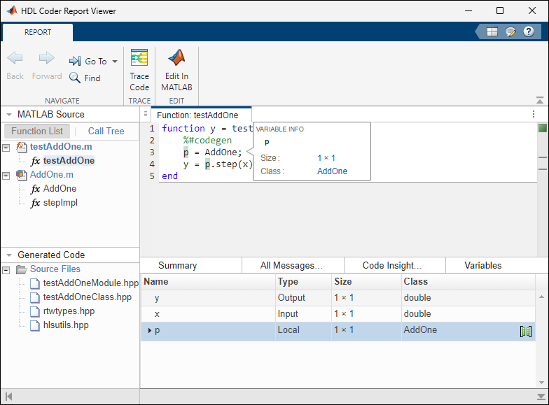
To view the generated HLS code, open the testAddOneClass.hpp
file from Source Files in the Generated
Code pane.


