Use the Fixed-Point Tool to Find and Replace Unsupported Functions in MATLAB Function Blocks
R2026bWhen working with MATLAB Function blocks, some functions and
MATLAB® language constructs are not supported for the automated fixed-point
conversion workflows, including the iterative fixed-point conversion workflow in the
Fixed-Point Tool. For a list of supported
and unsupported constructs, see MATLAB Language Features Supported for Automated Fixed-Point Conversion. In addition, some functions, such as
exp and sinh, are not supported because
they cannot take fixed-point inputs. For a successful conversion, replace or skip
unsupported functions used by MATLAB Function blocks in the system under
design.
To replace unsupported functions using a command-line workflow, use the getUnsupportedFunctionsForSystem function to find unsupported functions
in the system under design and the DataTypeWorkflow.FunctionReplacement object to specify function
replacements. For an example of the command-line workflow, see Replace Function in MATLAB Function Block with Lookup Table Approximation and Convert to Fixed Point.
Function Replacement in the Fixed-Point Tool
When your system under design contains MATLAB Function blocks, the Setup pane in the iterative fixed-point conversion workflow of the Fixed-Point Tool includes the Function Replacement section. Any unsupported functions the MATLAB Function blocks in the system under design use are listed in the table with options for replacement.
The Replacement column in the table provides these options:
Use default replacement— This option is available when a default function replacement is available. The default is a CORDIC-based implementation of the function.Set up a lookup table— This option is available when the function is compatible with a lookup table replacement. Selecting this option launches the Lookup Table Optimizer app.After you complete the steps in the Lookup Table Optimizer to create a lookup table approximation for the unsupported function, the custom lookup table replacement is saved in the current working directory. Use the
Refresh functions listoption to make the lookup table approximation available in the drop-down menu, and then select the custom lookup table replacement from the list.customFunction1, customFunction2, …— Custom functions in the current working directory are listed in the drop-down menu. To refresh this list when you add or remove functions from the current working directory, selectRefresh functions list.Refresh functions list— When you add additional custom functions or lookup table approximations to the current working directory, select this option to refresh the drop-down list.Skip this step for now— Select this option to take no action on the unsupported function. The MATLAB Function Block Best Practices check in the preparation stage will flag this as a warning. You can usecoder.float2fixed.skipinside the MATLAB Function block to exclude the unsupported function from conversion. If you take no action to exclude the unsupported function, fixed-point conversion fails.
Function replacements are applied to the model when you click the Apply Data Types button.
Note
When you use the Fixed-Point Tool to replace an unsupported function, the tool replaces all instances of the function in the system under design with the specified replacement.
Use the Fixed-Point Tool to Replace Unsupported
sinh Function in MATLAB Function
Block
This example shows how to use the Fixed-Point Tool to find and replace unsupported functions used inside a MATLAB Function block, and then convert the system under design to use fixed-point data types.
Open Model Containing MATLAB Function Block
Open the ex_mySinh model.
model = 'ex_mySinh';
open_system(model);
In this model, SubsystemA contains the MATLAB Function block my_sinh, which implements the hyperbolic sine function.
function y = my_sinh(u)
%#codegen
y = sinh(u);
This function does not support fixed-point data types, so it is not supported for automated fixed-point conversion workflows.
Replace Unsupported Function with Default Replacement
Open the Fixed-Point Tool. On the Apps tab, select Fixed-Point Tool.
In the tool, select the Iterative Fixed-Point Conversion workflow.
In the System Under Design (SUD) section of the Setup pane, select
SubsystemAas the system to convert.In the Function Replacement section, the table shows that the MATLAB Function block in the system under design contains the unsupported function
sinh. In the table, selectUse default replacementfor this function.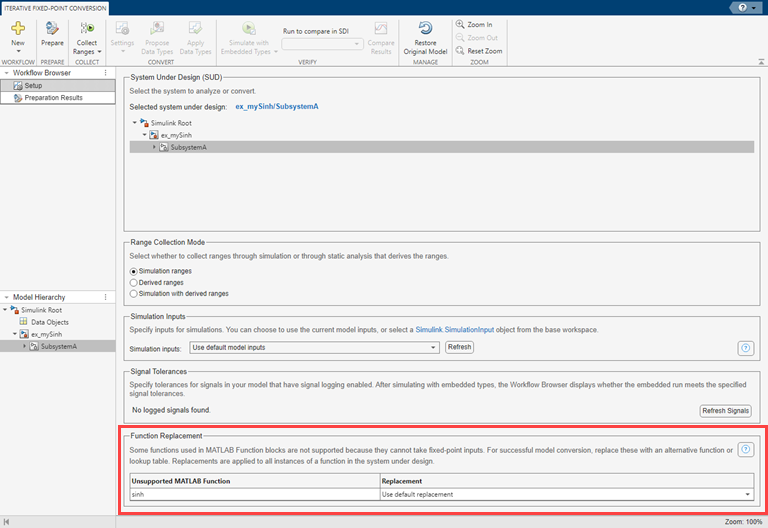
Click Prepare.
The MATLAB Function Block Best Practices check shows that with the default replacement enabled, all MATLAB Function blocks in the system under design are supported for fixed-point conversion.
Complete the fixed-point conversion workflow using the default settings.
Click Collect Ranges.
Click Propose Data Types.
Click Apply Data Types.
When you apply the proposed data types to the system under design, the tool also applies replacements for unsupported functions.
Verify the function replacement in the MATLAB Function block.
Open
SubsystemAin theex_mySinhmodel. The MATLAB Function block in this subsystem is replaced with a variant subsystem. The active variant,MATLAB Function_FixPt, is the fixed-point compatible version of the function specified in the function replacement step.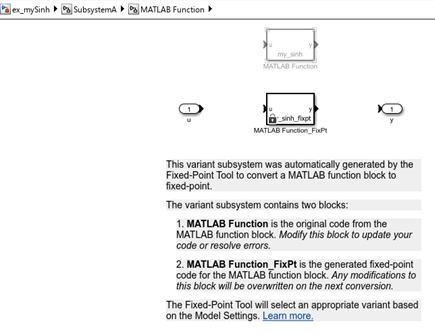
Open the
MATLAB Function_FixPtblock. The default function replacement option replaced the unsupportedsinhfunction with a CORDIC-based approximation,cordicsinhcosh.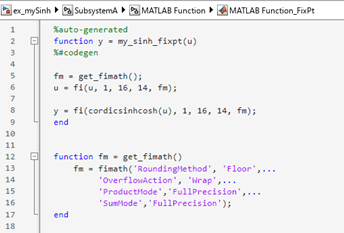
Replace Unsupported Function with Lookup Table Approximation
To restore the original version of the model, click Restore Original Model.
In the tool, select the Iterative Fixed-Point Conversion workflow.
In the System Under Design (SUD) section of the Setup pane, select
SubsystemAas the system to convert.In the Function Replacement section, the table shows that the MATLAB Function block in the system under design contains the unsupported function
sinh. In the table, selectSet up a lookup tablefor this function. The Lookup Table Optimizer app opens.Use the Lookup Table Optimizer app with the default settings to set up a lookup table replacement for the
sinhfunction:In the Lookup Table Optimizer app, the MATLAB Function Handle is
@(x)sinh(x), which corresponds to thesinhfunction used by the MATLAB Function block.Click Next.
Click Optimize.
Click Next.
Click Show Optimized LUT.
The app creates a new function in the current working directory. The code in this new function is a lookup table approximation of the
sinhfunction.Click Finish.
In the Fixed-Point Tool Function Replacement table, select
Refresh functions listfrom the drop down for thesinhfunction.From the drop down, select the custom function replacement you created using the Lookup Table Optimizer app.
In the Fixed-Point Tool, click Prepare.
The MATLAB Function Block Best Practices check shows that with the default replacement enabled, all MATLAB Function blocks in the system under design are supported for fixed-point conversion.
Complete the fixed-point conversion workflow using the default settings.
Click Collect Ranges.
Click Propose Data Types.
Click Apply Data Types.
When you apply the proposed data types to the system under design, the tool also applies replacements for unsupported functions.
Verify the function replacement in the MATLAB Function block.
Open
SubsystemAin theex_mySinhmodel. The MATLAB Function block in this subsystem is replaced with a variant subsystem. The active variant,MATLAB Function_FixPt, is the fixed-point compatible version of the function specified in the function replacement step.Open the
MATLAB Function_FixPtblock. The tool replaced the unsupportedsinhfunction with a lookup table approximation that you created using the Lookup Table Optimizer app.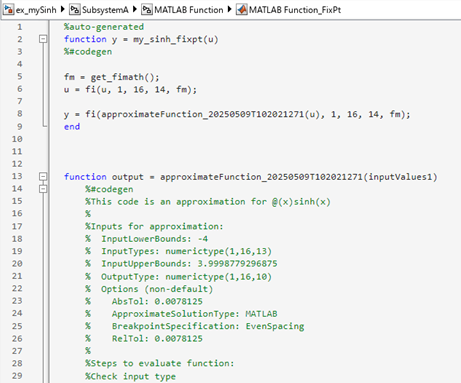
See Also
Fixed-Point Tool | getUnsupportedFunctionsForSystem | DataTypeWorkflow.FunctionReplacement | coder.float2fixed.skip

