Fixed-Point Instrumentation and Data Type Override
R2026bThe conversion of a model from floating point to fixed point requires configuring fixed-point instrumentation and data type overrides (DTO). Fixed-point instrumentation controls which objects log minimum, maximum, and overflow data during simulation. You use data type override to simulate your model using double, single, or scaled double data types.
Control Instrumentation Settings
The Fixed-Point Tool automatically enables fixed-point instrumentation when you click the Collect Ranges button in the tool. By default, the Fixed-Point Tool uses the current data type override set on the model. You can also choose to override data types with doubles, singles, or scaled doubles. When the simulation or derivation is complete, the tool automatically disables the instrumentation and removes the data type override, if data type override was selected in the tool. When you click the Simulate with Embedded Types button, the tool enables instrumentation during the simulation. Data type override settings on the model are not affected.
Instrumentation is required to collect simulation ranges using the Fixed-Point Tool, which include minimum, maximum, and overflow data. These ranges are used to propose data types for the model. When you are not actively converting your model to fixed point, disable the fixed-point instrumentation to restore the maximum simulation speed to your model. Leaving instrumentation and data type override settings on after the conversion can lead to unexpected results.
To enable instrumentation outside of the Fixed-Point Tool, at the command
line set the MinMaxOverflowLogging parameter to
MinMaxAndOverflow or
OverflowOnly.
set_param('MyModel','MinMaxOverflowLogging','MinMaxAndOverflow')
Instrumentation requires a Fixed-Point Designer™ license. To disable instrumentation on a model, set the parameter to
ForceOff or
UseLocalSettings.
set_param('MyModel','MinMaxOverflowLogging','UseLocalSettings')
Control Data Type Override
Use data type override to simulate your model using double, single, or scaled double data types. If you do not have Fixed-Point Designer, you can still configure data type override settings to simulate a model that specifies fixed-point data types. Using this setting, the software temporarily overrides data types with floating-point data types during simulation.
set_param('MyModel','DataTypeOverride','Double')
To observe the true behavior of your model, set the data type override parameter to
UseLocalSettings or
Off.
set_param('MyModel','DataTypeOverride','Off')
Prevent the Fixed-Point Tool from Overriding Integer Data Types
When performing data type override (DTO) on a selected system, the Fixed-Point Tool
overrides the output data types of each block in the system. The only blocks that are never
affected by DTO are blocks with boolean or enumerated output data types,
and blocks that are untouched by DTO by design (for example, lookup table blocks). Depending
on your application, you might want to preserve the data type of certain signals, for
example, blocks that represent indices.
To prevent the Fixed-Point Tool from overriding the data type of a specific
block, set the DataTypeOverride setting of the numeric type of the block
to Off.
Open the Block Parameters dialog box by double-clicking the block.
Under the Signal Attributes tab, in the Output data type field, specify the desired data type and set the
DataTypeOverrideproperty toOff.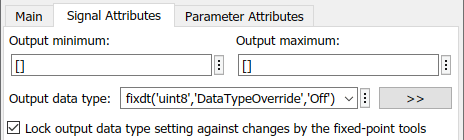
You can set this override to off at the command line by changing the Data Type Override
setting of a signal’s numerictype. In this example, the output data type
of this block remains a built-in uint8 even after performing data type
override.
Alternatively, you can prevent the Fixed-Point Tool from replacing the current data type by using the Lock output data type setting against changes by the fixed-point tools parameter that is available on many blocks. See Use Lock Output Data Type Setting for more information.
Instrumentation Settings and Data Type Override for a Model Reference Hierarchy
When you simulate a model that contains referenced models, the data type override and fixed-point instrumentation settings for the top-level model do not control the settings for the referenced models. You must specify these settings separately for the referenced model. If the settings are inconsistent, for example, if you set the top-level model data type override setting to double and the referenced model to use local settings and the referenced model uses fixed-point data types, data type propagation issues might occur.
When you change the fixed-point instrumentation and data type override settings for any instance of a referenced model, the settings change on all instances of the model and on the referenced model itself.
Data Type Override Limitations
For these blocks, data type override is not supported.
Stateflow® Chart blocks that use MATLAB® as the action language
State Transition Table blocks that use MATLAB as the action language
Truth Table blocks that use MATLAB as the action language
Test Sequence block
MATLAB Discrete-Event System block
Requirements Table block
The MATLAB Function block does not support data type
override for built-in integer data types (int8, int16,
int32, int64, uint8,
uint16, int32, int64). For all
other cases, see Data Type Override with MATLAB Function Block for details on how the MATLAB
Function block handles data type override.

