Generate AUTOSAR Code for Variant Parameters with Symbolic Dimensions
R2026bThis example shows how to use symbolic dimensions to specify array sizes for variant parameters in models configured for AUTOSAR code generation.
In this example, you:
Explore a model where a variant parameter array size is a symbolic dimension linked to an AUTOSAR system constant.
Generate AUTOSAR-compliant code that contains all variant parameter values.
Review how preprocessor conditionals in the generated code select the active variant parameter values at build time.
Understand Symbolic Dimensions for Variant Parameters
A variant parameter (Simulink.VariantVariable object) is a block parameter that takes different values depending on a variant condition. The representation of variant parameters in the generated code depends on the variant activation time of the variant control. When you set the activation time to code compile, the generated code contains all choices of the variant parameter. At build time, the compiler selects the active choice based on the value of the variant control.
When the variant parameter choices have different array sizes, you can use a symbolic dimension to represent the array size. A symbolic dimension lets the array size vary across variant choices by using a named parameter instead of a fixed number. In an AUTOSAR Blockset™ workflow, you define this named parameter as a system constant. The system constant maps to a preprocessor constant in the generated code.
To set up this workflow, you:
Define a system constant in the Architecture Data section of the data dictionary linked to the AUTOSAR component. For the base workspace, define an
AUTOSAR.Parameterobject with theSystemConstantstorage class.
Set the
Specificationproperty of theSimulink.VariantVariableto anAUTOSAR.Parameterobject, and set the dimensions of this object to reference the system constant name.
Define the variant control as a
Simulink.VariantControlobject whose value is anAUTOSAR.Parameterwith theSystemConstantstorage class. Then, set the activation time tocode compile.
Explore Example Model
The model slexASARVariantParametersSymbolicDim scales an input signal using a Gain block whose Gain parameter is a variant parameter, pGain. The model uses the data dictionary dASARVariantParametersSymbolicDim.sldd and the system target file autosar.tlc.
Open the model.
model = "slexASARVariantParametersSymbolicDim";
open_system(model);
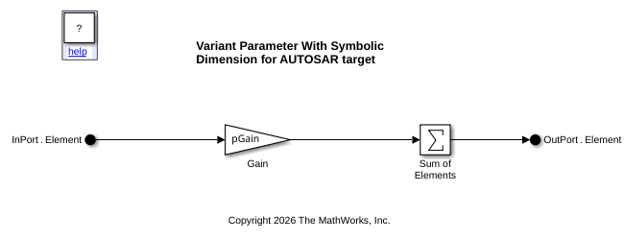
Examine Data Dictionary Setup
The data dictionary defines the variant parameter and its associated objects in the Design Data section:
pGainis aSimulink.VariantVariableobject with two choices of different array sizes:[2, 3]whenVExpr1is active, and[4, 5, 6]whenVExpr2is active.
VExpr1andVExpr2areSimulink.VariantExpressionobjects with conditionsvCtrl==1andvCtrl==2, respectively.
vCtrlis aSimulink.VariantControlobject whose value is anAUTOSAR.Parameterwith theSystemConstantstorage class. TheActivationTimesetting iscode compile.
In the Architecture Data section of the data dictionary:
pDimLengthis a system constant that defines the symbolic dimension for the variant parameter array.
The
Specificationproperty ofpGainuses anAUTOSAR.ParameterobjectpGainSpecwith dimensions[1, pDimLength]. With this setting, the system constantpDimLengthdetermines thepGainarray size.
The In Bus Element block input port also has dimension
[1, pDimLength], so the input signal size matches the variant parameter array size across all choices.
When vCtrl==1, pDimLength is 2, and the parameter and input arrays have length 2. When vCtrl==2, pDimLength is 3, and the arrays have length 3.
Generate Code
Generate code from the model.
slbuild(model)
### Searching for referenced models in model 'slexASARVariantParametersSymbolicDim'.
### Total of 1 models to build.
### Starting top model code generation target build for: slexASARVariantParametersSymbolicDim
### Starting build procedure for: slexASARVariantParametersSymbolicDim
### Exporting ARXML files for: slexASARVariantParametersSymbolicDim
### Successful completion of code generation for: slexASARVariantParametersSymbolicDim

Build Summary

Top model targets:

Model                                 Build Reason                                                    Status           Build Duration
=====================================================================================================================================
slexASARVariantParametersSymbolicDim  Target (slexASARVariantParametersSymbolicDim.c) did not exist.  Code generated.  0h 0m 17.249s

1 of 1 models built (0 models already up to date)
Build duration: 0h 0m 20.029s
Review System Constants and Variation Points
After code generation, examine the configuration header Rte_Cfg.h in the generated AUTOSAR Run-Time Environment (RTE) files.
stubFile = fullfile("slexASARVariantParametersSymbolicDim_autosar_rtw", ...
    "stub", "Rte_Cfg.h");
% Display relevant lines from the generated file.
coder.example.extractLines(stubFile, "/* Variation points */", ...
    "#define Rte_SysCon_vCtrl", 1, 1)
/* Variation points */
#ifndef Rte_SysCon_VExpr1
#define Rte_SysCon_VExpr1              (vCtrl == 1)
#endif

#ifndef Rte_SysCon_VExpr2
#define Rte_SysCon_VExpr2              (vCtrl == 2)
#endif

#define pDimLength                     3
#define Rte_SysCon_pDimLength          pDimLength
#define vCtrl                          2
#define Rte_SysCon_vCtrl               vCtrl
The header defines the system constants and variation points as preprocessor constants using #define:
pDimLengthcontrols the array size, andvCtrlcontrols the variant selection.
Rte_SysCon_VExpr1andRte_SysCon_VExpr2are variation point macros that test the variant conditions againstvCtrl.
To configure the component for a different variant, change the values of pDimLength and vCtrl in this header, and then rebuild. You do not need to regenerate source code.
Review Variant Parameter Array Declaration
The generated header file slexASARVariantParametersSymbolicDim.h declares the pGain array with size Rte_SysCon_pDimLength instead of a fixed integer.
hFile = fullfile("slexASARVariantParametersSymbolicDim_autosar_rtw", ...
    "slexASARVariantParametersSymbolicDim.h");
coder.example.extractLines(hFile, ...
    "struct P_slexASARVariantParametersSy_T_", "};", 1, 1)
struct P_slexASARVariantParametersSy_T_ {

#if Rte_SysCon_VExpr1 || Rte_SysCon_VExpr2

  sint16 pGain[Rte_SysCon_pDimLength]; /* Variable: pGain
                                        * Referenced by: '<Root>/Gain'
                                        */

#ifndef P_SLEXASARVARIANTPARAMETERSSY_T_VARIANT_EXISTS
#define P_SLEXASARVARIANTPARAMETERSSY_T_VARIANT_EXISTS
#endif
#endif

#ifndef P_SLEXASARVARIANTPARAMETERSSY_T_VARIANT_EXISTS

  uint8 rt_unused;

#endif

};
Review Variant Parameter Values in Generated Code
In the generated source file slexASARVariantParametersSymbolicDim.c, #if/#elif preprocessor conditionals select the active pGain values based on the variant condition.
cFile = fullfile("slexASARVariantParametersSymbolicDim_autosar_rtw", ...
    "slexASARVariantParametersSymbolicDim.c");
coder.example.extractLines(cFile, ...
    "P_slexASARVariantParametersSy_T slexASARVariantParametersSymb_P", ...
    "};", 1, 1)
P_slexASARVariantParametersSy_T slexASARVariantParametersSymb_P = {

#if Rte_SysCon_VExpr1 || Rte_SysCon_VExpr2

  /* Variable: pGain
   * Referenced by: '<Root>/Gain'
   */
#if Rte_SysCon_VExpr1

  { 2, 3 }
#elif Rte_SysCon_VExpr2
  { 4, 5, 6 }
#endif
#ifndef P_SLEXASARVARIANTPARAMETERSSY_T_VARIANT_EXISTS
#define P_SLEXASARVARIANTPARAMETERSSY_T_VARIANT_EXISTS
#endif
#endif
#ifndef P_SLEXASARVARIANTPARAMETERSSY_T_VARIANT_EXISTS
  0
#endif            /* P_SLEXASARVARIANTPARAMETERSSY_T_VARIANT_EXISTS undefined */
};
The step function uses Rte_SysCon_pDimLength to iterate over the input array, so the same code handles any array size.
coder.example.extractLines(cFile, "for (i = 0; i < Rte_SysCon_pDimLength", ...
    "}", 1, 1)
  for (i = 0; i < Rte_SysCon_pDimLength; i++) {
    /* Gain: '<Root>/Gain' incorporates:
     *  Inport generated from: '<Root>/In Bus Element'
     */
    slexASARVariantParamet_ARID_DEF.Gain[i] = (float64)
      slexASARVariantParametersSymb_P.pGain[i] * tmpIRead[i];
  }
See Also
Simulink.VariantExpression | AUTOSAR.Parameter (AUTOSAR Blockset)

