Optimize Performance of Memory Access by Using Data Alignment
R2026bFor some target processors, you can improve the performance of memory access by
instructing the compiler to align data objects on specific boundaries in memory. In the
generated code, you can align data objects such as Simulink.Parameter,
Simulink.Signal, and Simulink.Bus objects.
For information about specifying data alignment for a code replacement entry, see Data Alignment for Code Replacement.
For information about specifying data alignment for MATLAB® code, see coder.dataAlignment.
Specify Data Alignment Requirements for Data Objects
To specify the alignment boundary of a data object, set the Alignment
property by using one of these methods:
Dialog box editor for the data object
Programmatic interface for the object
This example shows how to specify the data alignment requirements using the programmatic interface or the Type Editor.
Data objects that support data alignment specification include:
Select Toolchain for Data Alignment Syntax
The generated code aligns data by using the capabilities and syntax supported by your
build toolchain. Set the model configuration parameter Toolchain to one of these toolchains, which support data alignment by
default using the syntax __attribute((aligned(%n))).
Microsoft® Visual C++®
MinGW®
GCC
Xcode with Clang
To use data alignment for a different toolchain or to use custom data alignment syntax, create a custom specification by registering a code replacement library. For more information, see Provide Custom Data Alignment Specifications for Compilers.
Align Data for a Data Object Programmatically
This example shows how to specify the data alignment for two
Simulink.Bus objects.
Open the example model
PreserveBusDims. The model contains two bus ports, which resolve toSimulink.Busobjects in the base workspace.openExample("PreserveBusDims")Set the data alignment for the data objects. For this example, set the alignment for the bus objects
ImperialSpecsandMetricSpecsto 64.ImperialSpecs.Alignment = 64; MetricSpecs.Alignment = 64;
Configure the model to use a toolchain that supports data alignment by setting the
Toolchainparameter. For example, use the MinGW toolchain.set_param("PreserveBusDims",Toolchain="MinGW64 | gmake (64-bit Windows)");
Generate code for the model.
slbuild("PreserveBusDims");Check that the generated code aligns the data by using the alignment syntax that you specified. For this example,
PreserveBusDims.hcontains this code.#ifndef DEFINED_TYPEDEF_FOR_ImperialSpecs_ #define DEFINED_TYPEDEF_FOR_ImperialSpecs_ typedef struct { __attribute((aligned(64))) real_T DimensionsInInches[30]; __attribute((aligned(64))) real_T WeightInPounds[10]; } ImperialSpecs; #endif #ifndef DEFINED_TYPEDEF_FOR_MetricSpecs_ #define DEFINED_TYPEDEF_FOR_MetricSpecs_ typedef struct { __attribute((aligned(64))) real_T DimensionsInCms[10][3]; __attribute((aligned(64))) real_T WeightInKilograms[10]; } MetricSpecs; #endif
Align Data for a Data Object by Using the Type Editor
Configure Alignment Values for Data Objects
Set the Alignment property of a data object by using the Type
Editor.
Open the Type Editor. On the Modeling tab, from the Design gallery, click Type Editor.
In the Type Editor, set the View to
All.For the data object that you want to align, set the value in the Alignment column.
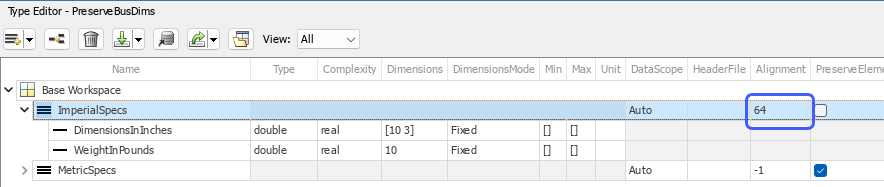
Use the Type Editor to specify the alignment for other data objects that you want to align.
Apply Alignment Specifications to the Model
Configure the model to use a toolchain that supports data alignment. On the Modeling tab, click Settings. Set the model configuration parameter Toolchain to a toolchain that supports data alignment. For example, select
MinGW64 | gmake (64-bit
                Windows)
and click OK.Generate code for the model. The generated header file contains the alignment directives for the data.
Data Alignment Limitations
When you try to perform data alignment in a case that is not supported:
If you specify the data alignment by using only a data object, the code generator produces an error.
If you specify the data alignment by using a code replacement entry, replacement does not occur. The code generator also produces an error for some cases.
Data Alignment Unsupported Cases
Data alignment is not supported for:
Software-in-the-loop (SIL) simulation
Model reference parameters
Exported functions in Stateflow® charts
Functions that are generated with C function prototype control or C++ class I/O arguments step method and that use root-level I/O variables
Functions that are generated with the AUTOSAR system target file and that use root-level I/O or AUTOSAR inter-runnable access functions
Data Alignment Requiring Generated Main Function
If the following conditions exist, the code generator includes data alignment
directives for root-level I/O variables in the ert_main.c or
ert_main.cpp file it produces. In this case, if you discard the
generated example main program, align used root-level I/O variables
correctly. If you choose not to generate an example main
program in this case, data alignment is not supported.
Compiler supports global variable alignment
Generate an example main program (select Configuration Parameters > Generate an example main program)
Generate a reusable function interface for the model (set Configuration Parameters > Code Generation > Interface > Code interface packaging to
Reusable function)Function uses root-level I/O variables that are passed in as individual arguments (set Configuration Parameters > Code Generation > Interface > Pass root-level I/O asto
Individual arguments)Function uses a root-level I/O variable
Function imposes alignment requirements
Code Replacement Limitations
If a replacement imposes alignment requirements on the shared utility interface arguments, the code generator does not honor data alignment. Under these conditions, replacement does not occur. Replacement is allowed if the registered data alignment type specification supports alignment of local variables, and the replacement involves only local variables.
Bus Object Limitations
For Simulink.Bus objects:
If user registered alignment specifications do not support structure field alignment, aligning
Simulink.Busobjects is not supported unless theSimulink.Busobject is imported.When you align a
Simulink.Busdata object, the elements in the bus object are aligned on the same boundary. The boundary is the lowest common multiple of the alignment requirements for each individual bus element.
Model Reference Limitations
When you specify alignment for functions that occur in a model reference hierarchy,
and multiple models in the hierarchy operate on the same function data, the bottommost
model dictates alignment for the rest of the hierarchy. If the alignment requirement for a
function in a model higher in the hierarchy cannot be honored due to the alignment set by
a model lower in the hierarchy, data alignment is not supported. To work around this
issue, if the shared data is represented by a bus or signal object, manually set the
alignment property on the shared data by setting the alignment property of the
Simulink.Bus or Simulink.Signal object.
Storage Class Limitations
Data that is associated with storage classes supports alignment only under certain conditions. This table shows the built-in storage classes that support data alignment and the required conditions.
| Storage Class | Conditions |
|---|---|
Default | None |
ExportedGlobal | None |
ImportedExtern | Specify the data alignment by using a data object. Specification by using a code replacement entry is not supported. |
ImportedExternPointer | Specify the data alignment by using a data object. Specification by using a code replacement entry is not supported. |
Volatile | None |
Const | None |
ConstVolatile | None |
ExportToFile | None |
ImportedFromFile | Specify the data alignment by using a data object. Specification by using a code replacement entry is not supported. |
Localizable | Not supported for root input ports |
GetSet | Not supported |
MultiInstance | None |
FileScope | Not supported when used from an Embedded Coder Dictionary |
Struct | None |
Reusable | None |
Bitfield | Not supported |
Define | Not supported |
ImportedDefine | Specify the data alignment by using a data object. Specification by using a code replacement entry is not supported. |
CompilerFlag | Specify the data alignment by using a data object. Specification by using a code replacement entry is not supported. |
For storage classes that you create by using the Embedded Coder Dictionary or the Custom Storage Class Designer, data alignment is not supported if the storage class has:
Data Access set to
PointerorFunctionData Scope set to
Exportedand:Data Initialization set to
MacroBit-Pack Boolean selected (available in Custom Storage Class Designer only)
Type set to
Other(available in Custom Storage Class Designer only)
Data Alignment Limitations Removed
These capabilities remove data alignment limitations.
In R2026b: PIL simulations support data alignment.

