Generate Software Executables for Multicore Models
R2026bInfineon® AURIX™ family of microcontrollers contain up to five TriCore® processing units. . Use these processing units or cores to develop multicore models for deployment in your system-on-chip (SoC) applications. You can use the SoC Builder tool to generate executables, code, and program the hardware board.
Single vs. Separate Executables
The SoC Builder tool generates software executables after you successfully build your multicore model. You can create a single executable and linkable format (ELF) file for all the participating cores or separate ELF files for different participating cores of the Infineon AURIX microcontrollers. The single ELF file option maps the data and code to the corresponding core-specific memory. This option also stores the common data and code in the RAM of the TriCore 0 processing unit. To store or write different data in different cores, you can use the custom storage option or core-specific linker files and create separate ELF files for each participating core of your application model. For more information on custom storage class, see Custom Storage Class for Infineon AURIX TC3x Microcontrollers.
Advantages of Single ELF File
Creating a single ELF file rather than separate ELF files enables you to:
Optimize memory — With a single ELF file, the Infineon low-level driver library (iLLD), MathWorks® peripherals, and interprocess communication (IPC) drivers are the common functions across all the cores. Sharing common code, functions, and data across the participating cores reduces the memory footprint.
Single linker file for all participating cores — You can maintain a single linker script for all the participating cores, which enhances the scalability of your application and reduces memory overlap issues.
Debug all participating cores at once — A single ELF file for all participating cores eliminates the need for manually enabling the processing units other than the TriCore 0 and manually loading the flash image of TriCore 0.
TriCore 0 is the principal processing unit that handles system initialization, boot processes, and critical control tasks in the AURIX microcontrollers.
Generate Single ELF File
To generate a single ELF file for all participating cores of multicore application model, follow these steps:
Open the multicore model and start SoC Builder by clicking Build, Deploy & Start in the Hardware tab.
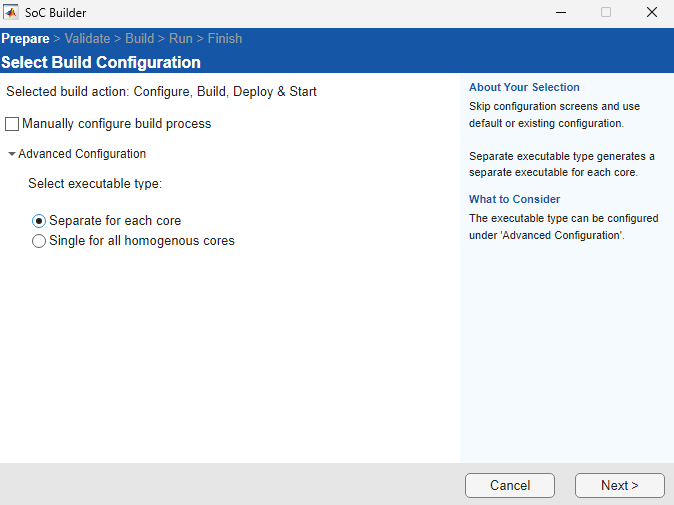
The SoC Builder tool provides these options in the Advanced Configuration pane:
Separate for each core (default) — Generate a separate ELF file for each participating core of the application model.
Single for all homogenous cores — Generate a single ELF file for all participating TriCore processing units of the application model.
Select Single for all homogenous cores to generate a single ELF file for all the participating TriCore processing units of the application model. Select Use custom linker file to provide your own custom linker file by using the Browse button.
When you disable the Use custom linker file parameter, Simulink® uses a default linker file that maps the data and code to the core-specific memory.

Click Next in the SoC Builder and continue with the model validation and build steps. The SoC Builder generates a single ELF file for all the participating cores after successful building of your application model. For more information on these steps, see Generate Code and Deploy Using SoC Builder.

