Measure Pulse Width Using NI Devices
R2026bThis example shows how to measure the width of an active high pulse using a counter input channel. A sensor measures distance from a surface and generates a pulse whose width is proportional to the measured distance. An analog channel in the same chassis provides the shared hardware clock for measurement.
When you use digital or counter channels on NI CompactDAQ modules, the channels require a hardware clock to run in clocked mode because these channels do not generate a sample clock. To supply a clock, add an analog input or output channel from another module in the same CompactDAQ chassis. This configuration provides a hardware clock for the digital or counter channel because the chassis shares the timing engine.

Configure Counter Input Channel
Create a DataAcquisition object, and add a counter input channel with PulseWidth measurement type. This example uses CompactDAQ chassis NI c9179 and module NI 9402 with ID cDAQ1Mod5.
dq = daq("ni");
ch = addinput(dq, "cDAQ1Mod5", "ctr0", "PulseWidth");
Determine Terminal of Counter Input Channel
To connect the input signal to the correct terminal, examine the Terminal property of the channel. The terminal is determined by the hardware.
ch.Terminal
ans =

    'PFI1'
Measure Distance
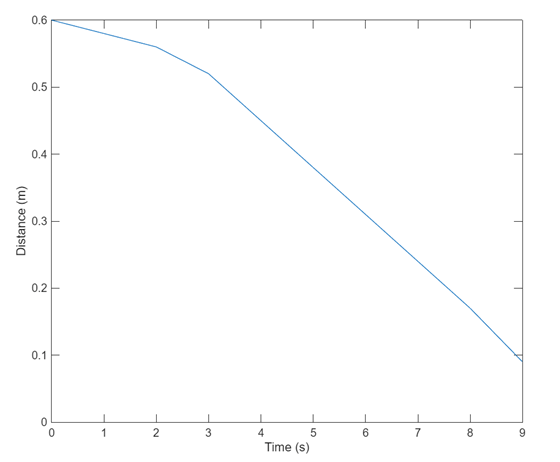
To determine if the counter is operational, acquire a single scan. This example uses a sensor that generates a high pulse of width 0.0010 seconds when the corresponding distance measured is one meter. To obtain the distance measured in meters, multiply the pulse width by 1000.
1000*read(dq, "OutputFormat", "Matrix")
ans =

     0.5
Measure Distance over Time
Use the hardware clock to acquire multiple counter measurements over time. NI counter devices require an external clock. By adding an analog input channel for a module on the same chassis, the internal clock is shared with both modules.
addinput(dq, "cDAQ1Mod5", "ctr0", "PulseWidth");

dq.Rate = 1;
data = read(dq, seconds(10));
plot(data.Time, 1000*data.cDAQ1Mod5_ctr0);
xlabel("Time (s)");
ylabel("Distance (m)");