Choose Specific Bug Finder Defect Checkers
R2026bYou can check your C/C++ code using the predefined subsets of defect checkers in Bug Finder. Alternatively, you can also customize which defects to check for during the analysis.
You can use a checkers activation file (*.XML) to select specific set of defects and share your selection across different projects.
For a full list of Polyspace®
Bug Finder™ defect checkers, see Defects. A spreadsheet containing all checkers is available in polyspaceroot\polyspace\resourcespolyspacerootC:\Program Files\Polyspace\R2026b.
User Interface
To configure checking violation of coding standards in the Polyspace Platform user interface user interface, open the Checkers Selection dialog box:
Double click the Configure node of the Projects pane.
On the Static Analysis tab, select Defects and Coding Standards. Select Use custom checkers file and then click Open (
 ) next to the option Checkers activation file.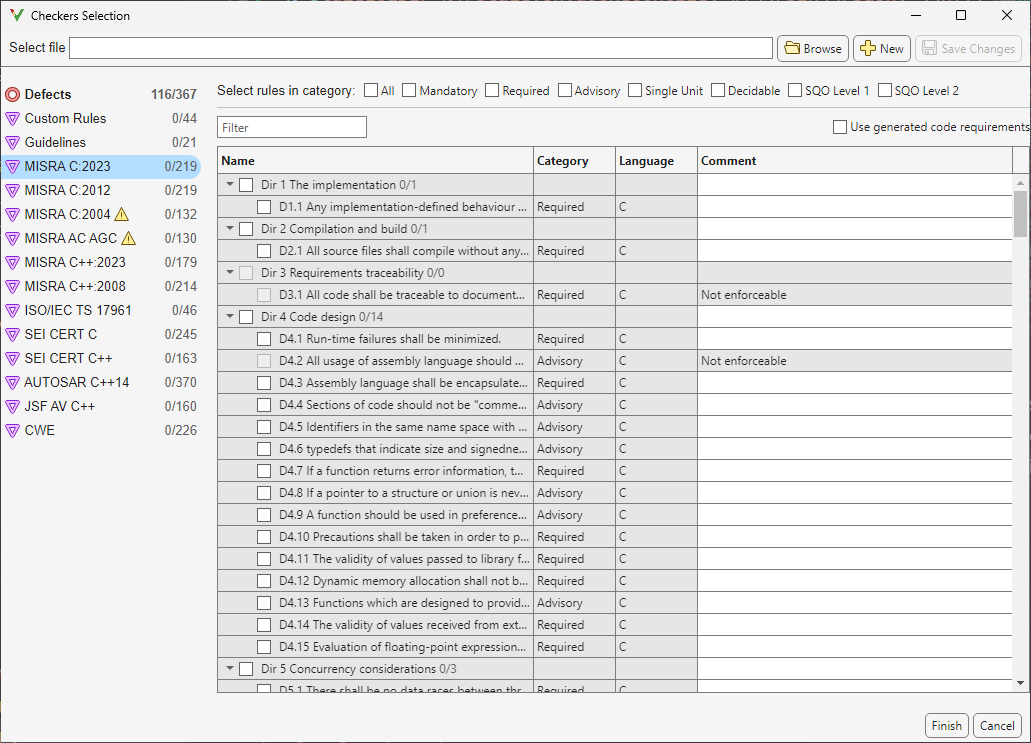
In the Checkers Selection dialog box, select the Defects node in the left pane and then select the defect checkers that you want. Find defects that you want to activate by using the Filter.
After activating the defects, save your selection as a reusable checkers activation file (
.xml).
Command Line
If you have a predefined selection of defect checkers in a checkers activation file activation_file.xml, use the file to run a Polyspace
Bug Finder analysis by using the option Checkers activation file (-checkers-activation-file):
polyspace-bug-finder-server -sources filename -checkers-activation-file activation_file.xml
Alternately, use the option Find defects (-checkers). Specify a comma-separated list of checkers as arguments. For instance, to run a Bug Finder analysis on a server with only the data race checkers enabled, enter:
polyspace-bug-finder-server -sources filename -checkers DATA_RACE,DATA_RACE_STD_LIB
See Also
Find defects (-checkers) | Checkers activation file (-checkers-activation-file) | Use custom checkers file

