Processor (-custom-target)
R2026bSelect the processor for the current build configuration
Description
Specify a processor name for static analysis or testing. The processor name translates to sizes of fundamental data types, definitions of types such as size_t and wchar_t, and other details. You can also modify some properties of a predefined processor, or create a custom processor and explicitly specify the processor details.
Note the following:
This option is automatically set if you create a project from your build command in the user interface or using the
polyspace-configuresystem command.This option value is ignored during static analysis if you select one of the specialized cross-compilers for the option
Compilation toolchain for static analysis (-compiler). For this subset of compilers, you specify both the compiler name and the processor name together when you specify the compilation toolchain for static analysis. For instance, the toolchain specificationrenesas - rh850specifies a Renesas compiler and the RH850 family of processors.
Set Option
Set the option using one of these methods:
Polyspace Platform user interface (desktop products only) — In your project configuration, on the Build tab, select Target and Compiler and then select or add a processor using this option.
Command line and options file — Use the option
-custom-targetto specify processor details. See Command-Line Information.Python® API: Get the
Processorproperty of a build configuration, then configure the processor object. Seepolyspace.project.Processor(Polyspace Test).TOML configuration file (
.toml.pscfg) — Use the[Processor]table. For example:[Processor] Custom = true Name = "MyCustomProcessor" CharBitsSize = 8 ShortBitsSize = 16 IntBitsSize = 32 LongBitsSize = 32 LongLongBitsSize = 64 FloatBitsSize = 32 DoubleBitsSize = 64 LongDoubleBitsSize = 64 PointerBitsSize = 32 Endianness = "LITTLE_ENDIAN" # "LITTLE_ENDIAN" or "BIG_ENDIAN"To use a predefined processor, set
Custom = falseand specify the processor identifier:[Processor] Custom = false Id = "Host Computer"
Why Use This Option
The processor details are used during dynamic testing to generate driver code for building the project. These details are also used to appropriately instrument your source code for code profiling.
Some of the checkers that run during static analysis also use the processor details. For instance, the checkers for overflow uses the sizes of data types to determine if the value assigned to a variable exceeds the maximum value that the variable type can accommodate.
Settings
Select a processor name in list of processors. To add to this list:
In the Manage section of the Configuration toolstrip, click
 Manage Processors to open the Manage Processors window.
Click Add a processor. Select a manufacturer and processor name and then select Add to add the selected processor.
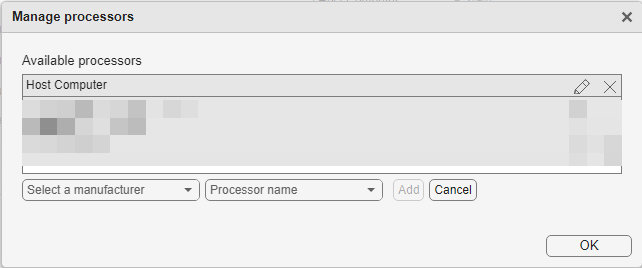
To add a custom processor, select
Customin the manufacturer dropdown.Click OK. The processor you added is now available for selection.
To review the properties of the selected processor, click
 to open the Edit Processor window. Depending on the processor you selected, you can modify some of the processor properties while others are fixed.
Default: Host Computer
Host ComputerThe dynamic testing uses your host computer as the processor.
AMDPolyspace® supports these
AMDprocessors:Athlon 64K5/K6/Athlonx86-32 (Windows32)x86-64 (Linux 64)x86-64 (Mac OS X)x86-64 (Windows 64)
ARM compatiblePolyspace supports these
ARMprocessors:ARM 7-11
ARM Cortex A
ARM Cortex M
ARM Cortex R
ARM 64-bit (LLP64)
ARM 64-bit (LP64)
AlteraPolyspace supports the
SoC (ARM Cortex A)processor fromAltera.
Analog DevicesPolyspace supports these
Analog Devicesprocessors:ADSP-CM40x(ARM Cortex-M)
Blackfin
SHARC
TigerSHARC
ApplePolyspace supports the
ARM64processor fromApple.
AtmelPolyspace supports these
Atmelprocessors:AVR
AVR (32-bit)
AVR (8-bit)
FreescalePolyspace supports these
Freescaleprocessors:32-bit PowerPC
68332
68HC08
68HC11
ColdFire
DSP563xx (16-bit mode)
DSP5685x
HC(S)12
MPC52xx
MPC5500
MPC55xx
MPC5xx
MPC7xx
MPC82xx
MPC83xx
MPC85xx
MPC86xx
MPC8xx
S08
S12x
StarCore
InfineonPolyspace supports these
Infineonprocessors:C16x, XC16x
PPU
TriCore
IntelPolyspace supports these
Intelprocessors:x86-32 (Windows32)
x86-64 (Linux 64)
x86-64 (Mac OS X)
x86-64 (Windows64)
MicrochipPolyspace supports these
Microchipprocessors:PIC18
dsPIC
NXPPolyspace supports these
NXPprocessors:Cortex-M0/M0+
Cortex-M3
Cortex-M4
RISC-VPolyspace supports these
RISC-Vprocessors:RV32I
RV64I
RenesasPolyspace supports these
Renesasprocessors:M16C
M32C
R8C/Tiny
RH850
RL78
RX
RZ
SH-2/3/4
V850
STMicroelectronicsPolyspace supports the
ST10/Super10processor fromSTMicroelectronics.
Texas InstrumentPolyspace supports these
Texas Instrumentprocessors:C2000
C5000
C6000
MSP430
Stellaris Cortex-M3
TMS470
TMS570 Cortex-R4
CustomYou can define a custom processor using this option.
Custom Processor Details
If you add a custom processor or modify the properties of an existing processor, you can provide the following information:
Sizes of fundamental data types – Enter the numerical value of the size in bits. Example values include 8,16,32, or 64.
In addition, if your processor defines a plain
charas a signed type, select Plain char is signed. Otherwise, plainchar-s are assumed to be unsigned.Alignment – Enter a numerical value that represents the maximum alignment of integer types in bits. Example values include 32 or 64.
Minimum alignment of structures – Enter a numerical value that represents the minimum alignment of members within composite objects such as structures or unions. Unlike the previous values, the specification uses bytes instead of bits. Example values include 4, 8 or 16.
This value is different from Alignment even though both values can be used to determine storage of members inside composite objects. For instance, a structure might need to be aligned on a 16-byte boundary for SIMD instructions or DMA transfers while individual integers inside the structure might need to be aligned on 4-byte boundaries.
Native word size – Enter a numerical value that represents the number of bits that the processor can process at a time. Example values include 8, 16, 32, or 64.
Byte ordering – Specify the endianness of the custom processor. Select one of Unspecified, Little endian, or Big endian.
Type of wchar_t – Select one of defined-by-compiler, signed short, unsigned short, signed int, unsigned int, signed long, or unsigned long.
Type of size_t – Select one of defined-by-compiler, unsigned char, unsigned short, unsigned int, unsigned long, or unsigned long long.
Type of ptrdiff_t – Select one of defined-by-compiler, signed char, short, signed int, int, long, or long long.
Underlying type of enum – Specify the underlying type for
enum. Select one of the following options:defined-by-compiler — Polyspace uses
signed intas the underlying type ofenumsfor all compilers exceptgnuandclang.For the
gnuandclangcompilers, Polyspace uses the first type that can hold all of the enumerator values from this list:unsigned int,signed int,unsigned long,signed long,unsigned long longandsigned long long.auto-signed-first — Polyspace uses the first type that can hold all of the enumerator values from this list:
signed char,unsigned char,signed short,unsigned short,signed int,unsigned int,signed long,unsigned long,signed long long, andunsigned long long.auto-unsigned-first — Polyspace uses the first type that can hold all of the enumerator values from this list:
For positive enumerator values:
unsigned char,unsigned short,unsigned int,unsigned long, andunsigned long long.For negative enumerator values:
signed char,signed short,signed int,signed long, andsigned long long.
Tips
Instead of specifying a processor explicitly, try creating a Polyspace Platform project from your build command first. For more information, see Configure Sources and Build Options in Project for Polyspace Analysis and Testing. If you cannot create a project from your build command, continue with the manual configuration of options.
Command-Line Information
This section applies to static analysis only.
To specify a processor for static analysis at the command-line, you can use one of the following command-line options:
-custom-targetwith a comma-separated list of processor properties.-targetwith a named processor, or-target mcpufollowed by other options to specify processor properties.
In the user interface:
The Processor option translates to the option
-custom-targetwith appropriate argumentsIf you also specify one of the specialized cross-compilers plus processor using the option
Compilation toolchain for static analysis (-compiler), this specification translates to the options-compilerand-target. For instance, the specificationrenesas - rh850translates to-compiler renesas -target rh850. In this case, the analysis log shows the use of both-custom-targetand-target.The option
-custom-targetdetermines type sizes, alignment, and endianness.The option
-targetsets predefined macros for the specific compiler and target.
-custom-target
The option -custom-target does not support named processors. Instead, you must specify all processor properties in a comma-separated list.
Parameter:
-custom-target |
Value:: Comma-separated list of processor properties in this order: <plainCharSignedNess>, <charSize>, <shortSize>, <intSize>, <shortLongSize>, <longSize>, <longLongSize>, <floatSize>, <doubleSize>, <longDoubleSize>,
<ptrSize>, <intAlignment>, <structAlignment>, <endianness>, <sizeTType>, <ptrDiffTType>, <wcharTType> |
Example (Bug Finder):: polyspace-bug-finder -custom-target false,8,2,4,-1,4,8,4,8,8,4,8,1,little,unsigned_int,int,unsigned_int |
Example (Code Prover):: polyspace-code-prover -custom-target false,8,2,4,-1,4,8,4,8,8,4,8,1,little,unsigned_int,int,unsigned_int |
The option argument in the above examples translates to the following processor details:
Whether plain
charis signed (<plainCharSignedNess>) –falseSize of
char(<charSize>) – 8 bits (only the size ofcharis specified in bits, all other sizes are in bytes)Size of
short(<shortSize>) – 2 bytesSize of
int(<intSize>)– 4 bytesSize of
short long(<shortLongSize>) –short longis not supported (indicated by -1)Size of
long(<longSize>) – 4 bytesSize of
long long(<longLongSize>) – 8 bytesSize of
float(<floatSize>) – 4 bytesSize of
double(<doubleSize>) – 8 bytesSize of
long double(<longDoubleSize>) – 8 bytesSize of pointer (
<ptrSize>) – 4 bytesMaximum alignment of all integer types (
<intAlignment>) – 8 bytesMinimum alignment of members within type
structorunion(<structAlignment>) – 1 byteEndianness (
<endianness>) –little(allowed values arelittleandbig)Underlying type of
size_t(<sizeTType>) –unsigned_int(allowed values areunknown,unsigned_char,unsigned_short,unsigned_int,unsigned_long, andunsigned_long_long)Underlying type of
ptrdiff_t(<ptrDiffTType>) –int(allowed values areunknown,signed_char,short,int,long, andlong_long)Underlying type of
wchar_t(<wcharTType>) –unsigned_int(allowed values areunknown,short,unsigned_short,int,unsigned_int,long, andunsigned_long)
-target
You can specify a named processor with the option -target. The named processors supported with -target are different from the named processors available for the option Processor in the Polyspace Platform user interface.
Parameter:
-target |
Value:
i386 | sparc | m68k | powerpc | c-167 | tms320c3x | sharc21x61 | necv850 | hc08 | hc12 | mpc5xx | c18 | x86_64 | mcpu |
Default:
i386 |
Example (Bug Finder):
polyspace-bug-finder -target m68k |
Example (Code Prover):
polyspace-code-prover -target m68k |
Example (Bug Finder Server):
polyspace-bug-finder-server -target m68k |
Example (Code Prover Server):
polyspace-code-prover-server -target m68k |
For more information on the details for the named processors, see -target. Note that the option -target mcpu indicates a custom processor. With -target
mcpu and other named processors, you can use another set of options to modify the default processor properties. This is an alternative to using the option -custom-target.
Limitations
The Polyspace Platform user interface does not support multiple processors with the same name. If a build configuration that you are importing or converting to internal has a processor with the same name but different values than one that is already defined in the project, you see a warning message. If you continue with the import or conversion, the conflicting processor settings defined in the incoming build configuration are discarded. The project keeps the settings for the identically named processor that was already defined in the project.
To keep the custom processor settings from the incoming build configuration, you must first rename or delete the identically named processor that exists in the project.
For more information on working with configuration variants and external configurations, see Share and Reuse Configuration Variants.
See Also
polyspace.project.Processor (Polyspace Test) | polyspace.project.BuildConfiguration (Polyspace Test)

