Generate an Audio Plugin from MATLAB and External C Code
R2026bThis example shows how to write an audio processing algorithm in C, wrap it in a MATLAB® audio plugin class using coder.ceval, and generate a VST3 plugin that a digital audio workstation (DAW) can load. With this approach you can reuse validated C libraries directly, without rewriting algorithms in MATLAB.
The example walks through these steps:
Write a C function that applies a soft-clipping audio effect.
Create a MATLAB
audioPluginsubclass that calls the C function viacoder.ceval.Validate the plugin for code generation compatibility.
Test the plugin interactively in MATLAB.
Generate a VST3 plugin binary.
Build and link a precompiled static library as an alternative to compiling C source directly.
Integrate stateful C code that manages heap-allocated objects using
coder.opaque.
Prerequisites
To run this example, you need:
Audio Toolbox™
A supported C/C++ compiler
Write the C Processing Function
Create a C function that applies tanh-based soft clipping to an audio frame. Soft clipping uses the tanhf function to smoothly saturate the signal as the drive increases, producing a warm distortion effect. The function accepts pointers to input and output buffers, the frame size, a drive amount, and a dry/wet mix parameter.
type softclip.h#ifndef SOFTCLIP_H
#define SOFTCLIP_H
#ifdef __cplusplus
extern "C" {
#endif
void SoftClipProcess(const float *in, float *out,
int frameSize, float drive, float mix);
#ifdef __cplusplus
}
#endif
#endif /* SOFTCLIP_H */
type softclip.c#include <stddef.h>
#include <math.h>
#include "softclip.h"
void SoftClipProcess(const float *in, float *out,
int frameSize, float drive, float mix)
{
if (in != NULL && out != NULL)
{
for (int i = 0; i < frameSize; i++)
{
float wet = tanhf(drive * in[i]);
out[i] = mix * wet + (1.0f - mix) * in[i];
}
}
}
Place softclip.h and softclip.c in the same folder as the MATLAB plugin class file.
The extern "C" guard in the header prevents name mangling when the audio plugin code generator compiles the source with a C++ compiler.
Create the Audio Plugin Class
Define a class that inherits from audioPlugin. The class has two user-facing parameters: Drive controls the saturation intensity, and Mix blends between the dry (unprocessed) and wet (saturated) signals.
The plugin class has two main responsibilities beyond the audio processing itself:
Register C files with the code generator. In the constructor, use
coder.updateBuildInfoandcoder.cincludeto tell the code generator where to find the C source and header files. Usecoder.const(pwd)to capture the source folder at code generation time as a compile-time constant.Provide dual code paths. In the
processmethod, usecoder.target("MATLAB")to select between a pure MATLAB implementation (for interactive prototyping) and C calls viacoder.ceval(for the generated plugin).
Examine the plugin class file SoftClipPlugin.m:
type SoftClipPlugin.mclassdef SoftClipPlugin < audioPlugin
%SoftClipPlugin Audio plugin that applies soft clipping using external C code.
% This plugin applies tanh-based wave-shaping to the input signal. The
% Drive parameter controls how hard the signal is pushed into saturation,
% and the Mix parameter blends between the dry and processed signals.
%
% When running in MATLAB, the plugin uses a pure MATLAB implementation.
% Following code generation (VST3, JUCE), it calls the C function
% SoftClipProcess via coder.ceval.
%
% See also SoftClipPluginLib, audioPlugin, coder.ceval.
% Copyright 2026 The MathWorks, Inc.
%#codegen
properties
Drive (1,1) {mustBeNumeric} = 1
Mix (1,1) {mustBeNumeric} = 100
end
properties (Constant)
PluginInterface = audioPluginInterface( ...
audioPluginParameter("Drive", ...
DisplayName="Drive", DisplayNameLocation="above", ...
Mapping={"lin",1,20}, ...
Style="rotaryknob", Layout=[2 1]), ...
audioPluginParameter("Mix", ...
DisplayName="Mix", DisplayNameLocation="above", Label="%", ...
Mapping={"lin",0,100}, ...
Style="rotaryknob", Layout=[2 2]), ...
audioPluginGridLayout( ...
RowHeight=[20 100], ...
ColumnWidth=[100 100], ...
Padding=[10 10 10 10]), ...
PluginName="SoftClip", ...
VendorName="MathWorks", ...
VendorVersion="1.0.0", ...
InputChannels=2, ...
OutputChannels=2)
end
methods
function plugin = SoftClipPlugin
coder.extrinsic("pwd");
srcDir = coder.const(pwd);
if ~coder.target("MATLAB")
coder.cinclude("softclip.h");
coder.updateBuildInfo("addSourcePaths",srcDir);
coder.updateBuildInfo("addIncludePaths",srcDir);
coder.updateBuildInfo("addSourceFiles","softclip.c");
coder.updateBuildInfo("addIncludeFiles","softclip.h");
end
end
function y = process(plugin, x)
[frameSize, numChannels] = size(x);
y = zeros(frameSize, numChannels, "like", x);
if coder.target("MATLAB")
mix = plugin.Mix / 100;
wet = tanh(plugin.Drive .* x);
y = mix .* wet + (1 - mix) .* x;
else
drive = single(plugin.Drive);
mix = single(plugin.Mix / 100);
for ch = 1:numChannels
xch = single(x(:,ch));
ych = coder.nullcopy(zeros(frameSize,1,"single"));
coder.ceval("SoftClipProcess", ...
coder.rref(xch), coder.wref(ych), ...
int32(frameSize), drive, mix);
y(:,ch) = ych;
end
end
end
function s = saveobj(plugin)
s = saveobj@audioPlugin(plugin);
s.Drive = plugin.Drive;
s.Mix = plugin.Mix;
end
function plugin = reload(plugin, s)
plugin = reload@audioPlugin(plugin, s);
plugin.Drive = s.Drive;
plugin.Mix = s.Mix;
end
end
methods (Static)
function plugin = loadobj(s)
if isstruct(s)
plugin = SoftClipPlugin;
plugin = reload(plugin, s);
end
end
end
end
How the Code Generation Path Works
During code generation, the process method calls SoftClipProcess one channel at a time using coder.ceval. Several details are important:
coder.rref(xch)passes the input buffer by read-only reference. This tells the code generator that the C function reads from this buffer but does not modify it.coder.wref(ych)passes the output buffer by write reference. The code generator knows the C function writes to this buffer.Scalar parameters (
drive,mix) are passed by value. Cast them tosingleto match thefloattype in the C function signature. TheframeSizeargument is cast toint32to matchint.coder.nullcopyallocatesychwithout initializing it. This is safe becauseSoftClipProcesswrites every element in the buffer.
In the constructor, coder.const(pwd) evaluates pwd at code generation time and embeds the result as a compile-time constant. This lets coder.updateBuildInfo pass the source folder path to the compiler. Because pwd is an extrinsic function (it runs in MATLAB, not in generated code), declare it with coder.extrinsic before use.
Validate the Plugin
Before generating a VST3 binary, validate the plugin to check for code generation compatibility issues. The validateAudioPlugin function verifies the class definition, runs a testbench, and compiles a MEX file to confirm that the C code integrates correctly.
validateAudioPlugin SoftClipPluginChecking plugin class 'SoftClipPlugin'... passed. Generating testbench file 'testbench_SoftClipPlugin.m'... done. Running testbench... passed. Generating mex file 'testbench_SoftClipPlugin_mex.mexw64'... done. Running mex testbench... passed. Deleting testbench. Ready to generate audio plugin.
Test the Plugin in MATLAB
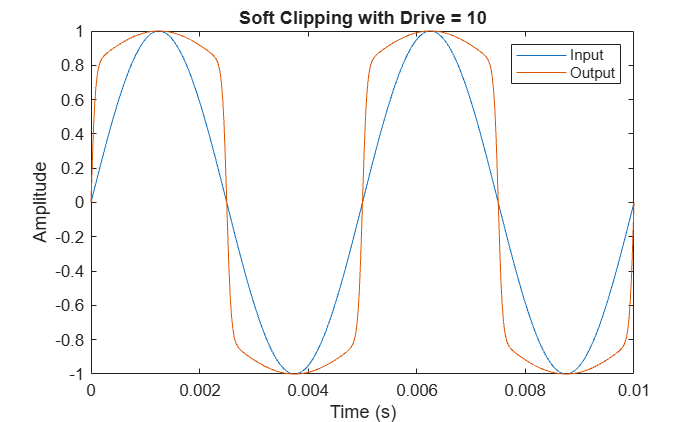
Create an instance of the plugin, set the drive to 10 and the mix to 80%, and process a short stereo sine wave. The MATLAB code path runs because you are executing in MATLAB, not generating a plugin. Compare the input and output signals to verify that the soft clipping effect is applied.
plugin = SoftClipPlugin;
plugin.Drive = 10;
plugin.Mix = 80;

fs = 44100;
t = (0:1/fs:0.01)';
x = [sin(2*pi*200*t) sin(2*pi*200*t)];

y = process(plugin, x);

plot(t, [x(:,1) y(:,1)])
xlabel("Time (s)")
ylabel("Amplitude")
legend("Input","Output")
title("Soft Clipping with Drive = " + plugin.Drive)
Generate a VST3 Plugin from C Source Files
Generate a VST3 plugin binary. The code generator compiles softclip.c together with the generated C++ code and produces a .vst3 file that you can load in any VST3-compatible DAW.
generateAudioPlugin -vst3 SoftClipPlugin
.......
Generate a VST3 Plugin from a Precompiled Static Library
In some workflows, you may want to link against a precompiled static library instead of including C source files directly. This is common when the C source code is proprietary, when the library is built by a separate build system, or when you want to distribute a binary without exposing the source.
Build a Static Library from the C Source (Windows)
To build a static library from softclip.c using the Microsoft® Visual C++® compiler, open a Developer Command Prompt for Visual Studio and run these two commands from the folder containing softclip.c:
cl /c /O2 softclip.c
lib softclip.obj /OUT:softclip.lib
The first command compiles softclip.c into an object file. The second packages it into a static library. The result is softclip.lib in the current folder.
You can also run these commands from within MATLAB if the compiler is on the system path:
system("cl /c /O2 softclip.c");
system("lib softclip.obj /OUT:softclip.lib");
Build a Static Library from the C Source (macOS)
On macOS, use the Xcode command-line tools (also required for audio plugin generation) to compile and archive from a Terminal:
xcrun cc -c -O2 softclip.c
xcrun ar rcs softclip.a softclip.o
The resulting softclip.a is the macOS equivalent of softclip.lib. Update the addLinkObjects call in your plugin constructor to reference softclip.a instead.
Link the Static Library in the Plugin Constructor
The SoftClipPluginLib class is identical to SoftClipPlugin except for the constructor. Instead of registering C source files, it links the precompiled softclip.lib:
type SoftClipPluginLib.mclassdef SoftClipPluginLib < audioPlugin
%SoftClipPluginLib Audio plugin that links a precompiled static library.
% This plugin is identical to SoftClipPlugin except that it links
% softclip.lib instead of compiling softclip.c during code generation.
%
% See also SoftClipPlugin, audioPlugin, coder.ceval.
% Copyright 2026 The MathWorks, Inc.
%#codegen
properties
Drive (1,1) {mustBeNumeric} = 1
Mix (1,1) {mustBeNumeric} = 100
end
properties (Constant)
PluginInterface = audioPluginInterface( ...
audioPluginParameter("Drive", ...
DisplayName="Drive", DisplayNameLocation="above", ...
Mapping={"lin",1,20}, ...
Style="rotaryknob", Layout=[2 1]), ...
audioPluginParameter("Mix", ...
DisplayName="Mix", DisplayNameLocation="above", Label="%", ...
Mapping={"lin",0,100}, ...
Style="rotaryknob", Layout=[2 2]), ...
audioPluginGridLayout( ...
RowHeight=[20 100], ...
ColumnWidth=[100 100], ...
Padding=[10 10 10 10]), ...
PluginName="SoftClipLib", ...
VendorName="MathWorks", ...
VendorVersion="1.0.0", ...
InputChannels=2, ...
OutputChannels=2)
end
methods
function plugin = SoftClipPluginLib
coder.extrinsic("pwd");
srcDir = coder.const(pwd);
if ~coder.target("MATLAB")
coder.cinclude("softclip.h");
coder.updateBuildInfo("addIncludePaths",srcDir);
coder.updateBuildInfo("addIncludeFiles","softclip.h");
coder.updateBuildInfo("addLinkObjects","softclip.lib", ...
srcDir, [], false, true);
end
end
function y = process(plugin, x)
[frameSize, numChannels] = size(x);
y = zeros(frameSize, numChannels, "like", x);
if coder.target("MATLAB")
mix = plugin.Mix / 100;
wet = tanh(plugin.Drive .* x);
y = mix .* wet + (1 - mix) .* x;
else
drive = single(plugin.Drive);
mix = single(plugin.Mix / 100);
for ch = 1:numChannels
xch = single(x(:,ch));
ych = coder.nullcopy(zeros(frameSize,1,"single"));
coder.ceval("SoftClipProcess", ...
coder.rref(xch), coder.wref(ych), ...
int32(frameSize), drive, mix);
y(:,ch) = ych;
end
end
end
function s = saveobj(plugin)
s = saveobj@audioPlugin(plugin);
s.Drive = plugin.Drive;
s.Mix = plugin.Mix;
end
function plugin = reload(plugin, s)
plugin = reload@audioPlugin(plugin, s);
plugin.Drive = s.Drive;
plugin.Mix = s.Mix;
end
end
methods (Static)
function plugin = loadobj(s)
if isstruct(s)
plugin = SoftClipPluginLib;
plugin = reload(plugin, s);
end
end
end
end
The key difference is the addLinkObjects call, which tells the code generator to link softclip.lib from the folder specified by srcDir. The remaining arguments specify that the library is not a MATLAB library and should be linked as-is. The header file and include path are still required so the compiler can resolve the function declaration.
Validate and Generate the Library-Linked Plugin
Validate and generate the library-linked plugin the same way as before.
validateAudioPlugin SoftClipPluginLibChecking plugin class 'SoftClipPluginLib'... passed. Generating testbench file 'testbench_SoftClipPluginLib.m'... done. Running testbench... passed. Generating mex file 'testbench_SoftClipPluginLib_mex.mexw64'... done. Running mex testbench... passed. Deleting testbench. Ready to generate audio plugin.
generateAudioPlugin -vst3 SoftClipPluginLib
.......
Integrate Stateful C Code with coder.opaque
The soft clipper in the previous sections is stateless: each call to SoftClipProcess depends only on the current input frame. Many audio algorithms are stateful; they maintain internal memory across frames. Examples include filters, delay lines, and envelope followers.
When the C implementation allocates state on the heap, the plugin must hold the C-side pointer across calls without interpreting it in MATLAB. The coder.opaque function creates a variable of a C type that MATLAB passes through opaquely: code generation treats it as the declared C type, but MATLAB code never dereferences it. Combined with coder.ceval, this lets you call the full create/process/reset/destroy lifecycle of a C object.
This section builds a one-pole low-pass filter plugin that stores per-channel filter state in a C struct allocated with malloc.
Write the Stateful C Code
The C implementation defines a LowPassObj struct that holds the number of channels and an array of previous output samples, one per channel. Four functions manage the lifecycle:
LowPassCreate: allocates the object and initializes state to zero.LowPassProcess: filters one channel of audio using a one-pole recursive filter: , where .LowPassReset: zeros the filter state (called when the host resets the plugin).LowPassDestroy: frees the allocated memory.
type lowpass_effect.h#ifndef LOWPASS_EFFECT_H
#define LOWPASS_EFFECT_H
#ifdef __cplusplus
extern "C" {
#endif
void* LowPassCreate(int numChannels);
void LowPassProcess(void *obj, const float *in, float *out,
int frameSize, int channel, float cutoff);
void LowPassReset(void *obj);
void LowPassDestroy(void *obj);
#ifdef __cplusplus
}
#endif
#endif /* LOWPASS_EFFECT_H */
type lowpass_effect.c#include <stdlib.h>
#include <math.h>
#include "lowpass_effect.h"
#ifndef M_PI
#define M_PI 3.14159265358979323846f
#endif
typedef struct {
int numChannels;
float *prev;
} LowPassObj;
void* LowPassCreate(int numChannels)
{
if (numChannels <= 0) {
return NULL;
}
LowPassObj *obj = (LowPassObj*)malloc(sizeof(LowPassObj));
obj->prev = (float*)calloc(numChannels, sizeof(float));
obj->numChannels = numChannels;
return (void*)obj;
}
void LowPassProcess(void *obj, const float *in, float *out,
int frameSize, int channel, float cutoff)
{
LowPassObj *const self = (LowPassObj*)obj;
if (self == NULL || channel < 0 || channel >= self->numChannels) {
return;
}
float a = 1.0f - expf(-2.0f * M_PI * cutoff);
float y = self->prev[channel];
for (int i = 0; i < frameSize; i++) {
y += a * (in[i] - y);
out[i] = y;
}
self->prev[channel] = y;
}
void LowPassReset(void *obj)
{
if (obj != NULL) {
LowPassObj *const self = (LowPassObj*)obj;
for (int i = 0; i < self->numChannels; i++) {
self->prev[i] = 0.0f;
}
}
}
void LowPassDestroy(void *obj)
{
if (obj != NULL) {
LowPassObj *self = (LowPassObj*)obj;
free(self->prev);
free(self);
}
}
Place lowpass_effect.h and lowpass_effect.c in the same folder as the plugin class file.
Create the Stateful Plugin Class
The LowPassPlugin class follows the same dual-path pattern as SoftClipPlugin, with several additions that handle memory management and statefulness in the C code:
Constructor : In the code generation path, the constructor declares a
void*variable withcoder.opaque('void*','NULL')and then callsLowPassCreateviacoder.cevalto allocate the C object. The returned pointer is stored in the private propertypFilter, which MATLAB carries opaquely between method calls. In MATLAB,pFilteris initialized to an empty array and later set to a numeric vector inreset.resetmethod : The audio plugin framework callsresetwhen the host transport resets. In the code generation path,resetcallsLowPassResetto zero the C filter state. In MATLAB, it re-initializes the numeric state vector.processmethod : In the code generation path,processpasses the opaque pointer, input buffer, output buffer, frame size, channel index, and a normalized cutoff frequency toLowPassProcess. The cutoff is normalized by dividing the parameter value by the host sample rate, obtained withgetSampleRate. In MATLAB, theprocessmethod implements the same one-pole filter directly.
Examine the plugin class file LowPassPlugin.m:
type LowPassPlugin.mclassdef LowPassPlugin < audioPlugin
%LowPassPlugin Audio plugin using a stateful C low-pass filter.
% This plugin demonstrates calling stateful C code from an audio plugin
% using coder.ceval and coder.opaque to manage a heap-allocated object.
% Copyright 2026 The MathWorks, Inc.
%#codegen
properties
Cutoff (1,1) {mustBeNumeric} = 1000
end
properties (Constant)
PluginInterface = audioPluginInterface( ...
audioPluginParameter("Cutoff", ...
DisplayName="Cutoff", DisplayNameLocation="above", ...
Label="Hz", Mapping={"log",20,20000}, ...
Style="rotaryknob", Layout=[2 1]), ...
audioPluginGridLayout( ...
RowHeight=[20 100], ...
ColumnWidth=100, ...
Padding=[10 10 10 10]), ...
PluginName="LowPass", ...
VendorName="MathWorks", ...
VendorVersion="1.0.0", ...
InputChannels=2, ...
OutputChannels=2)
end
properties (Access = private)
pFilter = []
end
methods
function plugin = LowPassPlugin
coder.extrinsic("pwd");
srcDir = coder.const(pwd);
if ~coder.target("MATLAB")
coder.cinclude("lowpass_effect.h");
coder.updateBuildInfo("addSourceFiles","lowpass_effect.c");
coder.updateBuildInfo("addIncludeFiles","lowpass_effect.h");
coder.updateBuildInfo("addSourcePaths",srcDir);
coder.updateBuildInfo("addIncludePaths",srcDir);
plugin.pFilter = coder.opaque('void*','NULL');
plugin.pFilter = coder.ceval("LowPassCreate", int32(2));
end
end
function reset(plugin)
if coder.target("MATLAB")
plugin.pFilter = zeros(1,2);
else
coder.ceval("LowPassReset", plugin.pFilter);
end
end
function y = process(plugin, x)
[frameSize, numChannels] = size(x);
y = zeros(frameSize, numChannels, "like", x);
cutoffNorm = single(plugin.Cutoff / getSampleRate(plugin));
if coder.target("MATLAB")
if isempty(plugin.pFilter)
plugin.pFilter = zeros(1, numChannels);
end
a = 1 - exp(-2 * pi * cutoffNorm);
for ch = 1:numChannels
prev = plugin.pFilter(ch);
for n = 1:frameSize
prev = prev + a * (x(n,ch) - prev);
y(n,ch) = prev;
end
plugin.pFilter(ch) = prev;
end
else
for ch = 1:numChannels
xch = single(x(:,ch));
ych = coder.nullcopy(zeros(frameSize,1,"single"));
coder.ceval("LowPassProcess", plugin.pFilter, ...
coder.rref(xch), coder.wref(ych), ...
int32(frameSize), int32(ch-1), cutoffNorm);
y(:,ch) = ych;
end
end
end
function s = saveobj(plugin)
s = saveobj@audioPlugin(plugin);
s.Cutoff = plugin.Cutoff;
end
function plugin = reload(plugin, s)
plugin = reload@audioPlugin(plugin, s);
plugin.Cutoff = s.Cutoff;
end
end
methods (Static)
function plugin = loadobj(s)
if isstruct(s)
plugin = LowPassPlugin;
plugin = reload(plugin, s);
end
end
end
end
How coder.opaque Works
In the constructor, the line:
plugin.pFilter = coder.opaque('void*','NULL');
declares pFilter as a variable of C type void*, initialized to NULL. During code generation, the compiler sees a void* pointer. In MATLAB, the variable is simply ignored; MATLAB uses the numeric pFilter property instead.
The next line:
plugin.pFilter = coder.ceval("LowPassCreate", int32(2));
calls the C function and assigns the returned pointer to pFilter. Because pFilter was declared as coder.opaque('void*'), the code generator knows the return type is void*. From this point on, every coder.ceval call that receives plugin.pFilter passes the pointer through to C without MATLAB interpreting its contents.
This pattern (declare with coder.opaque, assign from coder.ceval, and pass to subsequent coder.ceval calls) is the standard way to manage C-allocated objects from MATLAB code generation.
Validate and Generate the Stateful Plugin
Validate the low-pass plugin.
validateAudioPlugin LowPassPluginChecking plugin class 'LowPassPlugin'... passed. Generating testbench file 'testbench_LowPassPlugin.m'... done. Running testbench... passed. Generating mex file 'testbench_LowPassPlugin_mex.mexw64'... done. Running mex testbench... passed. Deleting testbench. Ready to generate audio plugin.
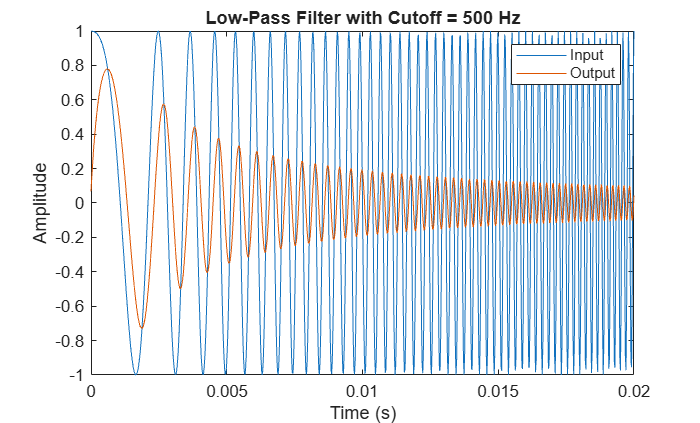
Test the plugin in MATLAB. Set the cutoff to 500 Hz and process a short stereo chirp signal that sweeps from 100 Hz to 5000 Hz. The low-pass filter should attenuate the high-frequency portion of the chirp.
plugin = LowPassPlugin;
plugin.Cutoff = 500;

fs = 44100;
t = (0:1/fs:0.02)';
x = [chirp(t,100,t(end),5000) chirp(t,100,t(end),5000)];

y = process(plugin, x);

plot(t, [x(:,1) y(:,1)])
xlabel("Time (s)")
ylabel("Amplitude")
legend("Input","Output")
title("Low-Pass Filter with Cutoff = " + plugin.Cutoff + " Hz")
Generate the VST3 plugin.
generateAudioPlugin -vst3 LowPassPlugin
.......
Summary
In this example you:
Wrote a stateless C audio effect and called it from an
audioPluginsubclass usingcoder.ceval,coder.rref, andcoder.wref.Registered C source files with the code generator using
coder.updateBuildInfo.Validated the plugin and generated a VST3 binary.
Built a static library and linked it with
addLinkObjectsas an alternative to compiling C source directly.Managed a heap-allocated C object from MATLAB using
coder.opaque, implementing a full create/process/reset/destroy lifecycle.
As a next step, try using audioTestBench to test your generated plugins interactively with audio files or live microphone input. You can also generate a JUCE project with generateAudioPlugin -juceproject to build cross-platform plugins using CMake.
See Also
coder.cevalgenerateAudioPluginvalidateAudioPlugin

